
Our Short List of 3
All 5 Picks at a Glance
| Product | Specs | Action |
|---|---|---|
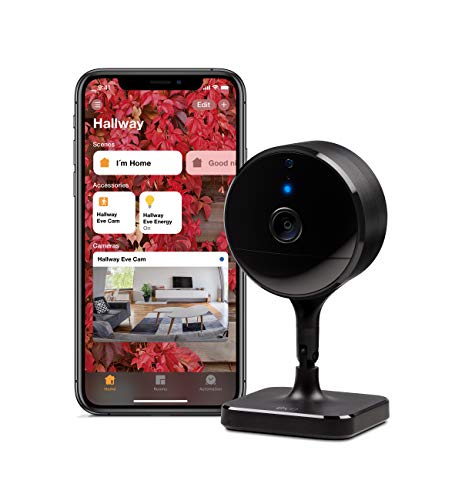 Eve Cam (ASIN: B08951RHL6) | Check price on Amazon | |
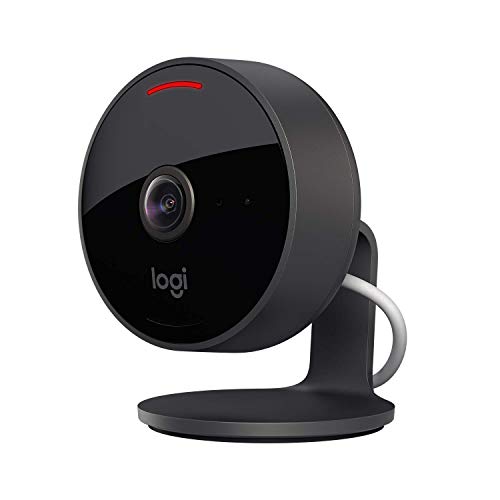 Logitech Circle View (ASIN: B085HKNBSX) | Check price on Amazon | |
 Aqara Camera Hub G3 (ASIN: B09J2CP8YS) | Check price on Amazon | |
 eufy Indoor Cam S350 with HomeBase 3 (ASIN: B0CJX9XY4S) | Check price on Amazon | |
 Eve Outdoor Cam (ASIN: B09YYSF57V) | Check price on Amazon |
Key takeaways
- Compare the best encrypted security cameras for home, from HomeKit Secure Video end-to-end encryption to AES-256 local storage, and pick the right fit.
What's inside
As an Amazon Associate I earn from qualifying purchases. This post may contain affiliate links at no extra cost to you.
Disclosure: As an Amazon Associate, we may earn from qualifying purchases made through links on this page, at no additional cost to you.
Best Encrypted Security Cameras for Home
Most home security cameras encrypt your video in transit, the same way a banking website does, and then decrypt it again on the manufacturer’s servers so the app can show it to you. That is transport encryption, and it still leaves your footage readable on someone else’s computers. Truly encrypted cameras go further: with end-to-end encryption, the video is locked on the camera and only your own devices hold the keys, so not even the platform storing the recording can watch it. The other strong approach keeps footage off the cloud entirely, stored locally under AES encryption on hardware inside your home.
This guide compares five home security cameras built around one of those two models. Four of them run on Apple HomeKit Secure Video, which applies end-to-end encryption to recordings stored in iCloud and analyses video on a hub inside your home rather than in a data centre. The fifth takes the local route, recording to a home base station that protects stored data with dual-layer AES-256 and RSA-1024 encryption. We also flag the honest limits of each approach, because an “encrypted” label on a box can mean very different things.
Quick Picks
- Eve Cam (ASIN: B08951RHL6) — the purest privacy design here: HomeKit Secure Video only, no manufacturer cloud or account at all. View on Amazon
- Logitech Circle View (ASIN: B085HKNBSX) — end-to-end encrypted HomeKit video plus hardware privacy controls, in a weatherproof body for indoor or outdoor use. View on Amazon
- Aqara Camera Hub G3 (ASIN: B09J2CP8YS) — 2K pan-and-tilt camera with HomeKit Secure Video support, local recognition and a built-in Zigbee hub. View on Amazon
- eufy Indoor Cam S350 with HomeBase 3 (ASIN: B0CJX9XY4S) — dual-lens 4K camera recording to a local base station with AES-256 encryption and expandable storage. View on Amazon
- Eve Outdoor Cam (ASIN: B09YYSF57V) — a floodlight camera built exclusively for HomeKit Secure Video, for encrypted coverage outside the house. View on Amazon
Eve Cam (ASIN: B08951RHL6)
Eve Cam is designed exclusively for Apple HomeKit Secure Video, and that single decision shapes its whole privacy model. There is no Eve cloud and no Eve account: live images travel directly to your home hub and, in Eve’s words, never reach the cloud at all, while recordings are stored fully encrypted in iCloud. Video analysis — distinguishing people, pets and vehicles — runs on your Apple TV or HomePod at home instead of on a remote server, and access to the camera from outside the home is fully encrypted through that hub. This is genuine end-to-end encryption, not a marketing synonym for TLS.
As a camera it records 1080p video with infrared night vision, a dedicated infrared motion sensor, a microphone and speaker for two-way talk, and dual-band 2.4/5 GHz Wi-Fi. It mounts magnetically on the included metal plate, runs from a USB power supply, and a clearly visible status LED always shows whether it is on, off or recording. You can set it to deactivate automatically when everyone is home, and its motion sensor can also trigger lights and other HomeKit devices even when the video stream itself is off.
Highlights
– End-to-end encrypted recordings via HomeKit Secure Video, with no manufacturer cloud or account
– Video analysis happens on your home hub, not on external servers
– Status LED and automatic home/away deactivation for day-to-day privacy
Considerations
– Apple-only: it needs an iPhone or iPad, a HomePod or Apple TV as a home hub, and an iCloud+ plan for recording
– Indoor use only, and the 1080p sensor trails the 2K and 4K rivals here for fine detail
Logitech Circle View (ASIN: B085HKNBSX)
Circle View is Logitech’s camera built for Apple HomeKit Secure Video, so it inherits the platform’s end-to-end encryption: recordings are encrypted before they leave for iCloud storage and can only be decrypted on your Apple devices. Logitech pairs that software model with unusually direct hardware privacy controls. The camera head tilts down for instant privacy when you are home, and a rear-mounted on/off switch cuts the camera physically, giving you a way to disable it that does not depend on an app setting.
The hardware is a step up in build from most indoor cameras: a weatherproof IP64 metal body with a matte finish, a 180-degree wide-angle lens, Full HD 1080p video with wide dynamic range, and enhanced infrared night vision rated to 15 feet. It is wired, with a tethered 10-foot power cable and an indoor USB power supply, and a wall-mounting bracket is included, so the same camera can watch a living room or a covered porch.
Highlights
– HomeKit Secure Video end-to-end encryption with in-home video analysis
– Tilt-down privacy position plus a physical rear on/off switch
– Weatherproof IP64 metal body and a very wide 180-degree field of view
Considerations
– HomeKit only, so Android households cannot use it at all
– Wired power and a 1080p ceiling; night vision range is modest for large rooms
Aqara Camera Hub G3 (ASIN: B09J2CP8YS)
The G3 is a 2K pan-and-tilt camera that doubles as a smart-home hub, and it supports HomeKit Secure Video — which is the route to choose if encryption is your priority, because recordings then get the platform’s end-to-end encryption and home-hub analysis. Used through Aqara’s own app it is a more conventional cloud camera, so treat HomeKit mode as the encrypted configuration and the Aqara cloud as an optional extra, not the main event.
On the hardware side it offers 2304 × 1296 resolution, a 110-degree lens on a pan-and-tilt body with 360-degree coverage, infrared night vision, and dual-band Wi-Fi. Recognition for faces, pets and gestures runs locally on the camera to drive automations, and a built-in Zigbee 3.0 hub can connect up to 128 Aqara devices, alongside an infrared blaster that can control a TV or air conditioner. Local recording to microSD is also available for households that prefer clips to stay on the device.
Highlights
– HomeKit Secure Video support brings end-to-end encrypted recording to a 2K camera
– Local face, pet and gesture recognition, plus a Zigbee hub and IR blaster in one unit
– Pan-and-tilt coverage with microSD local storage as a non-cloud option
Considerations
– The strongest encryption only applies in HomeKit mode; Aqara’s own cloud path is a separate, weaker model
– Zigbee hub works with Aqara devices rather than third-party Zigbee gear
eufy Indoor Cam S350 with HomeBase 3 (ASIN: B0CJX9XY4S)
This bundle takes the other credible route to encrypted home video: keep everything local. The S350 camera records to the included HomeBase 3 station inside your home, and eufy protects the data on that base with dual-layered AES-256 and RSA-1024 encryption, accessible only by the user. Storage starts with the base station’s built-in memory and expands with a hard drive up to 16TB, and there is no monthly fee. Be clear about the distinction, though: this is strongly encrypted storage at rest, not end-to-end encryption of a cloud stream — the privacy win comes from footage never needing to leave your house.
The camera itself is the most capable here: dual lenses deliver 4K UHD wide video and a telephoto view with 8× hybrid zoom, on a 360-degree pan-and-tilt mount with AI tracking. It detects people, pets and crying sounds, supports 24/7 recording, connects over dual-band Wi-Fi 6, and works with Alexa and Google Assistant, with HomeKit support listed for the camera range. On-device processing on the HomeBase also powers face recognition for telling family from strangers.
Highlights
– AES-256 and RSA-1024 encryption on local storage that stays in your home
– Dual-lens 4K camera with 8× zoom, AI tracking and 24/7 recording
– Expandable storage up to 16TB and no monthly fee
Considerations
– Encrypted local storage is not the same as end-to-end encryption; app access still passes through eufy’s service
– Two-box setup, and the microSD card for the camera itself is not included
Eve Outdoor Cam (ASIN: B09YYSF57V)
Eve Outdoor Cam extends the same privacy architecture as the indoor Eve Cam to the outside of the house. It is built exclusively for Apple HomeKit Secure Video, so recordings are end-to-end encrypted in iCloud, detection runs on your home hub, and there is no Eve account or manufacturer cloud in the loop. Eve positions it squarely on maximum security and privacy, and the model number is 20ECA4101.
The camera combines 1080p video with a built-in LED floodlight, infrared night vision, a motion sensor, and two-way communication, in a metal enclosure made for outdoor mounting. Through HomeKit Secure Video it can distinguish people, pets and vehicles for smarter notifications. It connects over 2.4 GHz Wi-Fi and, like the indoor model, needs a HomePod or Apple TV as a home hub and an iCloud+ plan for recorded video.
Highlights
– End-to-end encrypted HomeKit Secure Video recording for outdoor coverage
– Integrated floodlight, motion sensor and two-way talk
– People, pet and vehicle detection handled on your home hub
Considerations
– Apple ecosystem only, and 2.4 GHz Wi-Fi only
– Floodlight cameras need a suitable powered mounting point at installation
How to Choose
Start by deciding which trust model you actually want. End-to-end encryption, offered here by the HomeKit Secure Video cameras, means the recording is locked with keys held only by your devices; the storage provider cannot decrypt it. Encrypted local storage, the eufy route, means there is no cloud copy to breach in the first place, but you are trusting the vendor’s app and firmware instead of a key model you control. Both are far stronger than a camera whose only protection is an encrypted connection to a server that can read your video.
Next, check your ecosystem. All four HomeKit cameras require Apple hardware — an iPhone for setup, a HomePod or Apple TV as the always-on hub, and an iCloud+ plan for recordings. If your household is Android-based, the eufy bundle is the only pick here that fits, and it also suits anyone who wants to avoid subscriptions altogether. Then match the camera to the location: the Eve Cam and Aqara G3 are indoor cameras, the Circle View’s IP64 body covers sheltered outdoor spots, the Eve Outdoor Cam is the dedicated exterior option, and pan-and-tilt models like the G3 and S350 cover a whole room from one position.
Finally, look at the privacy controls beyond encryption. Hardware options — the Circle View’s tilt-down head and power switch, the Eve Cam’s status LED and automatic deactivation when you are home — protect you in the moments when the camera is pointed at your own family, which encryption alone does nothing about.
Key Specifications Explained
End-to-end encryption (E2EE) means video is encrypted on the camera and decrypted only on your viewing devices. HomeKit Secure Video works this way: even though recordings sit in iCloud, Apple cannot view them. Transport encryption (TLS) only protects video on its way to a server that can then read it — most cameras advertising “encrypted” video mean this, which is why the distinction matters.
AES-256 is the symmetric encryption standard used for stored data, and it is what protects recordings on the HomeBase 3, paired with RSA-1024 for key exchange. Home hub analysis means a device in your home, such as a HomePod or Apple TV, processes video to detect people, pets and vehicles, so that analysis never happens on a company’s servers. Local storage keeps recordings on a microSD card or a base station in your home; it removes cloud exposure but makes the physical device itself the thing to protect.
Setup and Use Tips
Place your home hub centrally: HomeKit Secure Video cameras depend on the HomePod or Apple TV for analysis and remote access, and a weak Wi-Fi link to the hub causes more problems than the camera itself. During setup, choose per-camera recording rules — record when away, stream only when home — rather than leaving every camera recording around the clock. For the eufy system, install the largest storage you are likely to need in the HomeBase at the start, enable the encryption and account protections in the app, and keep firmware updated on both the camera and the base. Whatever you buy, change default passwords, turn on two-factor authentication for the associated account, and check the status LED or app indicator after any power cut to confirm the camera came back online in the mode you expect.
Common Mistakes to Avoid
The most common mistake is assuming any camera labelled “encrypted” offers end-to-end encryption; in most cases it only means the connection is encrypted. A second is buying a HomeKit Secure Video camera without the required hub or iCloud+ plan, then blaming the camera when recording does not work. Third, avoid pointing an indoor camera at a bed or bathroom area just because it is encrypted — use privacy modes, schedules and physical switches instead. Finally, do not pair a strongly encrypted camera with a weak account password; the account, not the cipher, is usually the softest target.
FAQ
Is HomeKit Secure Video really end-to-end encrypted?
Yes. Recordings are encrypted on the camera and stored in iCloud in a form only your Apple devices can decrypt, and the analysis of video happens on your home hub. That is why these cameras require a hub and an iCloud+ plan.
What is the difference between the eufy’s AES-256 and end-to-end encryption?
AES-256 on the HomeBase 3 protects recordings stored on the device in your home, and the dual-layer design with RSA-1024 guards access to them. It is strong protection for data at rest, but it is not end-to-end encryption of a live stream between camera and phone in the HomeKit sense; the privacy benefit comes from keeping footage local.
Do encrypted cameras need a subscription?
The HomeKit cameras need an iCloud+ plan for recorded video, though live streaming works without one. The eufy bundle records locally with no monthly fee. In both cases the cost question is separate from the encryption itself.
Can I use these cameras with Android or Alexa?
The Eve and Logitech cameras are Apple-only. The Aqara G3 also works with Alexa, Google Assistant and IFTTT through the Aqara app, though its encrypted recording route is HomeKit. The eufy system works with Alexa and Google Assistant and is the natural fit for non-Apple homes.
Does encryption slow the camera down or hurt video quality?
No. The encryption on these cameras runs on dedicated hardware and home hubs, and it does not reduce resolution. The Aqara and eufy cameras record at 2K and 4K respectively while still offering their encrypted storage modes.
Final Verdict
For most privacy-conscious households with Apple devices, the Eve Cam is the cleanest answer: no manufacturer cloud, no extra account, and end-to-end encrypted recordings analysed inside your home. The Logitech Circle View adds the best hardware privacy controls and a weatherproof body, while the Aqara G3 suits smart-home tinkerers who want a hub and camera in one. If you are not in Apple’s ecosystem, or you simply refuse subscriptions, the eufy S350 with HomeBase 3 delivers genuinely encrypted local storage and the strongest camera hardware here — and the Eve Outdoor Cam completes the picture for anyone who wants the same end-to-end model watching the driveway.
Related guides
More from Amazon
Programs that pair well with the guide above. Offers and eligibility are set by Amazon and may change.
Free shipping on eligible items, Prime Video and more. Eligible new members can start with a free trial.
Start a Prime free trialAudiobooks and podcasts to listen to on the go. Eligible new members can start with a free trial.
Try Audible freeAd-free music streaming. Eligible new subscribers can start with a free trial.
Try Music Unlimited freeA free business account with business pricing and bulk-buying tools for work, shop or home office.
Create a business accountAs an Amazon Associate we earn from qualifying purchases.










Write Your Review
No reviews yet. Be the first to share your experience!