
Our Short List of 3
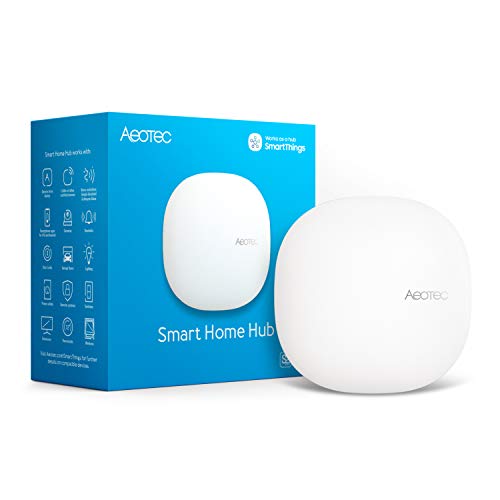
- Best for: SmartThings homes that still rely on Z-Wave locks and switches alongside Zigbee devices.
- Works as a SmartThings Hub
- Z-Wave
- Zigbee
- Matter Gateway

- Best for: Households that want automations to run locally without depending on an internet connection.
- Z-Wave 800
- Zigbee 3.0
- Matter
- Wi-Fi and Ethernet

- Best for: Aqara-centered homes that need Thread routing, Matter bridging, and wired PoE placement.
- Matter Controller
- Thread Border Router
- Zigbee
- Bluetooth
All 4 Picks at a Glance
| Product | Specs | Action |
|---|---|---|
| Aeotec Smart Home Hub |
| Check price on Amazon |
| Hubitat Elevation C-8 Pro |
| Check price on Amazon |
| Aqara Hub M3 |
| Check price on Amazon |
 Homey Pro (2026) |
| Check price on Amazon |
Key takeaways
- Quirky Wink Hub is discontinued and its service ended. Compare four current smart home hubs still sold new, with protocols, local control, and Matter support.
What's inside
As an Amazon Associate I earn from qualifying purchases. This post may contain affiliate links at no extra cost to you.
If you searched for the Quirky Wink Hub hoping to buy one new, the real decision is not which Wink model to pick. Wink hardware is discontinued, and the service the hub depended on for app control ended years ago, so a used Wink hub cannot serve as a dependable controller today. The choice now is which current hub can take over the job Wink once did: joining lights, locks, sensors, and switches from different brands into one system you can automate.
This guide is for former Wink owners who need a replacement controller for existing Zigbee and Z-Wave gear, first-time buyers who want one hub instead of a separate app per brand, and households adding Matter and Thread devices who need a controller that will stay supported. Each hub below was chosen from its name and specifications on its Amazon product page, covering built-in radios, local versus server-based automations, and listed voice assistants and platforms.
Quick Picks
As an Amazon Associate we earn from qualifying purchases.
| Product | Best for | Key spec from title |
|---|---|---|
| Aeotec Smart Home Hub | SmartThings homes keeping Z-Wave and Zigbee devices | Z-Wave, Zigbee, Matter Gateway |
| Hubitat Elevation C-8 Pro | Local automations that keep working without internet | Z-Wave 800 and Zigbee 3.0 with Matter |
| Aqara Hub M3 | Aqara Zigbee homes adding Matter and Thread | Matter Controller and Thread Border Router |
| Homey Pro (2026) | Mixed-brand homes wanting the widest protocol list | Z-Wave Plus, Zigbee, Matter and Thread |
How to Choose
Start with the radios your devices already use
List every device you own by protocol before you compare hubs, because a hub only controls what its built-in radios can reach. A home with Z-Wave locks, garage controllers, and in-wall switches needs a hub with Z-Wave built in, such as the Aeotec hub, the Hubitat C-8 Pro, or the Homey Pro. A home built mainly on Aqara Zigbee sensors and switches can use the Aqara Hub M3, but that hub is limited to Aqara-brand Zigbee devices. Wi-Fi bulbs and plugs do not need a hub radio, yet they still benefit from one controller for routines. Check each device box or app for Zigbee, Z-Wave, Thread, or Wi-Fi, then match that list to the hub title and specification bullets.
Decide how much you depend on a company server
Wink is the cautionary example here: when its service ended, hubs that still powered on lost dependable app control. To avoid repeating that outcome, separate hubs that run automations on the device itself from hubs that lean on a vendor cloud for rules and remote access. Hubitat and Homey Pro emphasize local processing, so lights and locks keep following schedules during an internet outage. SmartThings-based and Aqara setups mix local device control with cloud features for remote access and voice links. Ask what still works if the internet drops, what happens if the vendor changes its app, and whether core automations need an account at all. Local-first control costs more effort at setup but reduces long-term dependence.
Check Matter and Thread roles, not just logos
Matter and Thread are often printed together, yet they describe different jobs. A Matter controller commissions and controls Matter devices, a Matter bridge exposes older Zigbee or Z-Wave gear to Matter platforms, and a Thread border router connects Thread devices to your home network. The Aqara Hub M3 is listed as both a Matter controller and a Thread border router, the Aeotec hub is listed as a Matter gateway for SmartThings, and Hubitat and Homey Pro list Matter alongside their Zigbee and Z-Wave radios. Before buying, confirm which role you need for the exact devices you plan to add, since a hub can support one role without covering every other role in the same way.
Match the app, voice assistants, and setup effort to your household
A hub succeeds or fails on daily use, not on radio lists alone. Confirm that the hub app runs on every phone in the home, that it works with the voice assistants you already use, and that the setup path fits your patience. SmartThings suits households that want a mainstream app with Alexa and Google Assistant links. Hubitat offers deep custom rules and dashboards, which rewards tinkering but takes longer to learn. Aqara centers on the Aqara Home app and broad platform links including Home Assistant. Homey Pro aims at mixed-brand control with Siri, Alexa, and Google Home listed together. Choose the ecosystem your household will actually open every day.
The 4 Best Options
Aeotec Smart Home Hub
- Best for: SmartThings homes that still rely on Z-Wave locks and switches alongside Zigbee devices.
- Works as a SmartThings Hub
- Z-Wave
- Zigbee
- Matter Gateway
SmartThings homes that still rely on Z-Wave locks and switches alongside Zigbee devices.
Confirm the exact model number on the listing before ordering, since newer Aeotec hubs without Z-Wave use a different model code.
This is the closest like-for-like successor for a former Wink household that wants to stay in the SmartThings ecosystem while keeping older gear. Because it combines Z-Wave and Zigbee in one unit and adds Matter gateway duties, it can adopt many lights, locks, and sensors that Wink once coordinated, then tie them into SmartThings routines and voice control. It suits buyers who prefer a mainstream app and broad brand support over deep local customization, and who would rather migrate devices once than maintain separate bridges for each protocol.
Hubitat Elevation C-8 Pro
- Best for: Households that want automations to run locally without depending on an internet connection.
- Z-Wave 800
- Zigbee 3.0
- Matter
- Wi-Fi and Ethernet
Households that want automations to run locally without depending on an internet connection.
Check the compatible devices list for your exact locks and switches before buying, and expect several updates on first startup.
Hubitat takes the opposite approach to Wink by processing automations locally on the hub itself, so rules continue when the internet connection fails and no vendor server sits between a sensor and a light. The C-8 Pro pairs current Z-Wave and Zigbee radios with external antennas, wired Ethernet, and Matter support, which makes it a strong fit for larger homes and for owners who want detailed rules, dashboards, and custom logic. The trade-off is effort: device setup and troubleshooting expect more direct attention than a mainstream app.
Aqara Hub M3
- Best for: Aqara-centered homes that need Thread routing, Matter bridging, and wired PoE placement.
- Matter Controller
- Thread Border Router
- Zigbee
- Bluetooth
Aqara-centered homes that need Thread routing, Matter bridging, and wired PoE placement.
Confirm the regional model code and whether a power adapter is included, since PoE and USB power options differ by package.
The Hub M3 is built for homes that already lean on Aqara sensors, switches, and locks and now want those devices visible to Matter platforms. It acts as a Matter controller and Thread border router while also serving as the Zigbee hub for Aqara gear, and its PoE option allows a wired, centrally placed installation that helps Thread coverage. Infrared control adds a path for older air conditioners and media gear. Buyers with third-party Zigbee devices from many brands should note the Aqara-only Zigbee limit and plan accordingly.
Homey Pro (2026)
- Best for: Mixed-brand homes that want one hub spanning legacy radios and newer Matter and Thread devices.
- Z-Wave Plus
- Zigbee
- Wi-Fi
- BLE
Mixed-brand homes that want one hub spanning legacy radios and newer Matter and Thread devices.
Verify the United States model code on the listing, since regional variants carry different codes and radio configurations.
Homey Pro covers the widest protocol list in this group, combining Z-Wave Plus, Zigbee, Thread, Matter, Bluetooth LE, Wi-Fi, and infrared in a single local-first hub. That breadth suits a mixed-brand home where no single vendor app covers everything, from older Z-Wave switches to newer Thread sensors, without stacking multiple bridges on a shelf. It also lists Siri alongside Alexa and Google Home, which helps households split across phone platforms. The higher hardware ambition means buyers should confirm each planned device type against Homey support before committing.
Which One Fits Your Situation
You are replacing a Wink hub and keeping your current devices
Start by sorting your existing gear into Z-Wave, Zigbee, and Wi-Fi groups, then choose a hub covering the first two groups without extra bridges. The Aeotec hub fits if you want SmartThings routines and voice links with minimal relearning. The Hubitat C-8 Pro fits if the Wink shutdown pushed you toward local control no single company can switch off. Either way, plan to reset and re-pair each device, since devices cannot follow two controllers at once.
You want automations that survive an internet outage
Choose a hub that runs rules on the device itself, so motion lights, lock schedules, and heating routines keep working when broadband fails. The Hubitat C-8 Pro is the clearest match here, with local processing, wired Ethernet, and external antennas for larger homes. Homey Pro also emphasizes local control across many protocols. Test the result after setup by disconnecting the internet briefly and confirming that key automations still trigger, rather than assuming local behavior from marketing language alone.
Your home centers on Aqara devices and Apple Home
If most sensors and switches already carry the Aqara name, the Hub M3 keeps that gear in the Aqara Home app while bridging supported devices toward Matter platforms including Apple Home. Its Thread border router role gives newer Thread accessories a stable network path, and PoE placement avoids relying on a spare USB outlet near the router. Keep expectations measured for bridged features, since each platform exposes only part of what the native app shows.
You are starting fresh with devices from many brands
A new build with no legacy gear should favor breadth and longevity over brand loyalty. Homey Pro suits buyers who expect to mix Z-Wave, Zigbee, Thread, and infrared gear under one controller and one app. The Aeotec hub suits buyers who prefer the SmartThings ecosystem and its wide device catalog. In both cases, buy the hub before bulk-buying devices, confirm each planned product lists the same protocol, and add devices room by room so problems stay easy to isolate.
Common Mistakes
- Buying a used Wink hub because the hardware still powers on, without checking that the Wink service needed for app control has ended.
- Assuming every hub controls every protocol, then discovering that Z-Wave locks or third-party Zigbee sensors need a radio the chosen hub does not include.
- Treating Matter and Thread as the same feature, without confirming whether the hub acts as a controller, a bridge, a border router, or only some of those roles.
- Placing the hub in a metal cabinet or far corner of the house, then blaming devices for weak Zigbee or Z-Wave coverage that better placement would fix.
- Pairing dozens of devices at once before naming rooms and testing basic routines, which makes later troubleshooting slow and confusing.
Frequently Asked Questions
Can I still buy a new Quirky Wink Hub and set it up today?
No. Wink hardware is discontinued and the Wink service that provided app control ended years ago, so a new setup cannot be completed as a dependable system. Remaining units appear only as used or leftover stock without a supported service behind them. Choose a current hub with the radios your devices need, then reset and re-pair each device to the new controller.
Will my Wink-era Zigbee and Z-Wave devices work with a new hub?
In most cases, yes, provided the new hub includes the same radio. Z-Wave locks and switches need a hub with Z-Wave, while Zigbee bulbs and sensors need Zigbee support, with attention to brand limits such as the Aqara-only Zigbee rule on the Hub M3. Each device must be reset and paired to the new hub, since a device follows only one controller at a time.
What is the difference between a Matter controller and a Thread border router?
A Matter controller commissions and controls Matter devices within a platform such as SmartThings or Apple Home. A Thread border router connects low-power Thread devices to your home network so controllers can reach them. One hub can perform both jobs, as the Aqara Hub M3 does, but the roles remain distinct. Confirm both roles separately when your plan includes Thread sensors or locks.
Do I need a hub at all if my devices use Wi-Fi?
Wi-Fi bulbs, plugs, and cameras can run through their own apps without a hub, so a hub is optional for a small Wi-Fi-only setup. A hub becomes worthwhile when you add Zigbee, Z-Wave, or Thread devices, want automations that run locally, or want one app and one set of routines across brands. Many households start with Wi-Fi gear, then add a hub as the device count grows.
Related guides
More from Amazon
Programs that pair well with the guide above. Offers and eligibility are set by Amazon and may change.
Free shipping on eligible items, Prime Video and more. Eligible new members can start with a free trial.
Start a Prime free trialAudiobooks and podcasts to listen to on the go. Eligible new members can start with a free trial.
Try Audible freeAd-free music streaming. Eligible new subscribers can start with a free trial.
Try Music Unlimited freeA free business account with business pricing and bulk-buying tools for work, shop or home office.
Create a business accountAs an Amazon Associate we earn from qualifying purchases.










Write Your Review
No reviews yet. Be the first to share your experience!