
Our Short List of 3
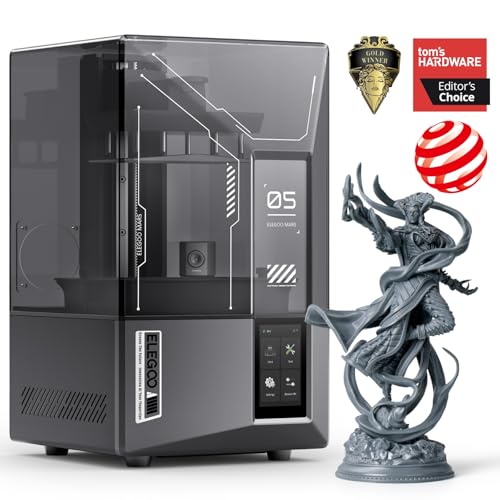
- Best for: Beginners and hobbyists who want sharp, detailed infantry and hero miniatures without a large footprint.

- Best for: Players building entire armies and terrain sets who want high resolution across a large build plate.

- Best for: Beginners and budget-conscious hobbyists who want a compact printer dedicated to small, detailed miniatures.
All 3 Picks at a Glance
| Product | Specs | Action |
|---|---|---|
| ELEGOO Mars 5 Ultra |
| Check price on Amazon |
| ELEGOO Saturn 4 Ultra |
| Check price on Amazon |
| Phrozen Sonic Mini 8K S |
| Check price on Amazon |
Key takeaways
- Find the best 3D printers for miniature wargaming, from compact 8K resin machines to fast 12K and 14K models that capture every tiny detail for your army.
What's inside
As an Amazon Associate I earn from qualifying purchases. This post may contain affiliate links at no extra cost to you.
Miniature wargaming lives or dies on detail. A 28mm soldier, a hulking dreadnought, or a swarm of alien horrors all need crisp armor plates, readable faces, fine weapons, and clean edges that survive priming and painting. Standard hobby printers built for large functional parts often struggle at this scale, producing visible layer lines and softened features. Resin printers cure liquid resin with light, one thin layer at a time, and resolve details far smaller than a filament nozzle can manage.
Choosing the right machine is not as simple as picking the highest resolution number on the box. Build volume, print speed, ease of leveling, and resin handling all matter, along with the size of the armies you plan to field. A compact printer may be perfect for single heroes and skirmish warbands, while a larger machine makes more sense if you want to print a full squad, a vehicle, or a terrain set in one session. This guide compares four resin printers that suit miniature wargaming and helps you match a machine to the way you play, paint, and build your forces.
Disclosure: As an Amazon Associate, we earn from qualifying purchases.
Quick Picks at a Glance
| Product | Key Spec | Best For |
|---|---|---|
| ELEGOO Mars 5 Ultra | 7-inch 9K mono LCD, 18-micron XY resolution | Beginners and detailed single miniatures |
| ANYCUBIC Photon Mono M7 Pro | 10.1-inch 14K mono LCD, 170 mm per hour | Large batches and the finest detail |
| ELEGOO Saturn 4 Ultra | 10-inch 12K mono LCD, 150 mm per hour | Big armies, vehicles, and terrain |
| Phrozen Sonic Mini 8K S | 7.1-inch 8K mono LCD, 22-micron XY resolution | Compact, affordable entry into resin miniatures |
How to Choose a 3D Printer for Miniature Wargaming
Resolution and XY accuracy
Resolution is the headline number, but XY resolution measured in microns tells you more about miniature quality. A smaller micron figure means each pixel of cured resin is smaller, so facial features, chainmail, rivets, and weapon engravings come out sharper. For 28mm and 32mm scale figures, look for an XY resolution of 22 microns or finer.
Build volume
Build volume decides how many miniatures you can print at once and how large a single model can be. A compact plate around 150 by 78 by 165 mm handles infantry, heroes, and small monsters comfortably. A larger plate around 220 by 125 by 230 mm lets you print a whole squad on one plate, or a vehicle hull or terrain piece without splitting the model into glued sections.
Print speed
Resin printers are slower than many hobbyists expect, because every layer needs exposure and the plate must lift and settle between layers. Speed figures such as 150 or 170 mm per hour describe the maximum vertical speed under ideal conditions with fast resin, so treat them as a guide rather than a promise.
Auto-leveling and ease of setup
Leveling the build plate is the classic beginner stumbling block in resin printing. Machines with automatic or mechanical-sensor leveling remove most of the guesswork and reduce failed first layers. If you are new to the hobby, prioritize a printer that levels itself and has a clear touchscreen interface.
Resin handling and safety features
Resin printing involves liquid photopolymer resin, gloves, ventilation, and washing and curing finished prints. Helpful features include a heated vat for consistent results in cool rooms, automatic resin refill so long prints do not run dry, and an air purification filter to reduce odor.
Top Picks
ELEGOO Mars 5 Ultra
- Best for: Beginners and hobbyists who want sharp, detailed infantry and hero miniatures without a large footprint.
Beginners and hobbyists who want sharp, detailed infantry and hero miniatures without a large footprint.
View the ELEGOO Mars 5 Ultra on Amazon
The ELEGOO Mars 5 Ultra is a compact 9K resin printer built around a 7-inch monochrome LCD with a resolution of 8520 by 4320 pixels and an XY resolution of 18 microns. Its build volume of 153.36 by 77.76 by 165 mm fits infantry squads, heroes, and small monsters, while a maximum print speed of 150 mm per hour keeps batch jobs moving. Smart automatic leveling and a mechanical sensor reduce setup errors, and the built-in AI camera can spot problems such as an empty build plate or warping during a print. WiFi transfer and cluster printing support let you send files without juggling USB sticks.
Pros:
– 9K screen with 18-micron XY resolution captures very fine miniature detail
– Smart automatic leveling and mechanical sensor simplify first-time setup
– AI camera monitors prints and can flag common failures
– WiFi transfer and cluster printing for convenient file management
Cons:
– Compact build volume limits large vehicles and terrain pieces
– Smaller resin vat needs refilling more often on long jobs
– AI camera features require a network connection to use fully
ANYCUBIC Photon Mono M7 Pro
View the ANYCUBIC Photon Mono M7 Pro on Amazon
The ANYCUBIC Photon Mono M7 Pro is the detail champion of this roundup. Its 10.1-inch monochrome LCD delivers 14K resolution at 13312 by 5120 pixels, with an XY resolution of 16.8 by 24.8 microns, fine enough to print holes as small as 0.3 mm in diameter. The build volume of 223 by 126 by 230 mm is generous, so a full squad, a large monster, or a vehicle can print in one session. A maximum speed of 170 mm per hour with high-speed resin at 0.1 mm layers keeps larger jobs moving, and the COB LighTurbo 3.0 light source with Fresnel lenses aims for light uniformity above 90 percent for consistent curing across the plate. Automatic resin filling and dynamic vat heating support long, hands-off army printing, and the leveling-free design removes a common beginner frustration.
Pros:
– 14K screen with very fine XY resolution for the smallest miniature details
– Large 223 by 126 by 230 mm build volume fits squads and vehicles
– Resin auto-fill and dynamic heating support long, unattended prints
– Leveling-free setup and fast 170 mm per hour maximum speed
Cons:
– Larger and heavier than compact printers, so it needs a dedicated space
– Top speed requires high-speed resin at 0.1 mm layer thickness
– More resin per print than smaller machines, raising running costs
Best for: Wargamers printing whole armies, large monsters, and vehicles who want the finest detail available.
ELEGOO Saturn 4 Ultra
- Best for: Players building entire armies and terrain sets who want high resolution across a large build plate.
Players building entire armies and terrain sets who want high resolution across a large build plate.
View the ELEGOO Saturn 4 Ultra on Amazon
The ELEGOO Saturn 4 Ultra pairs a big build area with high resolution, making it a strong choice for wargamers who print in volume. Its 10-inch 12K monochrome LCD offers a resolution of 11520 by 5120 pixels with an XY resolution of 19 by 24 microns, while the build volume of 218.88 by 122.88 by 220 mm fits multiple squads, large creatures, and terrain sections on a single plate. Smart automatic leveling, a mechanical sensor, and a built-in AI camera help catch failures early, and WiFi transfer makes it easy to manage a queue of army files. Tilt release technology reduces the time the plate spends peeling each layer from the film, helping the printer reach speeds up to 150 mm per hour.
Pros:
– Large build volume prints whole squads, vehicles, and terrain in fewer jobs
– 12K screen with 19 by 24 micron XY resolution for crisp detail
– Tilt release technology supports fast 150 mm per hour printing
– Auto-leveling, AI camera, and WiFi cluster printing aid long jobs
Cons:
– Bigger footprint and resin consumption than compact miniatures printers
– Best results still depend on careful resin choice and slicer settings
– Heavier machine that is awkward to move once set up
Phrozen Sonic Mini 8K S
- Best for: Beginners and budget-conscious hobbyists who want a compact printer dedicated to small, detailed miniatures.
Beginners and budget-conscious hobbyists who want a compact printer dedicated to small, detailed miniatures.
View the Phrozen Sonic Mini 8K S on Amazon
The Phrozen Sonic Mini 8K S is the compact, budget-friendly entry point in this lineup, aimed squarely at miniature work. Its 7.1-inch 8K monochrome LCD delivers 22-micron XY resolution, fine enough for crisp 28mm infantry, character models, and the small details wargamers care about. The build volume of 165 by 72 by 170 mm suits individual heroes, small squads, and the bits and accessories that customize an army. Layer thickness ranges from 0.01 to 0.30 mm, giving you control over the trade-off between surface smoothness and print time, and the maximum print speed of 80 mm per hour is adequate for its size class. USB connectivity keeps file transfer simple.
Pros:
– 8K screen with 22-micron XY resolution suits 28mm miniatures well
– Compact size fits easily on a hobby desk or small workspace
– Adjustable 0.01 to 0.30 mm layer thickness for detail or speed
– Straightforward USB workflow with broad slicer support
Cons:
– Slower maximum speed of 80 mm per hour than newer fast printers
– Smaller build volume means more print jobs for a full army
– No built-in camera or WiFi file transfer
Comparison Table
| Feature | Mars 5 Ultra | Photon Mono M7 Pro | Saturn 4 Ultra | Sonic Mini 8K S |
|---|---|---|---|---|
| Screen | 7-inch 9K mono LCD | 10.1-inch 14K mono LCD | 10-inch 12K mono LCD | 7.1-inch 8K mono LCD |
| Resolution | 8520 x 4320 | 13312 x 5120 | 11520 x 5120 | 7680 x 4320 |
| XY resolution | 18 microns | 16.8 x 24.8 microns | 19 x 24 microns | 22 microns |
| Build volume | 153.36 x 77.76 x 165 mm | 223 x 126 x 230 mm | 218.88 x 122.88 x 220 mm | 165 x 72 x 170 mm |
| Max speed | 150 mm per hour | 170 mm per hour | 150 mm per hour | 80 mm per hour |
| Auto-leveling | Yes | Leveling-free | Yes | Manual |
| Connectivity | WiFi, USB | WiFi, USB | WiFi, USB | USB |
Buying Guide
Start by thinking about what you actually print. If your games use 28mm infantry and the occasional hero, a compact high-resolution machine such as the Mars 5 Ultra or the Sonic Mini 8K S covers your needs and keeps resin use low. If you field large armies, print vehicles, or build terrain, the bigger plates of the M7 Pro and Saturn 4 Ultra save hours by fitting more models per job.
Resolution matters most at small scales. For 28mm and 32mm figures, an XY resolution of 22 microns or finer produces clean faces, hands, and weapon details, while coarser pixels soften the smallest features. Larger screens with the same resolution class spread pixels wider, so compare XY resolution rather than the K number alone.
Plan for the full workflow, not just the printer. Resin printing needs a wash and cure step, gloves, ventilation, and a safe place to store liquid resin away from sunlight. If your printing space is cool, a printer with a heated vat helps keep results consistent through winter sessions.
Avoid common beginner mistakes. Do not skip the wash and cure stages, since uncured resin stays sticky and can irritate skin. Do not print miniatures flat on the build plate, because suction forces and supports need angled orientation to protect fine details.
Budget by thinking in running costs. Resin, replacement film, gloves, filters, and electricity add up over an army project, and larger printers consume more resin per job. A cheaper compact printer can be the economical choice if you print a few models a week, while a larger machine earns its keep when you print in volume.
Frequently Asked Questions
Is resin or filament better for miniature wargaming?
Resin is generally better for miniature wargaming because it cures fine details that filament printers struggle to reproduce at 28mm scale. Filament printers work well for terrain, large vehicles, and bases, so many hobbyists eventually own both, but for infantry and character models resin is the usual recommendation based on specifications, features, and user feedback.
What resolution do I need for 28mm miniatures?
An XY resolution of 22 microns or finer is a good target for 28mm miniatures, and all four printers in this guide meet that standard.
How long does it take to print a squad of miniatures?
A squad of ten infantry models often takes several hours, depending on the tallest model on the plate, layer height, and resin settings. Larger printers fit more models per job, so a full squad may need one print instead of three.
Do I need a wash and cure station?
A wash and cure station is not strictly required, since you can wash prints in a container and cure them under a UV lamp or in sunlight, but it makes the process cleaner, faster, and more consistent. For regular wargaming printing, most hobbyists find a dedicated station worth having.
Is resin printing safe at home?
Resin printing can be done safely at home with sensible precautions: wear nitrile gloves, work in a ventilated space, avoid skin contact with liquid resin, and keep resin and uncured prints away from children and pets.
Can these printers also make terrain?
Yes, all four printers can make terrain pieces, although the larger build volumes of the M7 Pro and Saturn 4 Ultra handle walls, ruins, and scatter terrain more easily. Compact printers still produce excellent small terrain and objectives.
Conclusion
The best 3D printer for miniature wargaming depends on the size of your armies and the detail you demand. The ELEGOO Mars 5 Ultra is a strong all-rounder for detailed infantry and heroes, with 9K resolution and beginner-friendly automatic leveling. The ANYCUBIC Photon Mono M7 Pro leads on fine detail and build volume, making it the pick for large batches, vehicles, and the smallest features. The ELEGOO Saturn 4 Ultra balances a big plate with 12K resolution for players building whole forces and terrain. The Phrozen Sonic Mini 8K S offers an affordable, compact route into resin miniatures with resolution that suits 28mm gaming.
If you are just starting out and want sharp miniatures with minimal fuss, begin with the Mars 5 Ultra or the Sonic Mini 8K S. If you already know you will print entire armies, choose the M7 Pro for maximum detail or the Saturn 4 Ultra for the best blend of size and speed. Whichever machine you pick, take time to learn your resin and dial in your slicer profiles, and enjoy building a force that is truly your own.
Related guides
More from Amazon
Programs that pair well with the guide above. Offers and eligibility are set by Amazon and may change.
Free shipping on eligible items, Prime Video and more. Eligible new members can start with a free trial.
Start a Prime free trialAudiobooks and podcasts to listen to on the go. Eligible new members can start with a free trial.
Try Audible freeAd-free music streaming. Eligible new subscribers can start with a free trial.
Try Music Unlimited freeA free business account with business pricing and bulk-buying tools for work, shop or home office.
Create a business accountAs an Amazon Associate we earn from qualifying purchases.









Write Your Review
No reviews yet. Be the first to share your experience!