
Key takeaways
- Looking for the best home wifi cameras for your home? Compare five indoor Wi-Fi cameras on resolution, night vision, storage, and privacy before you choose.
What's inside
As an Amazon Associate I earn from qualifying purchases. This post may contain affiliate links at no extra cost to you.
As an Amazon Associate I earn from qualifying purchases.
The Short Answer
The best home wifi cameras for most households are the Blink Mini 2, the Wyze Cam v4, the Ring Indoor Cam (2nd Gen), the TP-Link Tapo C120, and the Arlo Essential Indoor Camera 2K (2nd Gen). Each one connects to your home Wi-Fi network, plugs into a standard outlet, and lets you watch live video from your phone. For one straightforward pick, go with the Blink Mini 2. It is small, simple to set up, and covers the basics well: high-definition video, color night view, motion alerts, two-way audio, and a built-in spotlight. Households that want sharper video and local recording without a subscription should look at the Wyze Cam v4 or the TP-Link Tapo C120 instead, while homes already using Alexa or Ring devices will find the Ring Indoor Cam (2nd Gen) fits naturally. The Arlo Essential Indoor Camera 2K (2nd Gen) rounds out the list with an automated privacy shield, which suits bedrooms and nurseries where privacy matters most.
The models in this guide are plug-in cameras made to sit on a shelf, a desk, or a wall mount inside your home. They stay powered through a cable, so you never charge a battery, and they send video over Wi-Fi to an app on your phone.
Our Top Picks
- Blink Mini 2 — Best overall for most homes: compact plug-in design, color night view, built-in spotlight, and simple Alexa integration.
- Wyze Cam v4 — Best video quality and local storage: 2.5K resolution, Wi-Fi 6 support, color night vision, and continuous recording to a microSD card.
- Ring Indoor Cam (2nd Gen) — Best for Alexa and Ring households: 1080p video, color night vision, and a manual privacy cover.
- TP-Link Tapo C120 — Best for subscription-free recording: 2K video, dual spotlights, color night vision, and local storage on a microSD card.
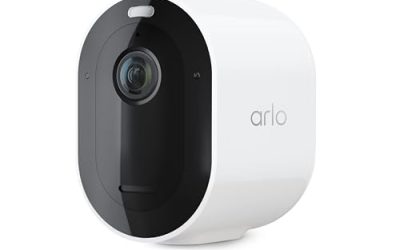
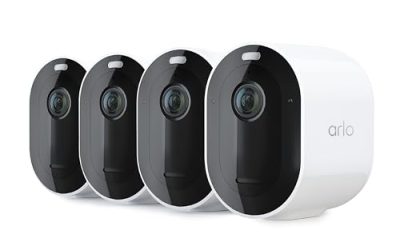
- Arlo Essential Indoor Camera 2K (2nd Gen) — Best for privacy: automated privacy shield, 2K video, and person and animal detection.
Quick Comparison
| Product | Best for | Key spec | Amazon link |
|---|---|---|---|
| Blink Mini 2 | Most homes, simple setup | 1080p HD video, color night view, built-in spotlight | View on Amazon |
| Wyze Cam v4 | Sharper video and local storage | 2.5K QHD video, Wi-Fi 6, microSD up to 512 GB | View on Amazon |
| Ring Indoor Cam (2nd Gen) | Alexa and Ring households | 1080p HD video, color night vision, privacy cover | View on Amazon |
| TP-Link Tapo C120 | Subscription-free recording | 2K QHD video, dual spotlights, microSD storage | View on Amazon |
| Arlo Essential Indoor Camera 2K (2nd Gen) | Privacy in bedrooms and nurseries | 2K video, automated privacy shield | View on Amazon |
How to Choose
Resolution and image clarity
Resolution decides how much detail you can see. A 1080p camera is enough to recognize a person in a room or check whether a pet is on the sofa. A 2K or 2.5K camera shows finer detail, which helps when you want to see a face clearly or zoom into a recorded clip. All five cameras here record in high definition, and the Wyze Cam v4, Tapo C120, and Arlo Essential Indoor Camera record in 2K or above.
Night vision
Most home cameras are used in dim rooms and at night, so night vision matters more than many buyers expect. Traditional infrared night vision shows a black-and-white image. Color night vision uses a sensor and a small light to keep color in the image after dark. The Blink Mini 2, Wyze Cam v4, Ring Indoor Cam (2nd Gen), and Tapo C120 all list color night vision.
Wi-Fi connection and placement
Every camera here connects over Wi-Fi, and most connect on the 2.4 GHz band. The Wyze Cam v4 adds Wi-Fi 6 support, which can help in homes with many connected devices, though a Wi-Fi 6 router is required to use that feature. Before buying, check that your router signal reaches the room where the camera will sit. A camera placed far from the router, behind thick walls, or in a basement may drop its connection.
Motion detection and alerts
Motion detection turns a camera into a useful monitor. When the camera sees movement, it sends an alert to your phone and records a clip. Some models also detect people, pets, or animals specifically, which reduces alerts from curtains moving or light changing. The Tapo C120 lists person, pet, and vehicle detection. The Arlo Essential Indoor Camera lists person recognition and animal detection.
Storage: cloud, local, or both
Video storage is where these cameras differ most. Some rely on cloud storage through an optional plan. Others let you record locally to a microSD card, which avoids a monthly fee. The Wyze Cam v4 supports continuous local recording on a microSD card up to 512 GB, sold separately. The Tapo C120 supports local storage on a microSD card and lists subscription-free local storage as a feature.
Two-way audio
Two-way audio lets you hear the room and speak back through the camera. It is useful for talking to a child, calming a pet, or telling a visitor you are on your way. All five cameras in this guide include two-way audio.
Privacy controls
A camera inside your home should give you control over when it records. The Ring Indoor Cam (2nd Gen) has a manual audio and video privacy cover that you slide over the lens. The Arlo Essential Indoor Camera (2nd Gen) has an automated privacy shield that closes over the lens when you want the camera off. The Blink Mini 2, Wyze Cam v4, and Tapo C120 rely on app controls and scheduling to pause recording.
Smart home compatibility
If you already use a voice assistant, choose a camera that works with it. The Blink Mini 2 and Ring Indoor Cam (2nd Gen) work with Alexa. The Wyze Cam v4 works with Alexa, Google Assistant, and IFTTT. The Tapo C120 and Arlo Essential Indoor Camera work with Alexa and Google Assistant, according to their listings.
The Picks in Detail
Blink Mini 2

The Blink Mini 2 is a compact plug-in camera that covers the essentials without complication. It records in 1080p HD video, shows night view in color, and includes a built-in spotlight that helps in dark rooms. Motion detection sends alerts to your phone, and two-way audio lets you hear and speak to the room. It works with Alexa, so you can ask to view the camera on a compatible display.
Pros
- Compact size fits easily on a shelf, desk, or wall mount
- Color night view and built-in spotlight for dark rooms
- Simple setup and Alexa integration
- Motion detection with alerts and two-way audio
Cons
- 1080p resolution is lower than the 2K models in this guide
- Cloud storage for clips requires an optional plan; confirm on the listing
View the Blink Mini 2 on Amazon
Wyze Cam v4

The Wyze Cam v4 is the sharpest camera in this guide. It records in 2.5K QHD resolution with an upgraded image processor and wide dynamic range. Enhanced color night vision uses a low-light sensor to keep color in the image after dark. It supports Wi-Fi 6 for a stable connection, sets up over Bluetooth without scanning a QR code, and works with Alexa, Google Assistant, and IFTTT. Continuous recording to a microSD card up to 512 GB, sold separately, means you can record around the clock without a subscription.
Pros
- 2.5K QHD resolution with wide dynamic range
- Enhanced color night vision with a low-light sensor
- Continuous local recording to microSD up to 512 GB without a subscription
- Wi-Fi 6 support, Bluetooth setup, and a motion-activated spotlight and siren
Cons
- Connects on 2.4 GHz Wi-Fi only; confirm on the listing
- MicroSD card is sold separately
View the Wyze Cam v4 on Amazon
Ring Indoor Cam (2nd Gen)

The Ring Indoor Cam (2nd Gen) is the natural choice for homes that already use Ring or Alexa. It records in 1080p HD video with color night vision, and it includes two-way talk, motion detection, and alerts through the Ring app. A manual audio and video privacy cover slides over the lens when you want the camera off, which is a clear and simple privacy control. The camera is compact, measuring about 1.93 inches by 1.93 inches by 3.81 inches including its ball-joint plate and mount, and it comes with a 6.5 foot Micro USB power adapter.
Pros
- Works smoothly with Alexa and other Ring devices
- Manual privacy cover for audio and video
- Color night vision and two-way talk
- Compact size with a flexible ball-joint mount
Cons
- 1080p resolution is lower than the 2K models in this guide
- Clip storage depends on an optional plan; confirm on the listing
View the Ring Indoor Cam (2nd Gen) on Amazon
TP-Link Tapo C120

The TP-Link Tapo C120 is a 2K QHD indoor and outdoor wired camera that stands out for subscription-free local storage. It records in 2K resolution, shows color night vision, and uses dual spotlights to help in low light. It detects people, pets, and vehicles, and it works as a baby monitor as well as a home security camera. Video can be stored locally on a microSD card, with optional cloud storage available, so you can avoid a monthly fee if you prefer.
Pros
- 2K QHD video with color night vision and dual spotlights
- Local storage on microSD without a subscription
- Person, pet, and vehicle detection
- Long 3 meter Type-C cable and mounting hardware included
Cons
- Wired power only, so it needs an outlet nearby
- Some advanced features may need an optional plan; confirm on the listing
View the TP-Link Tapo C120 on Amazon
Arlo Essential Indoor Camera 2K (2nd Gen)

The Arlo Essential Indoor Camera 2K (2nd Gen) is built for rooms where privacy matters. Its automated privacy shield closes over the lens when you want the camera off, so there is no doubt about whether it is watching. It records in 2K resolution, includes two-way audio, night vision, live streaming, and motion alerts, and it detects people and animals. It is a wired plug-in camera, so it stays powered without charging, and it works as a baby monitor or pet camera.
Pros
- Automated privacy shield for clear, visible privacy control
- 2K video with person and animal detection
- Two-way audio, night vision, and live streaming
- Works well as a baby monitor or pet camera
Cons
- Cloud storage after the trial needs an optional plan; confirm on the listing
- Wired power only, so it needs an outlet nearby
View the Arlo Essential Indoor Camera 2K (2nd Gen) on Amazon
Who Should Choose What
- First-time buyers and simple setups: Choose the Blink Mini 2. It is compact, easy to set up, and covers the core features without extra complexity.
- Households that want the sharpest video: Choose the Wyze Cam v4. Its 2.5K resolution, color night vision, and Wi-Fi 6 support suit anyone who wants clear detail and a stable connection.
- Alexa and Ring households: Choose the Ring Indoor Cam (2nd Gen). It fits into an existing Ring and Alexa setup, and its manual privacy cover is simple to use.
- Buyers who want to avoid a subscription: Choose the TP-Link Tapo C120 or the Wyze Cam v4. Both record locally to a microSD card, so you can keep clips without a monthly fee.
- Bedrooms, nurseries, and privacy-conscious homes: Choose the Arlo Essential Indoor Camera 2K (2nd Gen). Its automated privacy shield is the clearest privacy control in this guide.
- Pet owners: Choose the Wyze Cam v4 or the Tapo C120. Both detect pets, include two-way audio, and record in high resolution, so you can see and talk to your pet while you are away.
Common Mistakes
Placing the camera where Wi-Fi is weak
The most common mistake is putting the camera in a room with a poor Wi-Fi signal. A camera that drops its connection misses motion and stops recording.
Pointing the camera at a window
A camera facing a window spends its time watching the glass. Sunlight causes glare, and at night the camera sees its own reflection.
Forgetting about the power cable
All five cameras in this guide plug into an outlet. Buyers sometimes mount the camera and then find the cable is too short. Measure the distance to the nearest outlet before you choose a spot, and check the cable length on the listing.
Ignoring storage until clips disappear
Some cameras only keep clips for a short time unless you add storage. Decide before you buy whether you want cloud storage through an optional plan or local storage on a microSD card, and check how long clips are kept.
Skipping the privacy conversation
An indoor camera watches everyone in the room, including family members and guests. Tell the people in your home where the camera is and when it records.
Expecting one camera to cover a whole home
A single camera watches one room. If you want to cover a hallway, a living room, and a nursery, you need more than one camera. Begin with the room that matters most, then add cameras one at a time.
FAQ
Do these cameras need a subscription?
No, none of them require a subscription to watch live video and receive motion alerts. Storage is where a plan matters. The Wyze Cam v4 and Tapo C120 record locally to a microSD card without a subscription. The Blink Mini 2, Ring Indoor Cam (2nd Gen), and Arlo Essential Indoor Camera store clips through optional cloud plans.
Do home Wi-Fi cameras work without internet?
A home Wi-Fi camera needs your home Wi-Fi network to send video to your phone when you are away. If your internet connection goes down, you usually cannot view the camera remotely.
Can I use these cameras as a baby monitor?
Yes. The Tapo C120 and Arlo Essential Indoor Camera list baby monitoring as a use, and the Wyze Cam v4 lists baby monitoring among its recommended uses. Two-way audio lets you hear and speak to the nursery, and color night vision helps you see your child in a dark room.
How far can a home Wi-Fi camera see at night?
Night vision range depends on the sensor, the room size, and the amount of ambient light. Most indoor cameras cover a typical room clearly at night. Color night vision models use a small light or a sensitive sensor to keep color in the image.
Do these cameras record continuously or only on motion?
It depends on the model and the storage you use. The Wyze Cam v4 supports continuous 24/7 recording to a microSD card. The Tapo C120 supports local recording on a microSD card as well. Other models record clips when motion is detected.
Which camera is best for watching pets?
The Wyze Cam v4 and Tapo C120 are strong choices for pets. Both detect pets, include two-way audio so you can speak to your animal, and record in high resolution. The Blink Mini 2 is also listed as a pet camera and is a simpler, more compact option.
Conclusion
The best home wifi cameras balance video quality, night vision, storage, and privacy. The Blink Mini 2 is the top pick for most homes because it is compact, simple to set up, and covers the essentials with color night view, a built-in spotlight, and Alexa integration. The Wyze Cam v4 is the runner-up and the best choice for anyone who wants sharper 2.5K video, color night vision, Wi-Fi 6, and continuous local recording to a microSD card without a subscription. Homes already using Alexa and Ring should choose the Ring Indoor Cam (2nd Gen), buyers who want subscription-free recording should look at the TP-Link Tapo C120, and households that value privacy most should choose the Arlo Essential Indoor Camera 2K (2nd Gen) with its automated privacy shield.
Related guides
More from Amazon
Programs that pair well with the guide above. Offers and eligibility are set by Amazon and may change.
Free shipping on eligible items, Prime Video and more. Eligible new members can start with a free trial.
Start a Prime free trialAudiobooks and podcasts to listen to on the go. Eligible new members can start with a free trial.
Try Audible freeAd-free music streaming. Eligible new subscribers can start with a free trial.
Try Music Unlimited freeA free business account with business pricing and bulk-buying tools for work, shop or home office.
Create a business accountAs an Amazon Associate we earn from qualifying purchases.
Write Your Review
No reviews yet. Be the first to share your experience!