
Key takeaways
- Find the best Apple inspection cameras for iPhone and iPad, with Lightning and USB-C borescope picks, iOS apps, and clear buying guidance for every port.
What's inside
As an Amazon Associate I earn from qualifying purchases. This post may contain affiliate links at no extra cost to you.
The best Apple inspection cameras are borescope and endoscope cameras that turn an iPhone or iPad into the screen for a tiny camera on a long cable. That is the interpretation used throughout this guide: every pick below is an inspection camera, not a security camera and not a regular camera, and every pick states how it connects to an Apple device and which iOS app it uses.


Quick answer: start with the port on your iPhone or iPad. Owners of iPhone 15 and later, and owners of USB-C iPads, need a USB-C scope or a WiFi scope. Owners of an older Lightning iPhone or iPad need a Lightning scope, a scope that ships with a Lightning adapter, or a WiFi scope. A WiFi scope works with either port because it connects wirelessly, while a wired scope only works when its plug matches your device.
Quick Picks
Our Short List of 3
All 5 Picks at a Glance
| Product | Specs | Action |
|---|---|---|
| DEPSTECH WF028 Dual Lens Wireless Endoscope (B09CK7P84F) | Check price on Amazon | |
| Teslong NTC30P USB-C Endoscope Camera (B0C1GFBTDC) | Check price on Amazon | |
 MugEasy W400-B15 Endoscope Camera (B0C4FBM6GV) | Check price on Amazon | |
 Ditomil 16.4ft Single Lens Endoscope Camera (B0FXR9VFSV) | Check price on Amazon | |
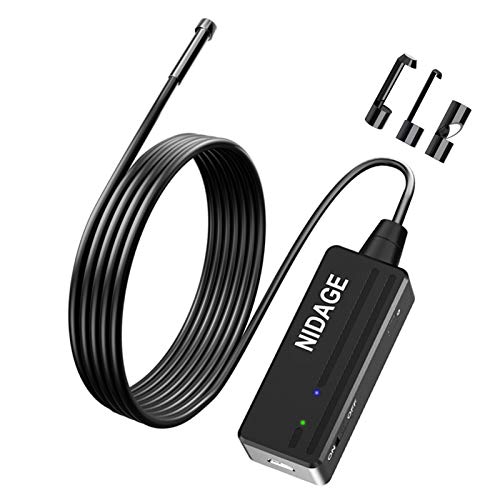 NIDAGE Wireless Endoscope Camera (B07C9C6P5D) | Check price on Amazon |
How to Choose
Match the Connector to Your iPhone or iPad
This step causes the most mismatches, so settle it before anything else. Apple moved newer iPhones to USB-C, while older iPhones and many older iPads use Lightning. A USB-C-only scope will not plug into a Lightning iPhone, and a Lightning-only scope will not plug into a USB-C iPhone without an adapter that the listing promises. Look at the bottom edge of your device, then read the listing for the exact connector in the box. A kit that ships with both a USB-C plug and a Lightning adapter covers both generations. A WiFi scope sidesteps the question entirely, because the camera talks to the phone over its own wireless network and the phone never needs a matching plug.
Confirm the iOS App Before You Buy
No inspection camera in this guide works through the built-in Camera app on an iPhone. Each one needs its own companion app from the App Store, and that app is part of the product. Download the named app before the camera arrives, or at least check that it is still listed in the App Store for your iOS version. The listing should name the app, and the manual or the QR code in the box should point to the same one. Also check the minimum iOS version. Several scopes in this guide support iOS 9 and later, which covers a wide range of older devices.
Choose Between Wired and WiFi
A wired scope draws its power from the phone and sends the image down the cable, so there is no separate battery to charge and no wireless network to join. Plug it in, open the app, and the live view appears. The trade-off is a physical tether: the phone has to stay close to the cable, and the connector has to match. A WiFi scope has a battery-powered transmitter box at the end of the cable. You charge the box, switch it on, join its WiFi network from your iPhone or iPad, and open the app. The phone can sit a short distance away, and the same scope works with a Lightning iPhone, a USB-C iPhone, and an iPad without any adapter. The trade-off is battery life and an extra connection step.
Pick a Probe Diameter That Fits the Opening
Probe diameter decides which openings the camera can enter at all. A 7.9mm probe, the most common size in this guide, fits many drains, ducts, engine openings, and wall cavities, but it will not fit through a narrow spark plug hole or a small inspection port. A 5.5mm probe, such as the one on the NIDAGE pick below, reaches tighter spaces, though a slimmer probe can be harder to steer. Measure the opening before you buy, and leave a little clearance for the cable to bend.
Get the Cable Length and Lighting Right
A 16.5ft cable reaches deep into drains, long ducts, and the back of an engine bay, but a long cable is harder to push around a bend and harder to store without kinking. A 10ft cable is easier to handle for household and automotive checks, and it still reaches most places a homeowner needs to inspect. A short 4.92ft cable is best for close work, such as looking inside an appliance or a wall box. Lighting matters just as much as length, because the inside of a pipe or an engine is dark. Look for several adjustable LED lights around the camera head, and check whether the brightness can be changed in the app.
Check Resolution, Waterproofing, and Accessories
Resolution is stated as 1080P, 1920 x 1440, or a similar figure, and a higher figure generally gives a clearer view of small details such as cracks, corrosion, and loose connections. Waterproofing is usually stated as an IP67 rating for the probe only, not for the whole camera, the cable, the connector, or the phone. An IP67 probe can handle wet pipes and damp cavities, but the WiFi box, the plug, and your iPhone should stay dry. Some cameras have a single forward-facing lens, while others add a side-facing lens that looks at the wall of a pipe without turning the whole probe.
The Best Apple Inspection Cameras Reviewed
DEPSTECH WF028 Dual Lens Wireless Endoscope (B09CK7P84F)
The DEPSTECH WF028 is the most flexible pick in this guide for Apple households, because it connects over WiFi and therefore works with a Lightning iPhone, a USB-C iPhone, and an iPad without any plug adapter. It uses the DEPSTECH-View app, available in the App Store for iOS 9 and later. The dual-lens camera records at 1080P through two lenses, one facing forward and one facing to the side, and the app lets you switch between a front view, a side view, or both at once on a split screen. The probe measures 7.9mm across and carries 7 adjustable LED lights, with an IP67 rating for the probe itself. The semi-rigid cable runs 16.5ft, and the kit includes a hook, a magnet, a charging cable, and a carrying case. The transmitter box needs charging before use.
Who it suits: Apple owners with a mix of Lightning and USB-C devices, anyone who wants a long cable and a side view,. Who should skip it: anyone who wants a wired plug-and-play scope with no battery to charge, and anyone who dislikes joining a separate WiFi network before each inspection.
Teslong NTC30P USB-C Endoscope Camera (B0C1GFBTDC)
The Teslong NTC30P is the cleanest pick for a newer Apple device, because it has a native USB-C plug and no adapter in the way. It is built for iPhone 15, 16, and 17, and for USB-C iPads such as the iPad Pro, and it uses the Xscope app from the App Store. The camera head carries 8 LED lights and an IP67 waterproof rating for the probe, and the kit includes a hook, a magnet, and a side-view mirror. The image sensor is listed at 1.0MP, lower than the 2.0MP figure on several other picks in this guide, so expect a serviceable view for finding blockages, leaks, and loose parts rather than the finest detail work. The hard limit is the connector: this scope is not compatible with older iPhones and iPads that use a Lightning port.
Who it suits: owners of iPhone 15 and later and owners of USB-C iPads who want a simple wired scope with no battery and no wireless setup. Who should skip it: anyone with a Lightning iPhone or iPad, and anyone who needs a side-view lens or a cable longer than 10ft.
MugEasy W400-B15 Endoscope Camera (B0C4FBM6GV)
The MugEasy W400-B15 is a straightforward Lightning pick for older Apple devices. Its hardware interface is Lightning, and the listing names iPhone and iPad as compatible devices, with iOS 9 and later supported through the UseePlus app. Plug it in, open the app, and the camera view appears on the phone screen. The camera records at 1920 x 1440 through a 7.9mm probe, with 8 adjustable LED lights and an IP67 waterproof rating for the probe. The semi-rigid cable runs 16.4ft, so it reaches deep into pipes, ducts, and engine bays, and it holds its shape when you bend it around a corner. The limitation is the connector: this variant is a Lightning scope, so it is not the right choice for a USB-C iPhone 15 or later unless the listing for the exact variant you buy promises a USB-C adapter in the box.
Who it suits: owners of a Lightning iPhone or iPad who want a long wired scope with a clear 1920 x 1440 view and no battery to manage. Who should skip it: owners of a USB-C iPhone or iPad who need a native USB-C plug, and anyone who wants a side-view lens rather than a single forward lens with a mirror attachment.
Ditomil 16.4ft Single Lens Endoscope Camera (B0FXR9VFSV)
The Ditomil 16.4ft single-lens scope is the pick for a household that has both Lightning and USB-C Apple devices and wants one camera to cover them. The main connector is USB-C, and the kit includes a Lightning adapter and a Micro-USB adapter, so the same scope can plug into a newer USB-C iPhone, an older Lightning iPhone, and a compatible iPad with the right adapter fitted. It uses the X-SCOPE app on iOS, and the live view appears in the app once the scope is connected and the app is open. The camera records at 1920 x 1440 through a 7.9mm probe, with 8 adjustable LED lights and an IP67 waterproof rating for the probe. The scope needs a phone and an app to work, since it has no built-in screen.
Who it suits: households with both Lightning and USB-C Apple devices, and anyone who wants a long 1920 x 1440 wired scope with a full accessory kit. Who should skip it: anyone who wants a dual-lens camera with a built-in side view, anyone who wants a scope with its own screen, and anyone who is likely to lose the small adapters.
NIDAGE Wireless Endoscope Camera (B07C9C6P5D)
The NIDAGE wireless endoscope is the slim-probe pick in this guide, and its 5.5mm camera head is the reason to choose it. A 7.9mm probe will not fit every opening, and this camera reaches into tighter spaces such as narrow tubes, small engine openings, and compact equipment where a wider head would stop at the entrance. It connects over WiFi, so it works with iPhone and iPad models regardless of whether they use Lightning or USB-C, and it uses the HD WiFi app from the App Store, with iOS 6 and later supported. The camera records at 1920 x 1080, with lower resolution settings also available, and the lens and tube carry an IP67 waterproof rating, while the WiFi box itself must stay dry. The cable is 4.92ft long and semi-flexible, which suits close work on a bench or inside an appliance, but it is far too short for a long drain run or a deep duct.
Who it suits: anyone who needs a slim 5.5mm probe for tight openings, owners of older iPhones and iPads, and anyone who wants a wireless scope for short, close inspections. Who should skip it: anyone who needs to inspect a long pipe or duct, and anyone who wants a long semi-rigid cable that can be pushed deep into a run.
What to Check Before You Buy
Before you order, run through a short checklist that takes five minutes and prevents most mismatches. First, confirm the port on your iPhone or iPad and match it to the connector in the box, including any adapter that the listing promises. Second, search the App Store for the exact app named in the listing and check that it installs on your iOS version. Third, measure the smallest opening the probe must pass through and compare it with the probe diameter. Fourth, measure the longest run you need to inspect and choose a cable that reaches it with a little length to spare. Fifth, check that the waterproof rating applies to the probe, and keep the transmitter box, the plug, and your phone dry. Finally, read the listing for the exact variant, because cable length, connector, and lens count can change between variants under a single product title.
FAQ
Do Apple inspection cameras work with any iPhone?
No, not every scope works with every iPhone. A wired scope must match the port on your device: USB-C scopes fit iPhone 15 and later, Lightning scopes fit older iPhones, and adapter kits cover both. A WiFi scope works with either port because it connects wirelessly, so it is the most flexible choice when a household has more than one iPhone generation.
Do I need an app to use an inspection camera with an iPhone?
Yes. The inspection cameras in this guide do not show their image in the built-in Camera app. Each one needs its own companion app from the App Store, such as DEPSTECH-View, Xscope, UseePlus, X-SCOPE, or HD WiFi, depending on the model. Download the app named in the listing, grant it the permissions it asks for, and open it after connecting the camera.
What is the difference between a borescope and an endoscope?
The two words are used for the same kind of tool in these listings: a small camera on a long cable that lets you see inside a space you cannot reach with your eyes. Borescope is the term most often used for rigid and semi-rigid inspection cameras for engines, pipes, and machinery, while endoscope is the broader term for a camera on a flexible tube.
Can I use an inspection camera in a wet drain?
You can use the probe in a wet drain when the listing gives the probe an IP67 waterproof rating, as all five picks in this guide do for the probe itself. Keep the rest of the kit dry: the WiFi transmitter box, the cable connectors, the adapters, and your iPhone or iPad should stay out of the water. Dry the probe after use, and do not submerge the camera deeper or longer than the rating allows.
Why does my inspection camera need a Lightning adapter?
Apple used the Lightning port on iPhones before the iPhone 15, and many iPads still use Lightning as well. A scope with a USB-C plug cannot connect to a Lightning port directly, so the kit includes a small Lightning adapter that fits between the scope plug and the phone. The adapter does not change the camera or the app; it only changes the shape of the connection.
Bottom Line
The best Apple inspection cameras in this guide all turn an iPhone or iPad into a useful inspection screen, and the right one depends on the port on your device and the job in front of you. Choose the DEPSTECH WF028 if you want a wireless dual-lens scope that works with any iPhone or iPad. Choose the Teslong NTC30P if you have a USB-C iPhone and want a simple wired scope. Choose the MugEasy W400-B15 if you have a Lightning iPhone or iPad and want a long wired scope. Choose the Ditomil 16.4ft scope if your household has both Lightning and USB-C devices and you want one adapter kit to cover them. Choose the NIDAGE wireless scope if you need a slim 5.5mm probe for tight openings and short checks. This guide is not affiliated with Apple, and none of the picks claims any endorsement by Apple.
Disclosure: As an Amazon Associate, we may earn from qualifying purchases.
Related guides
More from Amazon
Programs that pair well with the guide above. Offers and eligibility are set by Amazon and may change.
Free shipping on eligible items, Prime Video and more. Eligible new members can start with a free trial.
Start a Prime free trialAudiobooks and podcasts to listen to on the go. Eligible new members can start with a free trial.
Try Audible freeAd-free music streaming. Eligible new subscribers can start with a free trial.
Try Music Unlimited freeA free business account with business pricing and bulk-buying tools for work, shop or home office.
Create a business accountAs an Amazon Associate we earn from qualifying purchases.










Write Your Review
No reviews yet. Be the first to share your experience!