
Our Short List of 3

- Best for: Apple households adding Aqara sensors around one living-room camera hub.
- Video: 2K (2304 x 1296), 3 MP sensor
- 360-degree viewing angle via motorised pan and tilt
- AI facial, pet and gesture recognition
- Built-in Zigbee hub and infrared remote control
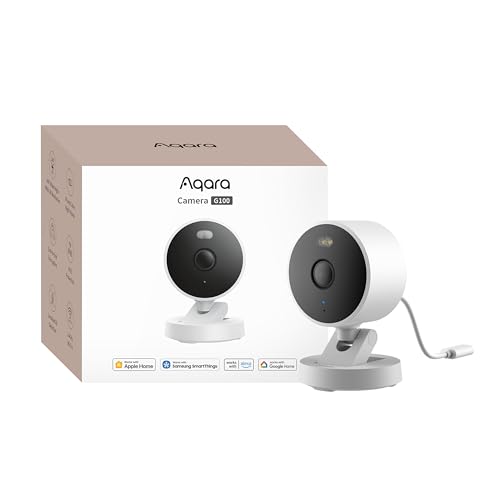
- Best for: A front door, side gate or nursery where one camera must handle indoor or outdoor duty.
- Video: 2K, 3 MP sensor, 140-degree field of view
- Spotlight colour night vision and infrared night vision
- AI detection with motion and person alerts; two-way audio
- Local recording to microSD card up to 512 GB
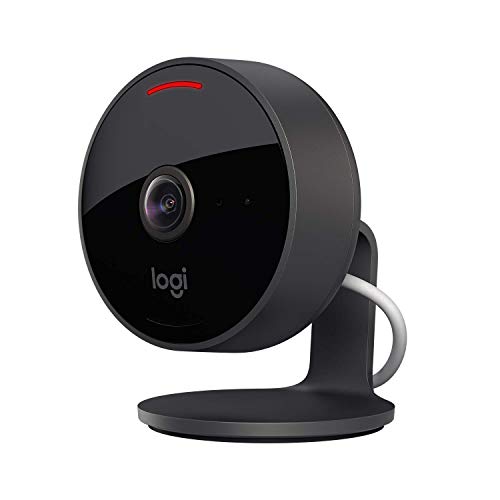
- Best for: One wide view over an entrance hall, living room or sheltered porch.
- Video: Full HD 1080p with wide dynamic range
- 180-degree field of view, Logitech TrueView
- Infrared night vision up to 15 ft
- IP64 weatherproof body with metal base
All 4 Picks at a Glance
| Product | Specs | Action |
|---|---|---|
| Aqara Camera Hub G3 |
| Check price on Amazon |
| Aqara G100 |
| Check price on Amazon |
| Logitech Circle View |
| Check price on Amazon |
 Eve Cam |
| Check price on Amazon |
Key takeaways
- Compare four HomeKit Secure Video cameras on Amazon US: Aqara Hub G3, Aqara G100, Logitech Circle View and Eve Cam, by storage, hub needs and placement.
What's inside
As an Amazon Associate I earn from qualifying purchases. This post may contain affiliate links at no extra cost to you.
The real decision with a HomeKit camera is not the lens or the resolution. It is how much of the camera you are willing to hand over to Apple. HomeKit Secure Video cameras record through your home hub into iCloud, with the analysis done in your house rather than a vendor’s cloud, but that bargain means some features on the box, such as pan and tilt or gesture control, only work inside the maker’s own app. Choosing well means knowing which parts you will actually use in the Home app day to day.
This guide is for iPhone households that already run lights and locks in the Home app, for privacy-first buyers who want no second cloud account, and for Aqara users building a sensor setup around a camera hub. The four picks come from their Amazon product pages: the Aqara Camera Hub G3, the Aqara G100, the Logitech Circle View and the Eve Cam, a spread of hub, indoor-outdoor, wide-angle and indoor-only designs.
Quick Picks
As an Amazon Associate we earn from qualifying purchases.
| Product | Best for | Key spec from title |
|---|---|---|
| Aqara Camera Hub G3 | A living room that also needs a smart home hub | 2K video with 360-degree pan and tilt |
| Aqara G100 | A front door or side gate, indoors or out | 2K video with spotlight colour and IR night vision |
| Logitech Circle View | One wide view of an entry hall or porch | 180-degree wide angle, 1080p HD |
| Eve Cam | An Apple-only indoor room where privacy leads | Motion sensor with microphone, speaker and night vision |
How to Choose
Secure Video recording versus live view only
Not every camera that appears in the Home app records the same way. HomeKit Secure Video models send their footage to a HomePod or Apple TV in your home, which analyses it for people, pets and vehicles and stores encrypted clips in iCloud. A camera with basic HomeKit support may only offer a live tile and motion alerts, leaving recording to the maker’s cloud. All four cameras here support Secure Video, so the check is about your home: you need a hub on the same network and an iCloud+ plan before any of them records a single clip.
What stays in the maker’s app
Apple’s Home app shows live video, recordings and alerts, but it does not expose every control the hardware carries. On the Aqara G3, the motorised pan and tilt, facial recognition setup and gesture commands are managed in the Aqara app, and its Zigbee hub pairs sensors there too. The Logitech and Eve cameras sit at the other extreme: they are built for HomeKit only, so there is no second feature set to miss. Decide before buying whether you are happy running two apps, because that split decides how much of the specification you paid for is actually reachable.
Hub and iCloud plan requirements
Secure Video is not a camera feature you can use on its own. Recording needs a HomePod, HomePod mini or Apple TV acting as the home hub, and an iCloud+ plan sized to your camera count: the Eve listing spells out a 50 GB plan or higher to start, with one camera on the 200 GB tier and up to five on the 2 TB tier. Households adding a third or fourth camera should check their tier first. Without a hub, these cameras still appear in the Home app, but they cannot analyse or store recordings.
Power, placement and weather rating
Every camera in this guide is wired, so placement starts with a power outlet rather than a battery schedule. The Circle View carries a tethered ten-foot cable, the Eve Cam ships with a 220 cm USB lead, and both Aqara models run from USB adapters. Weather rating then narrows the map: the G100 is IP65 and rated for indoor and outdoor use, the Circle View is IP64, while the G3 and Eve Cam are indoor models. Measure the run from outlet to mounting point before ordering, because the fixed cables cannot be extended with a longer lead.
The 4 Best Options
Aqara Camera Hub G3
- Best for: Apple households adding Aqara sensors around one living-room camera hub.
- Video: 2K (2304 x 1296), 3 MP sensor
- 360-degree viewing angle via motorised pan and tilt
- AI facial, pet and gesture recognition
- Built-in Zigbee hub and infrared remote control
Apple households adding Aqara sensors around one living-room camera hub.
The hub pairs Aqara Zigbee devices only, not third-party Zigbee gear, and the camera is indoor-only.
The G3 is the pick for an Apple household that is also building a wider smart home. Alongside its 2K camera it carries a Zigbee hub for Aqara sensors and an infrared blaster for older appliances, so one device covers a living room camera, a sensor network and remote control of a television or air conditioner. The motorised lens pans and tilts for a 360-degree view, and its on-device recognition separates faces, pets and gestures. Most of those extras are managed in the Aqara app, while the Home app receives the Secure Video stream and recordings, which suits buyers who accept a two-app split.
Aqara G100
- Best for: A front door, side gate or nursery where one camera must handle indoor or outdoor duty.
- Video: 2K, 3 MP sensor, 140-degree field of view
- Spotlight colour night vision and infrared night vision
- AI detection with motion and person alerts; two-way audio
- Local recording to microSD card up to 512 GB
A front door, side gate or nursery where one camera must handle indoor or outdoor duty.
HomeKit Secure Video still needs an Apple home hub and iCloud plan, and the wired feed limits how far from an outlet it can sit.
The G100 is the flexible placement pick: a small 2K camera rated IP65, so the same model can watch a nursery shelf or a covered side gate. Its spotlight gives colour night vision alongside infrared, and AI detection flags people and motion. Unlike the other cameras here it also records locally to a microSD card, which keeps event clips in the house even if you skip an iCloud plan, while Secure Video remains available when you want recordings in the Home app. It still needs a wired power feed, so the mounting point has to sit within reach of an outlet.
Logitech Circle View
- Best for: One wide view over an entrance hall, living room or sheltered porch.
- Video: Full HD 1080p with wide dynamic range
- 180-degree field of view, Logitech TrueView
- Infrared night vision up to 15 ft
- IP64 weatherproof body with metal base
One wide view over an entrance hall, living room or sheltered porch.
There is no local storage, so without an iCloud+ plan and a home hub it works as live view only.
The Circle View is built around one very wide look at a room or entry. Its 180-degree field of view covers an entire entrance area that narrower cameras would need two units to match, and the TrueView processing keeps that wide image usable in mixed light. Logitech made it for HomeKit Secure Video only, so there is no Logitech account or separate cloud in the chain. Privacy is handled physically: tilt the camera down to block the lens, or use the rear button to cut the camera and microphone. The IP64 metal body tolerates a sheltered porch as well as indoor mounting.
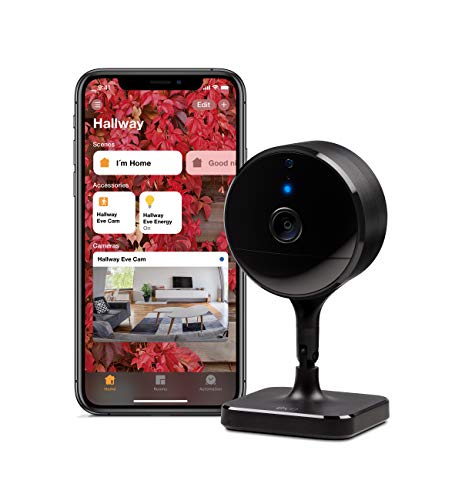
Eve Cam
- Best for: An Apple-only household wanting an indoor camera with no vendor account or registration.
- Video: 1080p, H.264
- Designed exclusively for Apple HomeKit Secure Video
- Dedicated infrared motion sensor; people and pet recognition via home hub
- Microphone and speaker for two-way audio
An Apple-only household wanting an indoor camera with no vendor account or registration.
It needs a HomePod or Apple TV (4th generation or later) as a home hub and an iCloud+ plan of 50 GB or more, neither included.
The Eve Cam is the indoor purist’s option. Eve builds it exclusively for HomeKit Secure Video, with no Eve cloud account standing between the camera and your iCloud storage, and live images routed through your home hub rather than a company server. A dedicated infrared motion sensor triggers alerts and automations, and the hub’s analysis can separate people from pets so notifications can be tuned by who is home. It mounts magnetically on the included metal plate for wall installation, and a visible status LED shows when it is on or recording. It is indoor-only and permanently wired by USB.
Which One Fits Your Situation
You are building an Aqara sensor setup
Start with the Camera Hub G3. Its built-in Zigbee hub pairs Aqara door, motion and vibration sensors, so the camera becomes the centre of the system rather than another standalone device, and its pan and tilt lets one unit sweep a whole living room. Add the G100 later for doors or outdoor corners where a fixed view is enough.
You need one camera at the front door
Choose the Aqara G100. The IP65 body handles a covered porch or an exposed side gate, the spotlight supports colour night vision after dark, and local microSD recording means the camera keeps saving clips even if your iCloud plan lapses. It is also the natural pick for a garage or workshop where an indoor-only model would be out of its depth.
You want the fewest cameras per room
The Logitech Circle View earns its place on field of view alone. At 180 degrees, one unit above an entrance covers the door, the hallway and the room behind you, work that usually takes two narrower cameras. Pick it for open-plan spaces and entry halls, and accept the trade: no local storage and no second platform if you later add non-Apple devices.
Your household is Apple-only, indoors
The Eve Cam fits a home that has settled on Apple for everything. It asks for no account and no registration, records only through Secure Video, and its motion sensor can drive HomeKit automations such as switching lights on when the front door opens. It suits bedrooms, nurseries and living rooms where a camera should switch itself off when everyone is home.
Common Mistakes
- Buying the camera before confirming a HomePod, HomePod mini or Apple TV is already set up as the home hub.
- Assuming pan, tilt and gesture controls appear in the Home app when they are managed in the maker’s app.
- Picking an iCloud+ tier that covers fewer cameras than the house will eventually run.
- Mounting an indoor-only camera like the G3 or Eve Cam on an exposed porch.
- Planning a mount point first and measuring the fixed power cable afterwards.
Frequently Asked Questions
Do HomeKit cameras need a subscription to record?
Recording through HomeKit Secure Video needs an iCloud+ plan, because the encrypted clips live in your iCloud storage. The camera makers here do not charge their own recording subscription on top, and the Aqara G100 can also record locally to a microSD card with no plan at all. Live viewing in the Home app works without recording enabled.
Which Apple devices work as the home hub?
A HomePod, HomePod mini or Apple TV (4th generation or later) can act as the hub that analyses and stores Secure Video recordings. The hub must stay powered and on the same home network as the cameras. An iPhone alone is not enough: without a hub, the cameras can be added to the Home app but cannot record analysed clips to iCloud.
Can these cameras record without iCloud?
Only the Aqara G100 offers a route around iCloud, recording to a microSD card of up to 512 GB inside the camera. The Aqara G3 leans on Aqara’s own cloud options outside HomeKit, while the Logitech Circle View and Eve Cam have no local storage at all and depend on Secure Video for every recording they keep.
Will these cameras also work with Alexa or Google Home?
The two Aqara models will: both listings name Alexa, Google Assistant and IFTTT alongside HomeKit. The Logitech Circle View and Eve Cam will not, because both are built for Apple HomeKit Secure Video exclusively. If your household mixes voice assistants, choose Aqara; if it is Apple-only, the exclusive models remove a whole layer of accounts and setup.
Related guides
More from Amazon
Programs that pair well with the guide above. Offers and eligibility are set by Amazon and may change.
Free shipping on eligible items, Prime Video and more. Eligible new members can start with a free trial.
Start a Prime free trialAudiobooks and podcasts to listen to on the go. Eligible new members can start with a free trial.
Try Audible freeAd-free music streaming. Eligible new subscribers can start with a free trial.
Try Music Unlimited freeA free business account with business pricing and bulk-buying tools for work, shop or home office.
Create a business accountAs an Amazon Associate we earn from qualifying purchases.










Write Your Review
No reviews yet. Be the first to share your experience!