
Key takeaways
- Find the best color chart for matching cameras with our guide to ColorChecker and SpyderCheckr charts, patch counts, sizes, and workflows for photo and video.
What's inside
As an Amazon Associate I earn from qualifying purchases. This post may contain affiliate links at no extra cost to you.
Introduction
The best color chart for matching cameras is a physical color checker chart, not a printed picture of colored squares and not a camera setting. In this guide, “color chart” means a color checker or color calibration chart: a rigid card or folding set of patches with known, spectrally formulated colors that you photograph at the start of a shoot so that editing software can measure how each camera rendered those known colors and bring the cameras into agreement.

That distinction matters. Two cameras can photograph the same scene and produce different skin tones, greens, and blues, even when the white balance numbers look identical. A color chart gives every camera the same known reference, so the differences between cameras become measurable instead of a matter of taste.
Quick answer: for most photographers and hybrid shooters who work with two or more cameras, the Calibrite ColorChecker Passport Photo 2 is the most versatile starting point, because it combines a 24-patch Classic target, white balance and gray balance targets, and software for custom camera profiles in a pocket-sized case. If you want a larger, simpler chart for a studio table or a tripod-mounted setup, the Datacolor SpyderCheckr 24 is a strong alternative. For portrait work with expanded skin tones, the Datacolor Spyder Checkr Photo adds more targets, and for a full-size, 48-patch reference, the original Datacolor SpyderCheckr remains a useful choice.
This guide explains how these charts work, what to look for when you compare them, and how to use one to match cameras in a real shoot. Every product below is a physical color reference chart for camera color matching.
Quick Picks
Our Short List of 3
All 4 Picks at a Glance
| Product | Specs | Action |
|---|---|---|
| Calibrite ColorChecker Passport Photo 2 (B0973HSH3V) | Check price on Amazon | |
| Datacolor SpyderCheckr 24 (B00LPS46TW) | Check price on Amazon | |
 Datacolor Spyder Checkr Photo (B0C76LB6VL) | Check price on Amazon | |
 Datacolor SpyderCheckr (B00465G49G) | Check price on Amazon |
How to Choose
Patch Count and Patch Variety
Patch count is the first number to compare, but it is not the whole story. A 24-patch chart covers the standard set of natural colors, primaries, secondaries, and a grayscale ramp, and that set is enough to build a custom camera profile and to correct white balance in most situations. A 48-patch chart adds more saturated colors, more skin tones, and more near-white and near-black tones, which can help when you need finer control over a specific hue.
More patches can also mean a larger chart or smaller individual patches, so consider how the chart will be photographed. Small patches need to be large enough in the frame for the software to sample them cleanly. A chart with fewer, larger patches can be easier to use at a distance, while a chart with many patches rewards a closer, well-lit reference shot.
Chart Size and Working Distance
Size decides where a chart can be used. A pocket-sized passport chart fits in a camera bag, can be held by a subject or placed on a table near the subject, and works well for location work, weddings, events, and travel. A full-size chart, roughly the size of a sheet of letter paper or larger, is easier to see from a distance and easier to sample in a wide shot, which helps on a studio set or at a product table.
Think about your usual working distance before you choose. If you often shoot with a second camera across a room, a small chart may be too small in that camera’s frame. If you often shoot close portraits or products, a large chart may be awkward to hold in the scene.
White Balance and Gray Targets
A color chart should include a neutral reference as well as color patches. A white balance target lets you set a custom white balance in camera, so every camera starts from the same neutral point before any color correction begins. A gray balance target and a grayscale ramp let you check exposure and confirm that neutrals stay neutral from shadows to highlights.
Charts that include these targets in the same case save time on set, because you do not need a separate gray card. When you compare charts, check whether the gray target is a separate face, a separate card, or part of the same folding unit, and whether the chart includes a stepped gray ramp for checking exposure.
Software and Profile Support
A chart is only half of the system. The other half is the software that reads the chart in your reference image and builds a correction. Some charts are designed to work with the maker’s own software to create custom DNG or ICC camera profiles, or HSL presets for editing software such as Adobe Lightroom, Adobe Camera Raw, Hasselblad Phocus, or Blackmagic DaVinci Resolve.
Before you buy, confirm that the chart’s software supports your editing software and your file type. A profile-based workflow works best with raw files, while a white balance and HSL workflow can also work with JPEG files and video. If you work in video, check that the chart is supported in your grading software, because a still-photo profile does not always transfer to a video workflow.
Build, Finish, and Durability
Color charts are precision references, and their accuracy depends on the patches staying true to their formulated colors. Look for a matte or ultra-matte finish that limits glare and reflections, because a glossy patch can pick up a reflection from a light or a window and give a false reading. A rigid case or a folding hard case protects the patches in a bag, and a lanyard or a stand helps you position the chart in the scene without an extra pair of hands.
Fading is a real concern over time. Some charts include a fade indicator that changes when the patches have been exposed to too much light, which is a useful warning that the chart may no longer be accurate. Store the chart in its case, keep it out of direct sun when it is not in use, and replace it if the patches look faded, scratched, or stained.
Multi-Camera and Video Matching
Matching cameras is a specific job, and not every chart is equally suited to it. For a two-camera interview, a wedding with a second shooter, or a product shoot with a still camera and a video camera, you need a chart that every camera can see clearly in the same light, and a workflow that produces a correction for each camera from the same reference.
Video adds its own requirements. Video charts often include targets arranged for vectorscope and waveform checks, with skin tones and grays laid out for use in camera or in grading software. If your main job is matching video cameras, a chart with video-oriented targets and a clear white balance reference will serve you better than a still-only chart.
The Best Color Chart For Matching Cameras Reviewed
Calibrite ColorChecker Passport Photo 2 (B0973HSH3V)
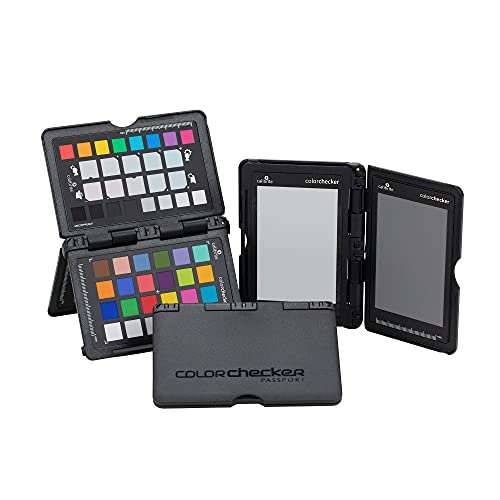
The Calibrite ColorChecker Passport Photo 2 is a pocket-sized, folding color calibration kit built around the 24-patch ColorChecker Classic target. It includes four targets in one protective case: the Classic 24-patch target for custom camera profiles, a white balance target for custom in-camera white balance, a gray balance target, and an enhancement target for creative adjustments. The case folds open to stand on its own, includes a lanyard, and closes to a size that fits in a jacket pocket or a small camera bag compartment.
For matching cameras, the Passport Photo 2 is a practical choice because the same compact reference can be photographed by every camera in the setup, in the same light, in a matter of seconds. The included software supports custom DNG and ICC camera profiles, so a profile built from one camera’s reference shot can be applied to that camera’s files, and a separate profile can be built for the second camera from its own reference shot. The white balance target gives both cameras a shared neutral point before profiling begins, which helps keep skin tones consistent across the set.
Who should skip it: photographers who need a large chart that stays visible in a wide shot from across a studio or an event space may find the pocket-sized patches too small at a distance. In that case, a larger chart such as the SpyderCheckr 24 will be easier to sample in the frame.
Datacolor SpyderCheckr 24 (B00LPS46TW)
The Datacolor SpyderCheckr 24 is a larger, single-sheet color chart with 24 target colors plus a gray face. The color face is used to color correct captures in supported editing software, while the gray face provides in-camera and post-process white balance and exposure adjustment. The chart measures 8.6 x 6.3 x 0.59 inches, weighs 5.3 ounces, and includes a tripod mount, a slipcover, and software for building corrections.
For matching cameras, the SpyderCheckr 24 has two advantages: size and simplicity. The larger patches are easier to sample when the chart is photographed from a distance, and the tripod mount lets you place the chart exactly where the subject will be and leave it there while each camera takes its reference shot. The software produces HSL color corrections for still and video cameras, and it is designed to work with Adobe Photoshop Camera Raw, Adobe Lightroom, Hasselblad Phocus, and Blackmagic DaVinci Resolve. The chart also includes a FadeCheckr indicator, which helps you know when the patches may have faded and need replacement.
Who should skip it: photographers who need more than 24 patches, expanded skin tones, or a pocket-sized chart for travel may prefer the Spyder Checkr Photo or the Passport Photo 2. The SpyderCheckr 24 is a single-sheet chart in a thin case, so it is less compact than a folding passport set.
Datacolor Spyder Checkr Photo (B0C76LB6VL)
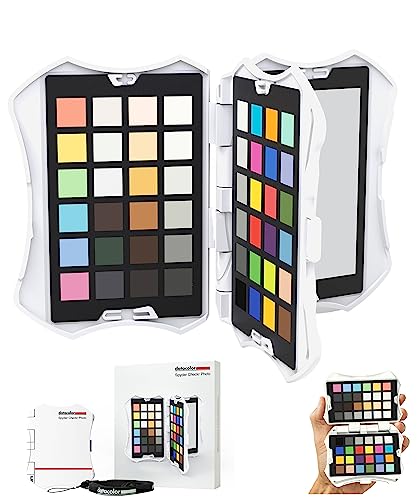
The Datacolor Spyder Checkr Photo, model SCK310, is a portable color matching tool with 62 color targets across four interchangeable cards in an ergonomic case. The set includes expanded skin tones for portraits, large targets for white and gray balancing, and a 24-step gray scale for exposure and dynamic range checks. The ultra-matte finish is designed to limit reflections.
For matching cameras, the extra targets are the point. The expanded skin tone set gives the software more data where it matters most for portraits, and the 24-step gray scale gives a detailed view of how each camera handles the range from black to white. The software can create hue, saturation, and luminance presets for use in photo editing software, which helps keep color consistent when you move between cameras, lenses, and sensor combinations.
Who should skip it: photographers who want the simplest possible workflow may find four cards and 62 targets more than they need, and a 24-patch chart will be faster on a busy set. Photographers who mainly match video cameras may also want to check that their grading software supports the Spyder Checkr Photo workflow before choosing it over a video-oriented chart.
Datacolor SpyderCheckr (B00465G49G)
The Datacolor SpyderCheckr, model SCK100, is the original full-size SpyderCheckr with 48 target colors plus a gray card for in-camera white balance. The larger patch set includes saturated colors, low-saturation colors, skin tone patches, near-white tints, near-black tones, and a gray ramp, giving the software more reference points than a 24-patch chart.
For matching cameras, the 48-patch set can help when a scene contains colors that fall between the standard 24 patches, or when you need finer control over a particular hue. The rigid case and tripod mount make it easy to place the chart in the scene and keep it steady while each camera takes a reference shot. The calibration workflow is designed to work with raw files, JPEG files, and video, which is useful when you are matching a still camera with a video camera or two cameras that record in different formats.
Who should skip it: photographers who travel light or who need a pocket-sized chart should choose the Passport Photo 2 or the Spyder Checkr Photo instead. The full-size SpyderCheckr is a larger, heavier tool, and its patch set may be more than a casual two-camera setup needs.
What to Check Before You Buy
Start by confirming that the chart you choose is a genuine color reference, not a printed copy. A genuine chart uses spectrally formulated pigments, and the patches are manufactured under controlled conditions so that each color reflects light in a known way. A printed copy made on an ordinary printer cannot reproduce those colors accurately, and using one as a reference will introduce errors into every correction you build from it. Buy from a reputable seller, check that the model number matches the maker’s listing, and inspect the chart when it arrives for clean, even patches and a case that closes properly.
Next, confirm the software and file support for your workflow. Check that the chart’s software supports your editing or grading software, your operating system, and your file type, whether that is raw, JPEG, or video. A chart that builds DNG profiles will be most useful in a raw still workflow, while a chart that builds HSL presets or supports DaVinci Resolve will be more useful for video.
Check the size against your working distance, and think about how you will hold or mount the chart on set. A tripod mount is useful for a studio chart, a lanyard and a self-standing case are useful for a location chart, and a rigid case protects the patches in transit. If you shoot outdoors, a matte finish matters, because glare from the sun can spoil a reference shot.
Finally, plan for replacement. Color charts fade with exposure to light, and a faded chart is no longer a reliable reference. Store the chart in its case, keep it out of direct sun when it is not in use, and check the fade indicator if your chart has one. When the patches look faded, scratched, or stained, replace the chart rather than continuing to build profiles from it.
Frequently Asked Questions
How do I use a color chart to match two cameras?
Photograph the same chart with both cameras under the same light, at the start of the shoot and again whenever the light changes. Use each camera’s reference shot to build a correction or profile for that camera in your editing software, then apply each camera’s own correction to its own files. The chart gives both cameras the same known colors to measure against, so the corrections bring them toward the same result instead of toward a guess.
Can a color chart fix white balance on its own?
A color chart can help you set a custom white balance, and the gray or white balance target is designed for exactly that job. Photograph the neutral target, use it to set white balance in camera or in editing software, and neutrals should stay neutral. For full color matching, though, white balance is only the first step. A custom profile or HSL correction built from the color patches addresses hue and saturation as well.
Is a 24-patch chart enough for matching cameras?
For most two-camera work, yes. The standard 24-patch set covers natural colors, primaries, secondaries, and a grayscale ramp, and it is the set that most profile software is built around. A 48-patch or 62-target chart adds finer detail for portraits or product work, but it is not required for a basic match.
How often should I replace a color chart?
Replace a color chart when the patches show fading, scratches, stains, or other damage, or when a fade indicator signals that the chart is no longer accurate. With careful storage in its case and limited exposure to direct light, a chart can last for years, but a chart that lives loose in a bag or in the sun will wear out sooner.
Bottom Line
The best color chart for matching cameras is the one that fits your working distance, your subject, and your editing software, and that you will actually photograph at the start of every shoot. For most photographers, the Calibrite ColorChecker Passport Photo 2 covers the core job in a pocket-sized case, with a Classic target, white balance and gray targets, and profile software. The Datacolor SpyderCheckr 24 is the simpler, larger choice for studio and tripod work, the Spyder Checkr Photo adds expanded skin tones and a detailed gray scale for portraits, and the original SpyderCheckr gives you a full-size 48-patch reference for a controlled set. Pick the chart that matches how you shoot, photograph it under the same light with every camera, and let the known colors do the matching work for you.
Disclosure: As an Amazon Associate, we may earn from qualifying purchases.
Related guides
More from Amazon
Programs that pair well with the guide above. Offers and eligibility are set by Amazon and may change.
Free shipping on eligible items, Prime Video and more. Eligible new members can start with a free trial.
Start a Prime free trialAudiobooks and podcasts to listen to on the go. Eligible new members can start with a free trial.
Try Audible freeAd-free music streaming. Eligible new subscribers can start with a free trial.
Try Music Unlimited freeA free business account with business pricing and bulk-buying tools for work, shop or home office.
Create a business accountAs an Amazon Associate we earn from qualifying purchases.










Write Your Review
No reviews yet. Be the first to share your experience!