
Key takeaways
- Find the best network security cameras for home and small business, with PoE power, ONVIF support, sharp video, and reliable local recording in this guide.
What's inside
As an Amazon Associate I earn from qualifying purchases. This post may contain affiliate links at no extra cost to you.
The best network security cameras give you a stable wired connection, clear video day and night, and recording that does not depend on a weak wireless signal. A network camera, also called an IP camera, connects to your home or office network through an Ethernet cable. Many models use Power over Ethernet, known as PoE, so one cable carries both power and video. That makes installation cleaner, removes the need for a power outlet at each camera, and keeps the video feed steady when other devices crowd your wireless network.

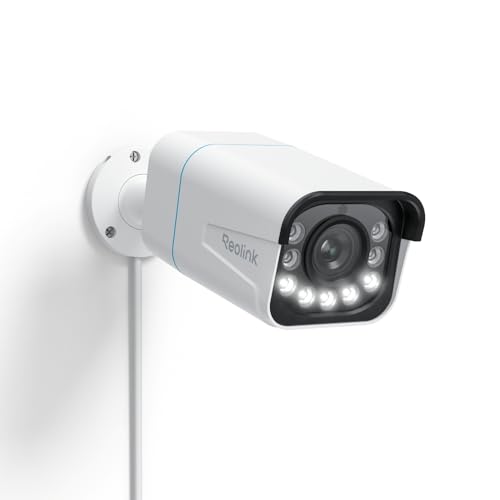
For a house, a small shop, or a warehouse entrance, a wired network camera is often the sensible starting point. You can run cameras back to a PoE switch or a recorder, view live video from a phone or computer, and store footage locally on a memory card, a recorder, or network storage.
The quick answer is that the Reolink RLC-810A is a strong all-round choice for most buyers, because it combines 4K video, PoE power, smart person and vehicle detection, and infrared night vision in a straightforward bullet design. If you need to read detail at a distance, the Reolink RLC-811A adds 5x optical zoom and color night vision. If you prefer a discreet dome for a porch or ceiling, the Reolink RLC-520A is a compact 5MP PoE dome. If you want a turret camera with AI detection and a wide view, the Amcrest IP5M-T1277E-AI is a useful alternative. Each camera below is a true network camera, not a battery camera or a standalone wireless camera.
Quick Picks
Our Short List of 3
All 4 Picks at a Glance
| Product | Specs | Action |
|---|---|---|
| Reolink RLC-810A (B07K74GWX5) | Check price on Amazon | |
| Reolink RLC-811A (B09873G7X3) | Check price on Amazon | |
 Reolink RLC-520A (B08LKC9BJ8) | Check price on Amazon | |
 Amcrest IP5M-T1277E-AI (B0BNM2SGPS) | Check price on Amazon |
How to Choose the Best Network Security Cameras
Match the camera to the place it will watch, the network you already have, and the way you want to store video. The points below cover the choices that matter most for home and small business buyers.
Resolution and Image Detail
Resolution decides how much detail you can read in a recording. A 4K camera records far more detail than a 1080p camera, which helps when you need to identify a face, read a vehicle plate, or check a small label near a door. A 5MP camera sits between those two levels and is often enough for a porch, a hallway, or a small room where the subject is close to the lens.
Think about distance before you choose resolution alone. A 4K camera with a wide lens still loses detail at long range, while a lower-resolution camera with optical zoom can do better on a distant gate. For a front door or garage entrance, 5MP or 4K both work well. For a long driveway or parking area, 4K plus optical zoom is a better combination. Also check frame rate, since a 4K camera at 15 frames per second can look less smooth than a 5MP camera at 30 frames per second.
PoE Power and Wiring
With PoE, a single Ethernet cable supplies power and carries video back to a switch or recorder. You do not need a separate power outlet at the camera, and you do not need a second cable for power. Most cameras in this guide use the IEEE 802.3af PoE standard, and many also accept a 12 volt DC adapter as an alternative.
If you have a PoE switch or a PoE recorder with spare ports, you can connect the camera directly. If you do not, you will need a PoE injector or a PoE switch, often sold separately. A long run through an attic, wall, or outdoor conduit needs weatherproof cable and proper sealing where it enters the building.
ONVIF Compatibility and Third-Party Recorders
ONVIF is an open standard that lets network cameras and recorders from different brands work together. If a camera supports ONVIF, you can often add it to a third-party network video recorder, a network storage system, or video management software such as Blue Iris or Synology Surveillance Station. That flexibility matters if you already own a recorder, if you want to mix brands, or if you want to move away from one app in the future.
Check the listing and the manufacturer specification for ONVIF support before you buy. If you plan to use a recorder from a different brand, confirm the ONVIF profile and stream settings, and allow time for setup after installation.
Night Vision and Low-Light Performance
Night vision decides whether a camera is useful after dark. Infrared night vision uses infrared LEDs to light a scene that looks dark to the human eye, and the camera records in black and white. The cameras in this guide list infrared ranges around 49 to 100 feet, which is enough for most porches, driveways, and small yards. The real range depends on the scene, mounting height, and nearby walls that reflect infrared light.
Color night vision is a different approach. It uses spotlights or a sensitive sensor to keep color in the image at night. Color can help you describe clothing, a vehicle color, or a sign, but it needs more light than infrared. The Reolink RLC-811A uses spotlights for color night vision, while the other cameras here rely mainly on infrared. If the area is already lit by a porch light, color night vision can work well. If the area is fully dark, infrared is the more reliable choice.
Storage, Recording, and Remote Viewing
A network camera needs a place to store video. Many models accept a microSD card for local recording, and the cameras in this guide support cards up to 256GB or 512GB, depending on the model. A memory card is simple and keeps video on the camera itself, but it has limited capacity and can be lost if the camera is damaged or removed. A network video recorder gives you more capacity, continuous recording for several cameras, and a central place to search footage.
Continuous recording uses far more space than motion-triggered recording, and 4K video uses far more space than 5MP video. If you only need the last few days, a large memory card may be enough. If you need a week or more from several cameras, a recorder with a hard drive is a better fit. Most network cameras work with a phone app for live viewing and playback.
The Best Network Security Cameras Reviewed
Reolink RLC-810A (B07K74GWX5)
The Reolink RLC-810A is a 4K PoE bullet camera for buyers who want a straightforward wired camera with sharp video and reliable night vision. It records 8MP video, which is the same as 4K, and it uses PoE to carry power and video over one Ethernet cable. The camera includes person, vehicle, and pet detection, time-lapse recording, and infrared night vision up to 100 feet. It supports a microSD card up to 512GB for local recording, and it works with a Reolink network video recorder, an FTP server, or a network storage device. The housing is rated IP67 for outdoor use.
This camera suits a front door, a driveway, a garage entrance, or a small business exterior where you want a fixed wide view and clear detail. The bullet shape is easy to aim. Smart detection helps reduce alerts from passing animals and moving shadows.
Who should skip it: buyers who need optical zoom should look at the RLC-811A instead, because the RLC-810A uses a fixed lens and digital zoom only. Buyers who have no PoE switch, injector, or recorder will need to add one, since neither a PoE injector nor a power adapter is included in the box.
Reolink RLC-811A (B09873G7X3)
The Reolink RLC-811A is a 4K PoE bullet camera with a 5x optical zoom lens, which makes it the strongest choice in this guide for distant detail. The motorized varifocal lens moves from a wide view to a tight view without losing resolution, so you can check a gate, a far fence line, or a vehicle at the end of a long driveway. The camera records 4K video, supports a microSD card up to 512GB, and includes person, vehicle, and animal detection, two-way talk, and color night vision with spotlights. The field of view reaches 123 degrees at the wide end, and the housing is rated IP67 for outdoor use.
This camera suits a long driveway, a large yard, a farm entrance, a warehouse yard, or any property where the subject is far from the mounting point. The optical zoom is the key feature: digital zoom enlarges the pixels you already captured, while optical zoom changes the lens to capture more detail from the start. Two-way talk lets you speak through the camera, which can be useful for a gate or a delivery point.
Who should skip it: buyers who only need a short-range view of a porch or a small room will not use the zoom often, and a simpler fixed-lens camera may be enough. As with other PoE cameras, you will need a PoE switch, injector, or recorder, since that power source is not included in the box.
Reolink RLC-520A (B08LKC9BJ8)
The Reolink RLC-520A is a 5MP PoE dome camera for buyers who want a compact, discreet network camera for a porch, a ceiling, or a covered entrance. It records 5MP video at 2560 by 1920 resolution at up to 30 frames per second, and it uses a 4.0 mm fixed lens with an 80 degree horizontal field of view. The camera includes person, vehicle, and animal detection, infrared night vision up to 100 feet, and a built-in microphone for audio recording. It supports a microSD card up to 512GB, records to a Reolink recorder, an FTP server, or a network storage device, and uses PoE power through a single Ethernet cable. The housing is rated IP67 and uses a metal enclosure.
This camera suits a front porch, a hallway, a small office, a retail entrance, or a covered patio where a bullet camera would look out of place. The dome shape sits close to the ceiling or soffit, which makes it less obtrusive and harder to grab than a protruding bullet. The 5MP resolution is enough for close-range detail, and the built-in microphone adds context to the video.
Who should skip it: buyers who need 4K detail or optical zoom should choose the RLC-810A or RLC-811A instead, because the RLC-520A uses a fixed lens and a lower resolution. Buyers who need a very wide view may also prefer a camera with a wider lens, since the 80 degree horizontal view is narrower than the wide end of the zoom camera in this guide.
Amcrest IP5M-T1277E-AI (B0BNM2SGPS)
The Amcrest IP5M-T1277E-AI is a 5MP AI turret PoE camera for buyers who want a wide view, smart detection, and ONVIF compatibility in a turret body. It records 5MP video at 20 frames per second with a 129 degree field of view, which covers a broad area from a single mounting point. The camera includes human and vehicle detection, tripwire and intrusion zones, a built-in microphone, and active deterrent features such as a spotlight and a siren. Night vision reaches up to 49 feet with dual illumination, using infrared light and white light. The housing is rated IP67, and the camera supports a microSD card up to 256GB, a computer, a recorder, or network storage.
This camera suits a wide driveway, a large porch, a small shop floor, or a yard where you want to cover a broad area with one camera. The turret shape sits between a bullet and a dome: it is easier to aim than a dome, and closer to the surface than a bullet. ONVIF and RTSP support make it a good fit for buyers who already use a third-party recorder or camera software.
Who should skip it: buyers who need 4K video should choose a 4K model instead, because this camera records at 5MP. Buyers who need long-range infrared night vision may prefer a camera with a 100 foot infrared range, since this model lists a shorter night vision range. A PoE switch or injector is required and is sold separately.
What to Check Before You Buy
First, confirm that you have a PoE power source. Count the spare PoE ports on your switch or recorder, and check the PoE standard and power budget. A single camera uses only a small amount of power, but a system with four or eight cameras needs a switch that can supply power to every port at once. If you have no PoE ports, add a PoE injector for one camera or a PoE switch for several cameras.
Second, measure the cable run. Use outdoor-rated Ethernet cable for any run that goes outside, and keep the run within the practical length for Ethernet. Plan the route through the attic, wall, or conduit, and leave slack at both ends. Use a waterproof connector cover at the camera, and seal any hole where the cable enters the building.
Third, check ONVIF and recorder compatibility. If you already own a recorder or camera software, confirm that the camera model works with it, and note the stream address and login settings you will need. If you are starting fresh, choose a recorder from the same brand for the simplest setup, or choose an ONVIF recorder if you want to mix brands later.
Fourth, decide on storage and retention. Choose a memory card size, a recorder hard drive size, or a network storage plan that matches how many cameras you have, how many hours a day they record, and how many days you need to keep. Continuous recording needs far more space than motion-triggered recording, and 4K needs far more space than 5MP.
Fifth, check the mounting surface and the view. Confirm that the mount can hold the camera, that the view is clear of branches and bright lights, and that you test the view at night as well as during the day. Set a strong password, change any default login, and keep the firmware updated. Aim the camera at your own property where possible, and tell household members and staff where cameras are placed.
FAQ
What is a network security camera?
A network security camera, also called an IP camera, connects to a network through an Ethernet cable and sends video over that network. Many models use Power over Ethernet, so one cable carries power and video. You can view video from a phone, computer, or recorder, and store footage on a memory card, a recorder, or network storage.
Do network security cameras need Wi-Fi?
No. A wired network camera does not need Wi-Fi for its main connection, because it uses an Ethernet cable. You still need a network connection for remote viewing, but the camera itself stays wired. That wired link is more stable than a wireless link, especially in a large house or a building with thick walls.
What is PoE, and do I need a PoE switch?
PoE stands for Power over Ethernet. It lets an Ethernet cable carry power as well as data, so a camera needs only one cable. You need a PoE switch, a PoE network video recorder, or a PoE injector to supply that power. The power source is often sold separately, so check the box contents before you buy.
What does ONVIF mean for a security camera?
ONVIF is an open standard for network cameras and recorders. A camera that supports ONVIF can often work with recorders and software from other brands, which gives you more choice when you build or expand a system. Check the camera specification for ONVIF support, and confirm compatibility with your recorder before you buy.
How much storage does a network camera need?
Storage needs depend on resolution, frame rate, recording mode, and retention time. A single 5MP camera recording only on motion needs far less space than a 4K camera recording continuously around the clock. A large microSD card can suit one camera for a few days, while a recorder with a hard drive suits several cameras for a week or more. Check the camera manual for supported card sizes.
Bottom Line
The best network security cameras in this guide are all wired PoE cameras, and each one suits a different kind of property. Choose the Reolink RLC-810A for a strong all-round 4K bullet camera, the Reolink RLC-811A when you need 5x optical zoom for distant detail, the Reolink RLC-520A when you want a discreet 5MP dome, and the Amcrest IP5M-T1277E-AI when you want a wide-view AI turret camera with ONVIF support. Plan your PoE power, cable runs, and storage before you order. A careful wired setup takes more planning than a wireless camera, but it rewards you with a stable feed and clear video.
Disclosure: As an Amazon Associate, we may earn from qualifying purchases.
Related guides
More from Amazon
Programs that pair well with the guide above. Offers and eligibility are set by Amazon and may change.
Free shipping on eligible items, Prime Video and more. Eligible new members can start with a free trial.
Start a Prime free trialAudiobooks and podcasts to listen to on the go. Eligible new members can start with a free trial.
Try Audible freeAd-free music streaming. Eligible new subscribers can start with a free trial.
Try Music Unlimited freeA free business account with business pricing and bulk-buying tools for work, shop or home office.
Create a business accountAs an Amazon Associate we earn from qualifying purchases.










Write Your Review
No reviews yet. Be the first to share your experience!