
Key takeaways
- Find the best compact cameras with raw support for flexible editing, from pocket zooms to large-sensor primes, with RAW formats, sensors and lenses compared.
What's inside
As an Amazon Associate I earn from qualifying purchases. This post may contain affiliate links at no extra cost to you.
A compact camera that records RAW files gives you far more room to shape a photograph after you take it than a camera that records JPEG files only. The best compact cameras with raw support let you recover shadow detail, correct white balance, pull back highlights, and adjust exposure without the baked-in processing that a JPEG applies at capture. That flexibility matters for travel, street photography, portraits, and landscapes.


The quick answer is that a 1-inch sensor compact with a zoom lens is the safest starting point for most photographers, because it pairs RAW capture with versatile framing in a pocket-sized body. A larger APS-C compact with a fixed prime lens records richer RAW files and suits photographers who already know their preferred focal length. Choose by sensor size and lens first, then check the exact RAW format and bit depth.
This guide compares four compact cameras that all record RAW stills, explains what each RAW format means in practice, and helps you match a camera to the way you shoot.
Quick Picks
Our Short List of 3
All 3 Picks at a Glance
| Product | Specs | Action |
|---|---|---|
| Canon PowerShot G7 X Mark III (B07TKNCQZL) | Check price on Amazon | |
| Ricoh GR III (B07NSMJX2K) | Check price on Amazon | |
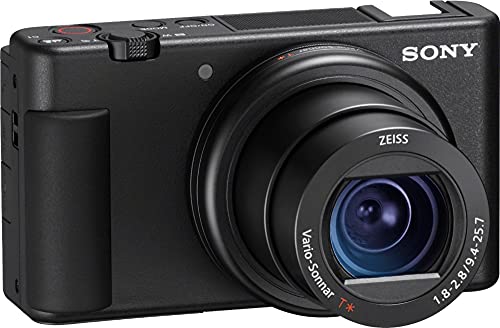 Sony ZV-1 (B08965JV8D) | Check price on Amazon |
How to Choose
RAW Format and Bit Depth
Sony compacts record ARW files, Canon compacts record CR3 files, and the Ricoh GR III records DNG files. All three hold far more image data than a JPEG, but your editing software must read the specific format for your camera model, so confirm compatibility for the exact model.
Bit depth shapes how far you can push a RAW file. A 14-bit RAW file records more tonal steps than a 12-bit file, which helps when you lift deep shadows or smooth a sky gradient. The Ricoh GR III and the Canon G7 X Mark III both record 14-bit RAW, while the Sony compacts here record compressed RAW, which keeps file sizes smaller.
Sensor Size and Image Quality
Sensor size decides how much light a compact camera gathers and how clean its RAW files look at higher ISO settings. A 1-inch sensor is the standard for premium compacts, and a clear step up from the smaller sensors in basic point-and-shoot cameras. It records detailed RAW files with useful dynamic range, and it keeps the body small enough to fit in a jacket pocket.
An APS-C sensor is larger still, and it shows in RAW files shot in dim light or at higher ISO settings. The Ricoh GR III uses an APS-C sensor with no anti-aliasing filter, which helps it record fine detail. The trade-off is that a larger sensor usually comes with a fixed prime lens rather than a zoom.
Lens: Zoom Range or Fixed Prime
The lens decides what you can frame, and the choice between a zoom and a fixed prime is the biggest practical divide among RAW compacts. The Sony RX100 VII reaches 200mm, which suits travel and events where you cannot walk closer. The Canon G7 X Mark III reaches 100mm with a brighter aperture, which suits portraits and indoor scenes. The Sony ZV-1 reaches 70mm, which suits close subjects and video-led shooting.
A fixed prime lens has one focal length and no zoom at all. The Ricoh GR III uses a 28mm lens, which suits street scenes, architecture, and landscapes, and forces you to move your feet to change the framing. That suits photographers who like a consistent wide perspective, and frustrates anyone who wants to photograph a distant subject.
Autofocus and Shooting Speed
RAW files are only useful if the image is in focus, so autofocus matters as much as sensor size. The Sony RX100 VII is the strongest camera here for moving subjects, with phase-detection autofocus, real-time tracking, and eye autofocus for people and animals. The G7 X Mark III and the ZV-1 also focus quickly for everyday subjects, while the Ricoh GR III uses hybrid autofocus that suits deliberate street shooting more than fast action.
Continuous shooting speed matters when a moment lasts a fraction of a second. The RX100 VII shoots bursts at up to 20 frames per second without blackout, which helps with sports, children, and animals. The G7 X Mark III shoots at up to 20 frames per second, and adds a RAW burst mode for a short sequence at a higher rate.
Viewfinder, Screen, and Controls
A viewfinder helps you compose in bright sunlight, where a rear screen can be hard to see, and it steadies the camera against your face. The Sony RX100 VII has a pop-up electronic viewfinder, which is a real advantage for outdoor RAW shooting. The G7 X Mark III, the GR III, and the ZV-1 have no built-in viewfinder, so you compose on the rear screen.
The rear screen still matters for every camera here. A tilting screen helps you shoot from a low angle or above a crowd, and a touchscreen lets you tap to focus quickly. The G7 X Mark III has a tilting touchscreen, the ZV-1 has a side flip-out screen, and the GR III has a fixed touchscreen.
RAW Workflow, Storage, and Battery
Shooting RAW changes the workflow after the shutter as well as before it. RAW files need editing software, they take longer to import and export, and they fill memory cards far faster than JPEG files. A single RAW file from a 20MP or 24MP compact is several times larger than a JPEG of the same scene, so a high-capacity, fast SD card is a practical necessity. Format the card in the camera before a shoot, and carry a spare card for a long day.
Battery life also deserves attention, because small compact bodies hold small batteries. The four cameras in this guide all use compact batteries that can run low during a long day of shooting. Carry a spare battery and a USB charging cable, and switch the camera off between locations. Before a trip, test the full workflow once: shoot RAW, import the files into your editor, and export a finished image.
The Best Best Compact Cameras With Raw Support Reviewed
Sony RX100 VII (B07VPQV7BY)
The Sony RX100 VII is the most versatile RAW compact in this guide, because it pairs RAW capture with the longest zoom and the fastest autofocus of the four cameras here. Its 20.1MP 1.0-type stacked CMOS sensor sits behind a 24-200mm ZEISS Vario-Sonnar T lens at f/2.8-4.5. It records RAW files in Sony ARW format alongside JPEG files.
The 24-200mm range is the key strength for RAW photography on the move. At 24mm you can photograph a wide street scene or a landscape, and at 200mm you can frame a distant subject tightly without cropping the RAW file later. Autofocus locks in 0.02 seconds, with real-time tracking and eye autofocus, and continuous shooting runs at up to 20 frames per second without blackout. The pop-up viewfinder helps in bright light, the camera records 4K video, and a microphone jack supports cleaner audio.
Partial-fit flag: the RX100 VII records compressed RAW only, with no uncompressed RAW option, so photographers who want the maximum possible editing latitude from every file should know that limit before buying. It also has no built-in neutral density filter, and its small battery runs down quickly during long days. It is still a full fit for the keyword: it is a compact camera, and it records RAW stills.
Who it suits: travel and everyday photographers who want one pocket camera that records RAW, zooms from wide to telephoto, and focuses fast enough for moving subjects.
Who should skip it: photographers who want uncompressed RAW files, a fixed prime lens, or the largest possible sensor in a compact body.
Canon PowerShot G7 X Mark III (B07TKNCQZL)
The Canon PowerShot G7 X Mark III is the best choice in this guide for photographers who want a bright lens in front of a 1-inch sensor, with RAW capture for careful editing. Its 20.1MP 1.0-inch stacked CMOS sensor and DIGIC 8 processor sit behind a 24-100mm f/1.8-2.8 lens with optical image stabilisation, and it records 14-bit RAW files in Canon CR3 format.
The bright lens is the main reason to choose this camera over a longer-zoom model. At f/1.8 you can use a faster shutter speed without raising the ISO as far, which keeps RAW files cleaner in restaurants, museums, and evening streets. The 4.2x optical zoom covers wide scenes and medium portraits, and the camera records 4K video at 30 frames per second and Full HD video at up to 120 frames per second. A tilting touchscreen helps with low-angle shots, and the built-in neutral density filter helps with wide-aperture shooting in bright light.
The trade-off is reach and framing. At 100mm, the G7 X Mark III cannot frame a distant subject as tightly as the 200mm RX100 VII, and it has no built-in viewfinder, so you compose on the rear screen in bright light. Those are practical limits rather than gaps in RAW support.
Who it suits: photographers who shoot portraits, food, travel, and indoor scenes, value a bright lens and 14-bit RAW, and want a pocket camera with a tilting screen.
Who should skip it: anyone who needs a long zoom for distant subjects or a viewfinder for bright outdoor shooting.
Ricoh GR III (B07NSMJX2K)
The Ricoh GR III is the large-sensor pick in this guide, and the strongest choice for photographers who want a wide prime lens and the richest RAW files a compact camera can record. Its 24.2MP APS-C CMOS sensor has no anti-aliasing filter, and it records 14-bit RAW files in DNG format. DNG is an openly documented RAW format that most editing software reads directly.
The fixed 28mm f/2.8 GR lens is the defining feature of this camera. At 28mm it suits street photography, architecture, landscapes, and environmental portraits, and its f/2.8 aperture is bright enough for evening streets. The lens is sharp across the frame, the camera has sensor-shift stabilisation, a built-in neutral density filter, and a magnesium alloy body that stays pocketable despite the large sensor. The touchscreen lets you tap to focus, and the camera includes 2GB of internal memory alongside its SD card slot.
Partial-fit flag: the GR III is a partial fit for photographers who need a zoom, a viewfinder, or strong video. It has no zoom at all, no built-in viewfinder, and its video is limited to Full HD, so it is not the camera to choose for distant subjects or video-led work. For stills-first RAW photography at 28mm, it is a full fit, and its APS-C sensor gives it the best RAW image quality in this guide.
Who it suits: street, travel, and documentary photographers who shoot at 28mm, edit RAW files carefully, and want the largest sensor and the cleanest DNG files in a pocket camera.
Who should skip it: anyone who needs a zoom lens, a viewfinder, or video beyond Full HD.
Sony ZV-1 (B08965JV8D)
The Sony ZV-1 is a compact camera built around video, and it still earns a place in this guide because it records genuine RAW stills alongside its video features. It uses a 20.1MP 1-inch stacked CMOS sensor with a 24-70mm f/1.8-2.8 ZEISS Vario-Sonnar T lens, fast hybrid autofocus, and a side flip-out screen. It records RAW files in Sony ARW format.
The bright f/1.8-2.8 aperture is the main stills advantage. In dim light it lets in enough light for cleaner RAW files at moderate ISO settings, and the large sensor helps keep detail in shadows. The forward-directional onboard microphone, with a detachable wind screen, is designed for voices and sound from in front of the camera, and the 3.5mm microphone jack allows an external microphone.
Partial-fit flag: the ZV-1 is a partial fit for stills-first RAW photographers. Its 24-70mm zoom is the shortest in this guide, it has no viewfinder and no hot shoe for a flash, and its controls are arranged for video rather than for manual stills shooting. It records compressed RAW, like the RX100 VII, with no uncompressed option. For photographers who split time between stills and video, or who shoot mainly at close range, it is a full fit for the keyword.
Who it suits: creators who shoot both video and RAW stills at close range, want a bright lens and a flip screen, and value a pocket-sized body.
Who should skip it: photographers who want a viewfinder, a long zoom, or a camera arranged mainly for manual stills work.
What to Check Before You Buy
Check the exact RAW format and confirm your editing software reads it for the exact camera model. ARW, CR3, and DNG are all genuine RAW formats, but a format name alone does not guarantee that your editor will open files from a particular model. Open a sample RAW file in your editor before a trip, or confirm support on the software maker’s camera support list.
Check the sensor size and the lens together, not separately. A large sensor with a fixed 28mm lens suits a very different photographer from a 1-inch sensor with a 24-200mm zoom, even though both record RAW files. Match the sensor and the lens to the subjects you photograph most.
Check the bit depth and the RAW options in the menu. A camera that records 14-bit RAW gives you more tonal steps for heavy editing than one that records 12-bit RAW, and a camera that records RAW and JPEG together lets you share quickly while keeping the RAW file for later.
Check storage, battery, and the exact listing before you complete a purchase. RAW files are large, so use a fast, high-capacity SD card and carry a spare battery for long days. Compact cameras are often listed in several versions, including bundles and international versions. Confirm that the listing matches the exact model, colour, and included items you want.
FAQ
Do all compact cameras shoot RAW?
No. Many basic compact cameras record JPEG files only, and RAW support is a feature of premium compacts such as the four cameras in this guide. Check the file format in the specifications before you buy, and look for RAW, ARW, CR3, or DNG.
What is the difference between RAW and JPEG?
A RAW file holds the unprocessed data from the sensor, with far more tonal and colour information than a JPEG. A JPEG is processed in the camera, with white balance, sharpening, and compression applied at capture. RAW files need editing software and take up more space, but they give you far more room to correct exposure and adjust white balance after the photograph is taken.
Which RAW format is best: ARW, CR3, or DNG?
There is no single best format, because the right choice depends on your camera and your software. ARW is Sony RAW, CR3 is Canon RAW, and DNG is the format used by the Ricoh GR III. DNG is openly documented and widely supported, while ARW and CR3 are tied to their makers. Confirm that your editing software opens RAW files from the exact camera model you plan to buy.
Do I need a fast memory card for RAW shooting?
Yes. RAW files are much larger than JPEG files, and a slow card can delay the camera while it writes a burst of RAW files. Use a fast SD card with enough capacity for a full day of RAW shooting, and carry a spare card for long trips.
Is a compact camera with RAW support enough for professional work?
It can be, for the right kind of work. A compact camera with a 1-inch or APS-C sensor and RAW capture records files that edit well and print well at normal sizes, and it is easy to carry where a larger camera would be left behind. For work that needs a longer lens, a larger sensor, or a viewfinder, a larger camera may still be the better tool.
Bottom Line
The best compact cameras with raw support give you the editing latitude of a larger camera in a body you can carry everywhere. The Sony RX100 VII is the most versatile pick for most photographers, because it pairs RAW capture with a 24-200mm zoom, a viewfinder, and very fast autofocus. The Canon PowerShot G7 X Mark III is the strongest choice for bright-lens shooting and 14-bit CR3 files. The Ricoh GR III records the richest RAW files in this guide, with a 24.2MP APS-C sensor and 14-bit DNG files, for photographers who are happy with a fixed 28mm lens.
Choose by lens and sensor first, then confirm the RAW format works with your editing software. A camera that fits your focal length and your workflow will produce better RAW files than a camera with a larger sensor that you leave at home.
Disclosure: As an Amazon Associate, we may earn from qualifying purchases.
Related guides
More from Amazon
Programs that pair well with the guide above. Offers and eligibility are set by Amazon and may change.
Free shipping on eligible items, Prime Video and more. Eligible new members can start with a free trial.
Start a Prime free trialAudiobooks and podcasts to listen to on the go. Eligible new members can start with a free trial.
Try Audible freeAd-free music streaming. Eligible new subscribers can start with a free trial.
Try Music Unlimited freeA free business account with business pricing and bulk-buying tools for work, shop or home office.
Create a business accountAs an Amazon Associate we earn from qualifying purchases.










Write Your Review
No reviews yet. Be the first to share your experience!