
Our Short List of 3
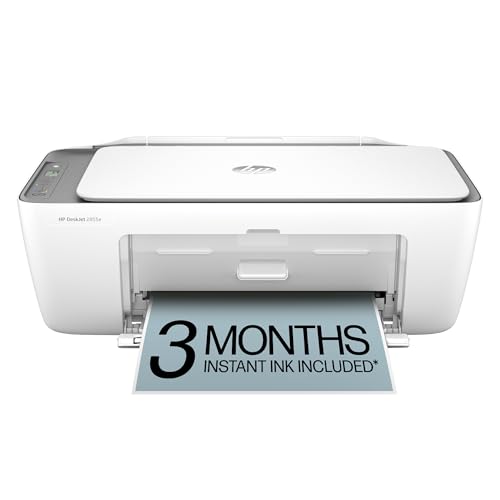
- Best for: A household that prints a few pages a week and wants color printing, copying, and scanning in one small machine.
- Type: Color inkjet all-in-one (print, copy, scan)
- Print speed: Up to 7.5 ppm black, 5.5 ppm color
- Print resolution: Up to 4800 x 1200 dpi color
- Paper capacity: 60-sheet input tray

- Best for: A home office that needs scanning, copying, and faxing alongside printing, especially multi-page documents.
- Functions: Print, copy, scan, fax
- Auto document feeder: Yes
- Paper capacity: 100-sheet front tray
- Duplex printing: Automatic two-sided printing
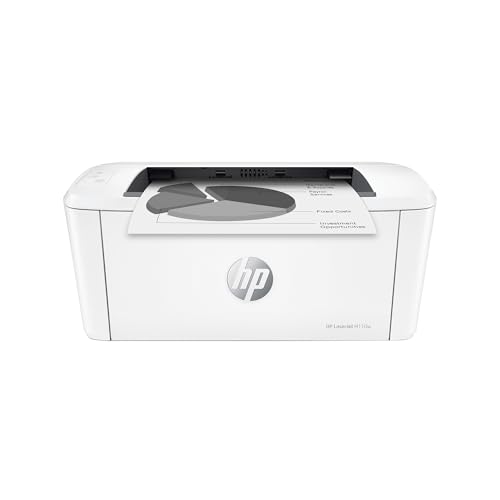
- Best for: A small desk or shelf that needs fast, reliable black-and-white documents and nothing else.
- Type: Monochrome laser printer, print only
- Print speed: Up to 21 ppm black
- Print resolution: 600 x 600 dpi
- Dimensions: 7.45 x 13.63 x 6.26 inches
All 4 Picks at a Glance
| Product | Specs | Action |
|---|---|---|
| HP DeskJet 2855e Wireless All-in-One Color Inkjet Printer |
| Check price on Amazon |
| Canon PIXMA TR4720 All-in-One Wireless Printer |
| Check price on Amazon |
| HP LaserJet M110w Wireless Monochrome Laser Printer |
| Check price on Amazon |
 Epson EcoTank ET-2800 Wireless Color All-in-One Supertank Printer |
| Check price on Amazon |
Key takeaways
- Looking for the best econony printers? Compare 4 budget printers for home use, from a cheap color all-in-one to a refillable tank model and a compact mono laser.
What's inside
As an Amazon Associate I earn from qualifying purchases. This post may contain affiliate links at no extra cost to you.
An economy printer forces a trade-off that a spec sheet never states plainly: the machine that costs the least on day one often costs the most by the end of the year. A cheap inkjet can drink through cartridges on school projects and boarding passes, while a laser that looks dull on the shelf quietly prints page after page for pennies. The real decision is not which printer is cheapest, but which printing habit you actually have — light color printing, stacks of black-and-white documents, or regular scanning and copying for a home office.
This guide covers the best econony printers for home use, chosen from Amazon listings by what each machine does and what it leaves out. Every pick below is a different answer to the budget question: a low-cost color all-in-one, a four-function home office inkjet, a compact monochrome laser, and a refillable tank printer built to keep ink costs down over time.
Quick Picks
As an Amazon Associate we earn from qualifying purchases
| Product | Best for | Key spec from title |
|---|---|---|
| HP DeskJet 2855e Wireless All-in-One Color Inkjet Printer | Light home printing with occasional color | Color inkjet all-in-one, 7.5 ppm black |
| Canon PIXMA TR4720 All-in-One Wireless Printer | Home office paperwork with scanning and fax | 4-in-1 with auto document feeder |
| HP LaserJet M110w Wireless Monochrome Laser Printer | Fast black-and-white documents in a small space | Mono laser, up to 21 ppm black |
| Epson EcoTank ET-2800 Wireless Color All-in-One Supertank Printer | Regular color printing with low ink costs | Cartridge-free Supertank, print, scan, copy |
How to Choose
Match the engine to how much you print
Inkjet, laser, and tank printers are three different answers to the same budget, and the right one depends on volume more than on the sticker. A cartridge inkjet suits a household that prints a few pages a week and wants color photos and schoolwork from one small box. A monochrome laser suits someone who prints mostly text and wants the machine ready after weeks of sitting idle, since toner does not dry out the way ink does. A tank printer suits a household that prints color every week and is tired of buying cartridges. Count your rough weekly pages before you compare models, because the cheapest machine for ten pages a week is rarely the cheapest for a hundred.
Work out the running cost, not just the machine
The ink or toner a printer drinks decides what it truly costs, and budget models hide that cost in different places. Cartridge inkjets need a black cartridge and a tri-color cartridge, and both run out on their own schedules, so check the cartridge numbers and their page yields before you buy. Some HP models offer an ink subscription with a free trial period, which can suit steady printing but adds a monthly charge once the trial ends. Toner cartridges last far longer and cost more per cartridge, which is why a mono laser often wins for text-heavy households. Tank printers flip the maths entirely: bottles of ink replace cartridges, and the ink included in the box can last a household a year or more.
Know what budget models leave out
Manufacturers keep economy printers cheap by removing features, so check the missing ones before the box arrives. Automatic two-sided printing is a common casualty — several budget inkjets make you flip the paper by hand, which gets old fast on long documents. An auto document feeder matters if you scan or copy multi-page stacks, and only some picks here have one. Paper tray size is another quiet cut: a 60-sheet tray needs refilling far more often than a 100-sheet tray. And a print-only laser has no scanner or copier at all, so a household that still copies IDs or school forms needs a second device or a different pick.
Check connectivity and desk space before you buy
A budget printer still has to fit your home network and your desk, and both cause more returns than any print defect. Several cheap models connect over 2.4 GHz Wi-Fi only, so a household running a 5 GHz-only network or a mesh system that hides the band can hit setup trouble. App printing matters too: HP Smart, Canon PRINT, and Epson Smart Panel each handle mobile printing differently, and the setup flow runs through the app on most of these models. Measure the desk space as well — a compact mono laser can tuck onto a shelf, while a tank printer with a rear paper feed needs clearance behind it.
The 4 Best Options
HP DeskJet 2855e Wireless All-in-One Color Inkjet Printer
- Best for: A household that prints a few pages a week and wants color printing, copying, and scanning in one small machine.
- Type: Color inkjet all-in-one (print, copy, scan)
- Print speed: Up to 7.5 ppm black, 5.5 ppm color
- Print resolution: Up to 4800 x 1200 dpi color
- Paper capacity: 60-sheet input tray
A household that prints a few pages a week and wants color printing, copying, and scanning in one small machine.
It connects over 2.4 GHz Wi-Fi only, it has no automatic duplex, and it is built to work only with cartridges that carry original HP chips or circuitry.
The DeskJet 2855e is the simplest pick in this roundup for a household that prints a little of everything. It prints, copies, and scans in color from one compact white unit, connects over Wi-Fi, and handles homework, forms, recipes, and the occasional color page without demanding desk space or setup patience. The 60-sheet tray and modest speed mark it clearly as a light-duty machine, and that is exactly the point: for a household printing a few pages a week, the 2855e covers every basic job and stays out of the way the rest of the time.
Watch out for: It connects over 2.4 GHz Wi-Fi only, it has no automatic duplex, and it is built to work only with cartridges that carry original HP chips or circuitry.
Canon PIXMA TR4720 All-in-One Wireless Printer
- Best for: A home office that needs scanning, copying, and faxing alongside printing, especially multi-page documents.
- Functions: Print, copy, scan, fax
- Auto document feeder: Yes
- Paper capacity: 100-sheet front tray
- Duplex printing: Automatic two-sided printing
A home office that needs scanning, copying, and faxing alongside printing, especially multi-page documents.
It still runs on cartridges, so heavy daily printing pushes running costs up; check the PG-275 and CL-276 yields against your weekly volume first.
The PIXMA TR4720 is the home office pick of this roundup, the one to choose when printing is only half the job. It prints, copies, scans, and faxes from a single device, and the auto document feeder handles multi-page stacks that would take forever on a flatbed alone. Automatic two-sided printing saves paper on longer documents, and the 100-sheet front tray means fewer refills than the smaller trays on cheaper inkjets. For a household that processes forms, school paperwork, and the occasional fax, the TR4720 covers the whole workflow instead of just the printing part.
Watch out for: It still runs on cartridges, so heavy daily printing pushes running costs up; check the PG-275 and CL-276 yields against your weekly volume first.
HP LaserJet M110w Wireless Monochrome Laser Printer
- Best for: A small desk or shelf that needs fast, reliable black-and-white documents and nothing else.
- Type: Monochrome laser printer, print only
- Print speed: Up to 21 ppm black
- Print resolution: 600 x 600 dpi
- Dimensions: 7.45 x 13.63 x 6.26 inches
A small desk or shelf that needs fast, reliable black-and-white documents and nothing else.
It prints in black and white only and has no scanner or copier, so color pages and copying need another device.
The LaserJet M110w answers a different budget question: what if you print only black-and-white documents and want them fast? At up to 21 pages per minute in black, it outruns every inkjet here, and toner does not dry out between print jobs, so the machine is ready even after weeks untouched. HP describes it as the smallest laser printer in its class, and the footprint backs that up — it fits where a full-size printer cannot. The trade-off is absolute: no color, no scanning, and no copying, so it suits a desk that prints documents and nothing else.
Watch out for: It prints in black and white only and has no scanner or copier, so color pages and copying need another device.
Epson EcoTank ET-2800 Wireless Color All-in-One Supertank Printer
- Best for: A household that prints color every week and wants the lowest ink cost over time.
- Type: Color inkjet all-in-one with refillable ink tanks (print, copy, scan)
- Print speed: 10.0 ISO ppm black, 5.0 ISO ppm color
- Max print resolution: 5760 x 1440 dpi
- Paper capacity: 100-sheet input, 30-sheet output
A household that prints color every week and wants the lowest ink cost over time.
It costs more up front than the cartridge models here, it prints slowly on big jobs, and it has no automatic duplex or document feeder.
The EcoTank ET-2800 is the pick for households that print color regularly and are tired of cartridge maths. Instead of cartridges it uses refillable ink tanks filled from bottles, and the ink included in the box covers up to 4,500 black pages or 7,500 color pages, which is why its running costs stay low long after the first setup. It prints, copies, and scans with a flatbed scanner, and the color output reaches 5760 x 1440 dpi, sharp enough for photos and school projects. Speed is the compromise: at 10 ppm in black and 5 ppm in color, it is the slowest printer here, and two-sided documents need a manual flip.
Watch out for: It costs more up front than the cartridge models here, it prints slowly on big jobs, and it has no automatic duplex or document feeder.
Which One Fits Your Situation
You print a little of everything at home
Pick the HP DeskJet 2855e. It prints, copies, and scans in color, sets up through the HP Smart app, and its small tray and modest speed are no problem at a few pages a week. The 3 months of Instant Ink with HP+ activation covers the settling-in period, and the compact white body fits on a shelf or side table.
Your home office runs on paperwork
Pick the Canon PIXMA TR4720. The auto document feeder and automatic duplex handle multi-page forms and reports, the 100-sheet tray needs less refilling, and fax joins print, copy, and scan in one box. It is the only pick here that covers the full document workflow instead of just printing.
You print mostly black-and-white documents
Pick the HP LaserJet M110w. Toner never dries out, 21 ppm black output clears a stack of forms quickly, and the tiny footprint fits the smallest desk. Accept the limits — no color, no scanning — and it is the most reliable document printer in this roundup.
You print color often and hate buying cartridges
Pick the Epson EcoTank ET-2800. Refillable tanks and the large amount of ink in the box keep running costs down for regular color printing, and the flatbed scanner covers copying and scanning. Accept the slow speed and manual duplex, and the tank design pays for itself over time.
Common Mistakes
- Buying the cheapest printer without checking cartridge or toner yields — the ink can cost more than the machine within months.
- Choosing a print-only laser and then discovering the household still needs to copy or scan documents.
- Assuming every budget printer connects to 5 GHz Wi-Fi — several models here work on 2.4 GHz only.
- Ignoring the paper tray: a 60-sheet tray on a busy household means constant refilling.
- Expecting automatic two-sided printing on the cheapest models — many economy printers make you flip pages by hand.
- Letting an inkjet sit unused for months and then blaming the printer when dried nozzles ruin the first page back.
Frequently Asked Questions
Is a cheap printer really cheaper in the long run?
Not always. A low-cost inkjet can be the most expensive machine in this guide if you print daily, because cartridges run out fast. A mono laser or a tank printer usually costs less per page over a year of steady use, even though the machine itself costs more up front. Match the printer to your weekly page count before you compare machines.
Inkjet or laser for home use?
Choose inkjet when you need color — photos, school projects, and mixed documents all favour ink. Choose laser when almost everything you print is black-and-white text, since toner prints faster, never dries out, and handles long idle periods better. Households that need both usually end up with an inkjet all-in-one or a tank printer.
Do I need an all-in-one, or is print-only enough?
An all-in-one earns its place the first time you copy an ID, scan a form, or print from your phone. Print-only models like the LaserJet M110w suit a desk that produces documents and nothing else. If anyone in the house copies or scans even once a month, the all-in-one is the safer buy.
What is the best econony printer for a student?
For a student printing essays, forms, and the occasional color page, the HP DeskJet 2855e covers the basics in one small machine. If the workload grows to regular multi-page assignments, the Canon PIXMA TR4720 adds the document feeder and automatic duplex that make longer documents far less tedious.
Related guides
More from Amazon
Programs that pair well with the guide above. Offers and eligibility are set by Amazon and may change.
Free shipping on eligible items, Prime Video and more. Eligible new members can start with a free trial.
Start a Prime free trialAudiobooks and podcasts to listen to on the go. Eligible new members can start with a free trial.
Try Audible freeAd-free music streaming. Eligible new subscribers can start with a free trial.
Try Music Unlimited freeA free business account with business pricing and bulk-buying tools for work, shop or home office.
Create a business accountAs an Amazon Associate we earn from qualifying purchases.


Write Your Review
No reviews yet. Be the first to share your experience!