
Our Short List of 3

- Resolution: 2K HDR video, 2560 x 1440
- Field of view: 130 degrees diagonal, fixed lens
- Privacy features: Automated Privacy Shield closes over the lens when disarmed; motion and audio detection disabled and microphone off while closed
- Power: Wired plug-in, indoor power adapter

- Resolution: 2K video, 2304 x 1296
- Field of view: 110-degree lens; 340-degree pan, 45-degree tilt (30 up, 15 down)
- Privacy features: Sleep mode rolls the lens back into the housing; can run on schedules and automations
- Power: USB-C, 5V 2A adapter, corded
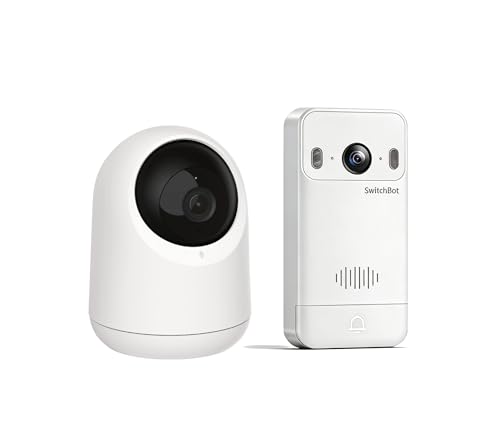
- Resolution: 1080p Full HD video
- Field of view: 360-degree horizontal pan, 115-degree vertical tilt
- Privacy features: Privacy Mode physically rotates the lens downwards, blocking the view and disabling recording
- Power: Corded, micro USB cable (2 m) and USB adaptor included
All 5 Picks at a Glance
| Product | Specs | Action |
|---|---|---|
| Arlo Essential Indoor Camera 2K (2nd Generation) |
| Check price on Amazon |
| Aqara Camera Hub G3 |
| Check price on Amazon |
| SwitchBot Pan/Tilt Cam |
| Check price on Amazon |
 TP-Link Tapo C210 |
| Check price on Amazon |
 Kasa EC70 (Kasa Spot Pan Tilt) |
| Check price on Amazon |
Key takeaways
- Five indoor cameras suited to a bedroom, compared on physical privacy shutters, sleep modes, local recording and two-way talk, with placement advice.
What's inside
As an Amazon Associate I earn from qualifying purchases. This post may contain affiliate links at no extra cost to you.
A bedroom is the most private room in the home, so a camera placed there has to justify itself in a way a hallway or front door camera never does. People still have good reasons to add one: checking on a parent who rests during the day, watching a pet that sleeps in the room, or confirming the room is undisturbed while travelling. In every case, the same ground rules apply. Everyone who sleeps in the room should know the camera is there and agree to it. The lens should cover the doorway or a specific spot rather than the bed itself wherever that is practical. And the privacy controls should be part of the daily routine, not an afterthought buried in an app menu.
That is why this guide only includes indoor cameras with a published way to shut the lens down. Each of the five models below can stop capturing through a physical shield, a lens that rotates out of sight, or a maker-documented privacy mode, and each publishes local recording options or a clear statement of how recordings are handled. None of them is a concealed device, and none is framed here as one. These are visible household cameras, chosen for rooms where being able to prove the camera is off matters as much as the picture it takes when it is on.
Disclosure: As an Amazon Associate, we earn from qualifying purchases made through links on this page, at no extra cost to you.
What Makes a Camera Suitable for a Bedroom
The first dividing line is how the camera stops watching. The strongest designs move hardware: a shield closes over the lens, or the lens assembly rotates down or rolls back into the body, so anyone in the room can see at a glance that nothing is being captured. The second group relies on a privacy mode inside the app. Done properly, as the makers document it, that mode halts streaming and recording of both video and audio even though the lens itself does not move. Both approaches appear below, and each product section states plainly which type it uses, because the difference matters in a bedroom.
Storage is the second consideration. Cameras that record to a microSD card inside the device keep footage in the home and keep working to a local timeline without an account plan. Cloud-based models send recordings to the maker’s servers, which brings app conveniences but also means saved clips live outside the house and usually sit behind a service plan. Neither route is automatically right; what matters is knowing which one a camera uses before it goes on the nightstand.
Smaller details carry extra weight in this room. A visible status light tells occupants the camera is awake. Two-way talk lets you speak to a child, a parent, or a pet without walking in. Infrared night vision matters because bedrooms are dark for much of the day. Finally, basic account hygiene applies to every model here: a unique password, the app’s two-step sign-in where offered, and firmware updates left switched on.
Arlo Essential Indoor Camera 2K (2nd Generation)
- Resolution: 2K HDR video, 2560 x 1440
- Field of view: 130 degrees diagonal, fixed lens
- Privacy features: Automated Privacy Shield closes over the lens when disarmed; motion and audio detection disabled and microphone off while closed
- Power: Wired plug-in, indoor power adapter
Arlo builds its bedroom case around a single piece of hardware: the Automated Privacy Shield. As Arlo documents it, the shield is a physical cover that closes over the lens whenever the camera is disarmed in the Arlo Secure app. While the shield is closed, the camera disables motion and audio detection and turns its microphone off, so the off state is visible from across the room and covers sound as well as pictures. For a shared bedroom, that visible, mechanical off position is the clearest arrangement any camera in this guide offers.
The camera itself is a fixed-position wired model, so placement is a one-time decision: a shelf or wall mount aimed at the door covers the room through a 130-degree diagonal field of view, with 2K HDR video at 2560 x 1440 for detail. Infrared night vision is published at up to 25 feet, and two-way audio and a built-in siren are included. The honest limitation is storage. This model has no memory card slot; recordings are handled through Arlo’s cloud service, and saved video sits behind the Arlo Secure plan. Live viewing works through the app, but anyone who wants a local copy of footage kept inside the home should look at the card-based models below instead.
See the Arlo Essential Indoor Camera 2K on Amazon
Aqara Camera Hub G3
- Resolution: 2K video, 2304 x 1296
- Field of view: 110-degree lens; 340-degree pan, 45-degree tilt (30 up, 15 down)
- Privacy features: Sleep mode rolls the lens back into the housing; can run on schedules and automations
- Power: USB-C, 5V 2A adapter, corded
The Aqara Camera Hub G3 takes the rotating-lens approach and makes it obvious. Its lens sits in a round head, and when sleep mode is activated, Aqara’s design rolls the lens back into the housing so the front of the camera shows a plain face with closed-eye markings instead of a lens. The state of the camera is readable at a glance, and the mode can be triggered from the app or tied into automations, so the camera can put itself to sleep on a schedule or when the household comes home.
Video is 2K at 2304 x 1296 through a 110-degree lens, and the motorised head pans 340 degrees and tilts 45 degrees (30 degrees up, 15 degrees down), which lets one unit sweep a whole bedroom from a dresser. Recordings can stay local on a microSD card of up to 128 GB, and the camera also works with HomeKit Secure Video, Alexa, and Google Assistant; Aqara notes that HomeKit Secure Video mode records at 1080p. Night vision uses 940 nm infrared LEDs, a wavelength chosen because it produces no visible red glow, which suits a sleeping room. Two-way talk is built in. The G3 also doubles as a Zigbee 3.0 hub for up to 128 Aqara devices and an infrared controller for appliances, which is more than a bedroom strictly needs, but the hub role is there if the household already runs Aqara sensors.
See the Aqara Camera Hub G3 on Amazon
SwitchBot Pan/Tilt Cam
- Resolution: 1080p Full HD video
- Field of view: 360-degree horizontal pan, 115-degree vertical tilt
- Privacy features: Privacy Mode physically rotates the lens downwards, blocking the view and disabling recording
- Power: Corded, micro USB cable (2 m) and USB adaptor included
SwitchBot’s Pan/Tilt Cam is the most literal about its off state. Its manual describes Privacy Mode in plain terms: activated through the app, it physically rotates the camera lens downwards, blocking its view and disabling recording. A downward-facing lens is easy for anyone in the room to verify, and the camera returns to its normal position when the mode is switched off. That mechanical behaviour, documented in the maker’s own manual, is exactly what a bedroom camera should offer.
Coverage comes from a 360-degree horizontal pan and 115-degree vertical tilt at 1080p Full HD, with eight infrared LEDs handling night vision and two-way audio for speaking into the room. Recordings can be kept on a microSD card of up to 128 GB, with cloud storage offered as an option rather than a requirement. Power is corded through the included 2-metre micro USB cable and adaptor, and the camera connects over 2.4 GHz Wi-Fi only, which is worth knowing in homes where the 2.4 GHz band is crowded. The manual also lists a patrol mode that cycles the camera between preset viewpoints on a schedule; in a bedroom, that is better used sparingly and pointed at agreed areas, or left off entirely. Resolution is the modest part of this package, but 1080p with full pan coverage suits a room check-in role.
See the SwitchBot Pan/Tilt Cam on Amazon
TP-Link Tapo C210
- Resolution: 2K 3MP video, 2304 x 1296
- Field of view: 360-degree horizontal pan, 114-degree vertical tilt
- Privacy features: Tapo app Privacy Mode stops streaming and recording of video and audio; live view turns black while active
- Power: Corded electric, power adapter included
The Tapo C210 handles privacy in software, and TP-Link documents exactly what that means. In the Tapo app, Privacy Mode temporarily disables the live streaming and recording functions, and TP-Link’s support pages confirm it stops the camera streaming or recording both video and audio, with the live view turning black while the mode is on. The lens itself does not move on this model, so the off state is confirmed in the app rather than by looking at the camera. That is a real distinction from the shield and rotating-lens designs above, and it is stated here so the choice is an informed one.
In return, the C210 is a capable room camera. It records 2K 3MP video at 2304 x 1296, pans 360 degrees horizontally and tilts 114 degrees vertically, and can follow motion across the room. Night vision is published at up to 30 feet. Footage can be stored locally on a microSD card of up to 256 GB, which keeps recordings inside the home and avoids any need for a service plan to look back at clips; Tapo Care cloud storage is offered as an extra. Power is corded through the included adapter, the camera runs on 2.4 GHz Wi-Fi, and two-way audio is built in. For a bedroom checked mainly from another room or while away, where the app-level privacy stop suits everyone in the household, it covers the brief well.
See the TP-Link Tapo C210 on Amazon
Kasa EC70 (Kasa Spot Pan Tilt)
- Resolution: 1080p Full HD video
- Field of view: 360-degree horizontal pan, 113-degree vertical tilt
- Privacy features: Kasa app Privacy Mode stops streaming and recording of video and audio, as documented by TP-Link for Kasa cameras
- Power: Wired plug-in, power adapter included
The Kasa EC70, sold as the Kasa Spot Pan Tilt, is the pick for households that want continuous local recording. Its listing states that it records and stores footage on a local microSD card of up to 256 GB, so the timeline lives on the camera itself rather than in a cloud account. Privacy is handled through the Kasa app: TP-Link documents Privacy Mode as a feature of its Kasa cameras as well as its Tapo line, and in that mode the camera stops streaming and recording video and audio. As with the C210, the stop is software-level and the lens stays where it is, which the household should weigh against the shield-based designs.
The camera records 1080p Full HD video with a 360-degree horizontal pan and 113-degree vertical tilt, motion detection and tracking, and infrared night vision published at up to 30 feet. Two-way audio is built in, a status light on the front shows the camera’s state, and power is wired through the included adapter, so there are no batteries to manage. It works with Alexa and Google Assistant for viewing on a smart display. Nothing about the EC70 is exotic, and that is its appeal for a bedroom: a straightforward pan and tilt camera, an app-level privacy stop documented by its maker, and recordings that stay on a card inside the device.
Placing a Bedroom Camera Responsibly
Hardware choices only go so far; placement and habits finish the job. Aim the camera at the doorway or at the specific area it is meant to watch, such as a pet’s bed or a medicine cabinet, rather than at the bed itself. Talk the placement through with a partner, older children, or anyone else who uses the room, and mention the camera to overnight guests as a matter of course. Where the app offers schedules or presence-based automations, use them so the camera sleeps when the household is home and awake only when it needs to be.
It also helps to make the off state part of the routine: shield closed, lens down, or privacy mode on whenever the room is in ordinary use, and on only for the specific reason the camera was installed. Keep the app account protected with a unique password and two-step sign-in where the maker offers it, and let firmware updates install. A bedroom camera should feel like a household appliance with a clear off switch, never like a quiet observer, and the five models above were chosen because their makers publish exactly that kind of off switch.
Frequently Asked Questions
Is it appropriate to put a camera in a bedroom at all?
It can be, when there is a clear reason, such as checking on a resting parent or a pet, and when every adult who uses the room knows the camera is there and agrees to it. A camera should never record anyone in a bedroom without their knowledge. Local rules on recording, especially audio, vary, so check what applies where you live before switching one on.
What is the difference between a physical shutter and an app privacy mode?
A physical shutter or rotating lens, such as the shields and sleep modes on the Arlo, Aqara, and SwitchBot models here, physically covers or turns the lens away, so the off state is visible in the room. An app privacy mode, as TP-Link documents for the Tapo and Kasa models, stops streaming and recording in software while the lens stays in place. Both stop capture; the physical designs add visible confirmation.
Can these cameras record without a service plan?
Four of the five models record to a microSD card inside the camera, per their listings: the Aqara G3 accepts cards up to 128 GB, the SwitchBot and Tapo and Kasa models cover local recording as listed in their sections. The Arlo is the exception; it has no card slot, and saved recordings are handled through its cloud service and plan.
Do these cameras work in a dark bedroom?
Yes. All five publish infrared night vision for low-light and dark rooms. The Arlo’s infrared range is published at up to 25 feet, the Tapo C210 and Kasa EC70 at up to 30 feet, the SwitchBot uses eight infrared LEDs, and the Aqara G3 uses 940 nm LEDs, which produce no visible red glow to disturb sleep.
The Bottom Line
For the clearest off state, the Arlo Essential Indoor Camera 2K closes a physical shield over its lens and silences its microphone, with cloud-only recording as the trade-off. The Aqara G3 and SwitchBot Pan/Tilt Cam rotate their lenses out of sight and keep footage on local cards. The Tapo C210 and Kasa EC70 rely on maker-documented app privacy modes and pair them with generous local storage. Any of the five can work in a bedroom, provided the people who sleep there chose it together and the privacy controls get used every day.
Related guides
More from Amazon
Programs that pair well with the guide above. Offers and eligibility are set by Amazon and may change.
Free shipping on eligible items, Prime Video and more. Eligible new members can start with a free trial.
Start a Prime free trialAudiobooks and podcasts to listen to on the go. Eligible new members can start with a free trial.
Try Audible freeAd-free music streaming. Eligible new subscribers can start with a free trial.
Try Music Unlimited freeA free business account with business pricing and bulk-buying tools for work, shop or home office.
Create a business accountAs an Amazon Associate we earn from qualifying purchases.










Write Your Review
No reviews yet. Be the first to share your experience!