
Key takeaways
- Find the best audio video security cameras for small business, with two-way talk, audio alerts and clear video for shops, offices and warehouses. Learn more.
What's inside
As an Amazon Associate I earn from qualifying purchases. This post may contain affiliate links at no extra cost to you.
A small business needs more than a silent picture of the front door. When a delivery driver arrives after hours, when a customer needs directions at the counter, or when raised voices in the stockroom need a closer look, the best audio video security cameras for small business record what was said as well as what happened. Sound turns a clip into evidence, and two-way talk turns a camera into a way to speak with someone on the premises while you are somewhere else.


Quick answer: For most small businesses, the Wyze Cam v4 (B0CJ9YX7DG) is the strongest starting point, with 2.5K video, enhanced two-way talk, a spotlight and a siren in a compact wired camera. If your entrances have no nearby outlet, choose a battery or solar camera such as the Arlo Pro 5S (B0BL2262ML) or the eufy SoloCam S220 (B0BZ55JZ4S).
Quick Picks
Our Short List of 3
All 5 Picks at a Glance
| Product | Specs | Action |
|---|---|---|
| Wyze Cam v4 (B0CJ9YX7DG) | Check price on Amazon | |
| TP-Link Tapo C120 (B0CH45HPZT) | Check price on Amazon | |
 Arlo Pro 5S (B0BL2262ML) | Check price on Amazon | |
 eufy Security SoloCam S220 (B0BZ55JZ4S) | Check price on Amazon | |
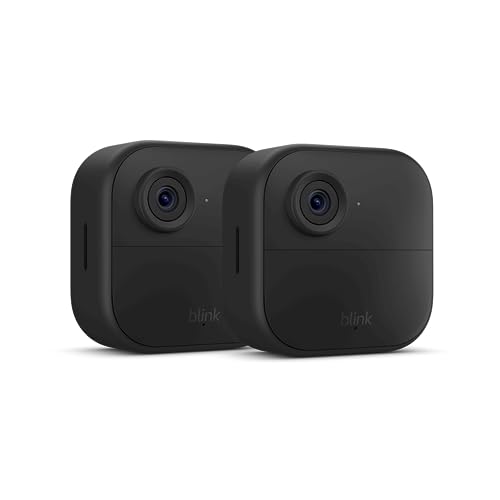 Blink Outdoor 4, 2-Camera System (B0B1N6B8QT) | Check price on Amazon |
How to Choose
Two-Way Audio Quality, Not Just a Microphone
A microphone alone only lets you listen. For a business, the speaker matters just as much, because it lets you answer. Look for cameras that list full two-way audio or two-way talk, and check whether the listing mentions noise cancellation or a stronger amplifier. In a shop with music playing, or a warehouse with fans and machinery running, a weak speaker will be hard to hear. Place the camera close to the area where conversations happen, usually within a few steps of the counter, the till, or the entrance, so voices stay clear in the recording.
Video Resolution and Night Vision for Business Spaces
Audio is only half of the evidence. Faces at the till, number plates in the car park, and hands near the stockroom shelf all need enough detail to identify. A 2K or 2.5K camera gives a clear step up from basic 1080p for reading faces and labels, and that extra detail matters when a clip is passed to police or an insurer. Night vision matters too, because many incidents happen after dark. Color night vision, helped by a spotlight, keeps clothing colors and vehicle colors visible, while infrared night vision works in full darkness but records in black and white.
Wired, Battery, or Solar Power
Power decides where a camera can live. Wired cameras need an outlet nearby, but they can record around the clock without battery worries, which suits a till, a reception desk, or a back office. Battery cameras can go on a fence, a gate, or a wall far from any socket, but they need recharging, and very cold weather can shorten battery life. Solar cameras solve the charging problem where sunlight reaches the panel for part of the day, which suits an outdoor yard or a delivery bay. Before you buy, walk each spot you plan to cover and check for a socket, for Wi-Fi signal, and for sun.
Storage: Local Recording, Cloud, or Both
Audio and video clips are only useful if you can find them later. Local storage on a microSD card or a home base keeps recordings in your building and avoids a monthly fee, but a card can fill up, and a stolen camera can take its card with it. Cloud storage keeps clips off site, but it often needs a paid plan for history beyond a short trial, and some features, such as recorded history and activity zones, may be locked behind that plan. For a business, a sensible setup is local recording for day-to-day clips plus cloud backup for anything important, with a clear routine for saving incident clips before they are overwritten.
Coverage, Field of View, and Placement
One wide camera over the shop floor can replace two narrow ones, but a wide view also makes distant faces smaller. A 125-degree or wider view suits an open shop floor, a restaurant dining area, or a warehouse aisle, while a narrower view suits a till or a safe, where detail matters more than width. Think in zones: entrance, till, stockroom door, back door, and car park. Give the entrance and the till the best cameras, with audio, because those are the places where conversations and transactions happen.
Audio Recording Law, Privacy, and Staff Notice
Audio recording rules differ by state and by country, and some places require the consent of everyone being recorded, while others require only one party to consent. Before you switch on audio recording, check the law where your business operates, and check it again if you have more than one location. Tell staff in writing that audio and video recording is in use, put up clear signs for customers and visitors, and keep cameras out of restrooms, changing areas, and other places where people expect privacy. Limit who can listen to recordings and set a retention period so old clips are deleted on a schedule rather than kept forever.
The Best Audio Video Security Cameras for Small Business Reviewed
Wyze Cam v4 (B0CJ9YX7DG)
The Wyze Cam v4 is a compact wired camera that records 2.5K QHD video and carries enhanced two-way talk, with a more powerful amplifier and an updated microphone for clearer conversation through the camera. It is rated IP65 for indoor and outdoor use, has a motion-activated spotlight and a built-in siren, and supports continuous local recording to a microSD card up to 512 GB, so a small shop can keep rolling footage without a subscription. Wi-Fi 6 support helps it hold a steady connection at longer range, and it works with Alexa and Google Assistant.
In a business, this camera suits the till, the reception desk, or a small stockroom, where a wired camera near an outlet can watch and listen all day. The spotlight and siren give it a deterrent role after hours.
Who it suits: small shops, cafes, and offices that want clear audio and video at the counter or entrance, with local recording and no need for batteries.
Who should skip it: businesses that need a camera far from any outlet, since this is a wired camera with a USB cable, and anyone who needs a battery camera for a gate or a fence line.
TP-Link Tapo C120 (B0CH45HPZT)
The TP-Link Tapo C120 records 2K QHD video and stands out for its full-duplex two-way audio with noise cancellation, which lets both sides talk at once, more like a phone call than a walkie-talkie exchange. That matters at a busy counter, where a customer and a member of staff may speak over each other. It has a built-in microphone and speaker, dual spotlights, color night vision, and an IP66 rating for indoor and outdoor use. Person, pet, and vehicle detection runs on the camera, and local storage runs to a microSD card up to 512 GB.
For a small business, the Tapo C120 suits entrances, reception areas, and service counters where spoken exchanges need to be heard clearly on the recording.
Who it suits: shops, salons, clinics, and offices where staff talk with visitors at a desk or counter and need the conversation to stay intelligible on the recording.
Who should skip it: businesses that need a fully wire-free camera for a remote gate or yard, since this camera needs wired power, and anyone who wants a PoE camera that runs over an Ethernet cable.
Arlo Pro 5S (B0BL2262ML)
The Arlo Pro 5S is a wireless battery camera that records 2K HDR video across a wide 160-degree field of view, with 12x digital zoom, color night vision, a spotlight, a siren, and two-way audio. Dual-band Wi-Fi connects to the stronger of the 2.4 GHz and 5 GHz networks, which helps in a building with thick walls or a busy network. It is rated IP65, runs on a removable rechargeable battery, and includes a wall mount, a magnetic charging cable, and a quick start guide.
In a business, this camera suits entrances, loading bays, and car parks where running a cable would be awkward or costly. The wide view covers a doorway and the ground in front of it in one frame, and the spotlight and siren give it a visible deterrent role. Two-way audio lets an owner speak to a delivery driver or a visitor from the app, even when nobody is on site.
One point to weigh before buying: recorded video history and some smart features, such as activity zones, need an Arlo Secure plan after the trial period. Live viewing and two-way talk still work without it.
Who it suits: businesses that need wire-free audio and video at doors, yards, and parking areas, with a wide view and a strong deterrent set.
Who should skip it: businesses that want all recordings kept locally with no plan at all, and anyone who needs continuous wired recording around the clock without recharging a battery.
eufy Security SoloCam S220 (B0BZ55JZ4S)
The eufy Security SoloCam S220 is a wireless outdoor camera with a built-in solar panel that keeps its battery charged, so it can stay mounted in a sunny spot without regular recharging. It records 2K video across a 135-degree field of view, has a built-in microphone and speaker for two-way audio, and uses on-camera AI to flag human activity. It stores clips on 8 GB of built-in storage, works with HomeBase 3 for extra storage, and connects over 2.4 GHz Wi-Fi.
For a small business, this camera suits a yard, a delivery area, a side gate, or a car park where sunlight reaches the panel and no outlet is nearby. The solar panel removes the chore of taking cameras down to charge, which is the usual weak point of battery cameras in a business setting.
One limit to plan around is sunlight. The panel needs a few hours of direct sun each day to keep the battery topped up, so a shaded alley or a north-facing wall may not charge it well.
Who it suits: businesses with sunny outdoor areas, yards, and gates that need audio and video without wiring or routine battery charging.
Who should skip it: businesses whose camera spots sit in shade for most of the day, and anyone who needs a wired camera for continuous indoor recording at a till or desk.
Blink Outdoor 4, 2-Camera System (B0B1N6B8QT)
The Blink Outdoor 4 2-Camera System covers two outdoor spots with one kit, including two cameras, a Sync Module 2, batteries, mounting kits, and a power adapter for the module. Each camera records 1080p HD video with infrared night vision and two-way audio, and runs on AA lithium batteries with a battery life rated up to two years. The system works with Alexa, so live views can be called up on a compatible screen, and motion alerts arrive in the Blink app.
For a small business, this kit suits a front door plus a back door, or an entrance plus a car park, where two cameras are needed but the budget does not stretch to two higher-resolution cameras. The long battery life keeps maintenance low, and the Sync Module 2 ties both cameras together and supports local storage.
The honest trade-off is resolution. At 1080p, this camera records less detail than the 2K and 2.5K picks in this guide, so faces at a distance will be softer, and number plates will be harder to read. Keep these cameras close to the action, over a door or a till entrance, rather than at the far end of a long yard. Also note that kept motion clips need a plan or local storage through the Sync Module, so check that setup before you rely on it for evidence.
Who it suits: small businesses that need two outdoor cameras with audio, long battery life, and simple setup, especially rented premises where wiring is limited.
Who should skip it: businesses that need fine detail at a distance, such as reading number plates across a car park, and anyone who wants 2K or higher video at every camera.
What to Check Before You Buy
Start with the law. Audio recording rules differ by state and by country, and some places require consent from everyone in range of the microphone. Check the rules where your business operates, tell staff in writing, put up signs where cameras record sound, and keep audio off in areas where people expect privacy. If in doubt, ask a local legal adviser before you switch audio recording on.
Next, map your zones before you buy anything. Walk the premises with a floor plan and mark the entrance, the till, the stockroom door, the back door, and the car park. Give the entrance and the till the best audio cameras, because those are the places where conversations and transactions happen.
Then check power and Wi-Fi at each spot. A wired camera needs an outlet within reach of its cable. A battery camera needs a plan for recharging. A solar camera needs direct sun. Every camera needs a Wi-Fi signal strong enough to carry video and audio without dropping, so test the signal at each mounting point with a phone before you fix anything to a wall.
Check storage and retention as a system, not camera by camera. Decide how long you need to keep clips, who can view them, and how incident clips are saved before they are overwritten. A microSD card in the camera is simple and cheap, but a stolen camera takes its card with it, so keep important clips backed up elsewhere.
Finally, think about who manages the system day to day. One person should own the app accounts, the passwords, and the access list, with two-factor authentication switched on. Give staff access only to the cameras they need, remove access when someone leaves, and keep the camera firmware updated.
FAQ
Do all of these cameras record audio and video together?
Yes. Every camera in this guide has a built-in microphone and a speaker for two-way talk, so each one records video with sound and lets you speak through the camera from the app. Check the audio settings in the app after setup, since audio recording may need to be switched on.
Is it legal to record audio in a small business?
It depends on where the business operates. Audio recording rules differ by state and by country, and some places require the consent of everyone being recorded. Check local law before enabling audio recording, tell staff in writing, put up clear signs for customers and visitors, and keep cameras out of restrooms and changing areas.
Which camera is best for a shop counter?
For a counter, choose a wired camera with clear two-way audio and local recording, such as the Wyze Cam v4 or the TP-Link Tapo C120. A wired camera stays powered all day, the microphone sits close to the conversation, and the recording keeps running without battery worries. Mount it where it can see faces at the till and hear the exchange, and keep the area around it clear so the microphone is not blocked by a shelf or a display.
Do I need a subscription to keep recordings?
It varies by camera. Some cameras record to a microSD card or a home base with no monthly fee, while others keep recorded history behind a paid plan after a trial. The Arlo Pro 5S and the Blink Outdoor 4 both need a plan or a local storage setup for kept clips, so check that before you buy. Whatever you choose, save important clips promptly, because clips on a card or in the cloud are eventually overwritten.
Bottom Line
The best audio video security cameras for small business are the ones that hear as clearly as they see, and that fit the power, placement, and storage of your actual premises. Start with the Wyze Cam v4 for the till or entrance, add the Tapo C120 where conversations need to stay crystal clear, and use the Arlo Pro 5S or the eufy SoloCam S220 where wiring cannot reach. The Blink Outdoor 4 2-Camera System covers a second outdoor spot without extra wiring. Whatever you choose, check the audio recording law where you operate, tell your staff, put up signs, and save important clips before they are overwritten.
Disclosure: As an Amazon Associate, we may earn from qualifying purchases.
Related guides
More from Amazon
Programs that pair well with the guide above. Offers and eligibility are set by Amazon and may change.
Free shipping on eligible items, Prime Video and more. Eligible new members can start with a free trial.
Start a Prime free trialAudiobooks and podcasts to listen to on the go. Eligible new members can start with a free trial.
Try Audible freeAd-free music streaming. Eligible new subscribers can start with a free trial.
Try Music Unlimited freeA free business account with business pricing and bulk-buying tools for work, shop or home office.
Create a business accountAs an Amazon Associate we earn from qualifying purchases.










Write Your Review
No reviews yet. Be the first to share your experience!