
Key takeaways
- Find the best auto tracking video conferencing cameras for hybrid meetings, with AI speaker tracking, auto-framing, 4K video, and clear room audio in one guide.
What's inside
As an Amazon Associate I earn from qualifying purchases. This post may contain affiliate links at no extra cost to you.
The best auto tracking video conferencing cameras keep the speaker in frame without anyone touching a remote, adjusting a mount, or asking a colleague to move closer to the lens. That matters in hybrid meetings, where remote participants often watch a wide, distant shot while the person speaking sits at the edge of the frame. A camera with speaker tracking, presenter tracking, or auto-framing changes that picture as the conversation moves around the room.


The short answer is to match the tracking style to the room. A single presenter needs a compact camera that pans and tilts to follow one person. A small meeting room needs a camera and speakerphone system that can find the active speaker among several people. A larger room needs a wider view, stronger zoom, and microphones that reach the far end of the table. The five cameras below cover those situations, and every one is a video conferencing camera with auto-tracking built in, not a fixed webcam and not a surveillance camera.
Quick Picks
Our Short List of 3
All 4 Picks at a Glance
| Product | Specs | Action |
|---|---|---|
| 1. OBSBOT Tiny 2 (B0C3B6ZR1V) | Check price on Amazon | |
| 2. Insta360 Link 2 (B0DDTH3HX8) | Check price on Amazon | |
 4. Owl Labs Meeting Owl 3 (B0B193JVDJ) | Check price on Amazon | |
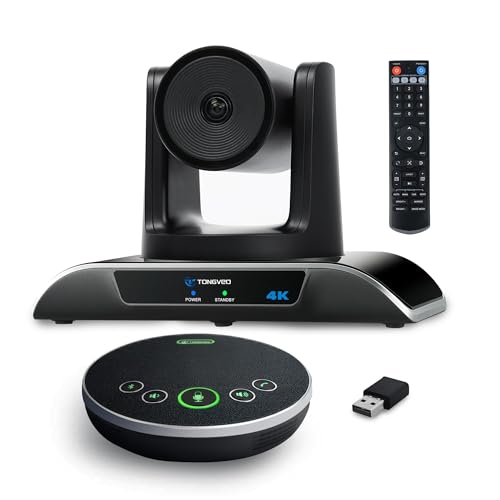 5. TONGVEO 4K Conference Room Camera System (B0BRPKS8HP) | Check price on Amazon |
How to Choose
Tracking That Follows the Speaker, Not Just the Room
Auto-tracking is not one feature. Some cameras use a motorised head to pan and tilt after a single presenter. Others use software framing to crop a wide view around the active speaker. A third group uses a 360-degree lens and microphone array to switch the close-up view to whoever is speaking. For a solo presenter, physical pan and tilt usually gives the smoothest result, because the lens itself moves. For a group, speaker tracking based on voice and face detection is more useful. Before choosing, decide whether one person will do most of the talking or whether the camera must follow a conversation that passes from person to person.
Room Size and Seating Layout
Room size decides the field of view, the zoom range, and the microphone reach. A desk camera works well for one person at a computer, and a compact 360-degree camera works well in the centre of a round table. A long rectangular table is harder, because people at the far end sit small in the frame and far from the microphone. In that layout, a camera with zoom and a separate speakerphone helps remote participants see faces and hear quiet voices. Measure the distance from the camera position to the farthest seat, and check whether the camera can frame that seat without turning the whole room into a distant wide shot.
Video Resolution and Low-Light Performance
Resolution helps, but sensor size and light handling matter just as much. A 4K camera with a larger sensor often holds detail better in a dim room than a smaller-sensor camera with the same headline resolution. Look for autofocus that locks quickly, HDR or light correction for bright windows behind the speaker, and a frame rate that keeps movement smooth. For most meetings, 4K at 30 frames per second is a solid target, with 1080p at 60 frames per second useful when the presenter moves quickly.
Audio Pickup and Echo Control
A tracking camera that follows the speaker is only half of a good meeting. Remote participants also need to hear that speaker clearly. Some cameras in this guide include built-in microphones and a speaker, while others are cameras only and rely on a separate microphone or speakerphone. Check the microphone pickup range and whether noise reduction and echo cancellation are listed. A camera with a short pickup range suits a desk or a small table. A room system with a speakerphone suits a group, because the microphone sits closer to the people speaking.
Platform Compatibility and Setup
Most auto-tracking conferencing cameras connect over USB and work with Zoom, Microsoft Teams, and Google Meet, but the details still deserve a check. Confirm the operating system requirements, the USB connection type, and whether any tracking modes need companion software. Some tracking features run on the camera itself, while others need a desktop app for zones, presets, gestures, or whiteboard mode. A plug-and-play camera suits a shared room where different laptops connect each day. Also check the mount: a monitor clip suits a desk, while a tripod thread or wall mount suits a room camera.
Privacy, Control, and When to Turn Tracking Off
Auto-tracking should be easy to pause. A presenter may want to stop following, lock a wide shot, or point the camera at a whiteboard. Look for a gesture, remote control, button, or software switch that pauses tracking quickly. A privacy mode that turns the lens away or covers it is also useful in a shared room. In a group meeting, tracking that switches too often can distract remote viewers, so a camera with a group framing mode can be calmer than one that chases every small movement.
The Best Auto Tracking Video Conferencing Cameras Reviewed
1. OBSBOT Tiny 2 (B0C3B6ZR1V)
The OBSBOT Tiny 2 is a compact 4K webcam with a motorised pan, tilt, and zoom head and AI tracking that follows a presenter as they move. Its 1/1.5-inch sensor is larger than the sensor in many desktop webcams, which helps with detail and low-light image quality. The listing describes AI tracking with multiple modes, autofocus, gesture control, voice control, and HDR light correction, with video up to 60 frames per second at lower resolutions and 4K for a sharper still image.
The tracking is the main reason to choose this camera. The head pans and tilts to keep the presenter centred, rather than cropping a fixed frame, so movement across a desk or a teaching space stays in view. Gesture control lets the presenter start or stop tracking, or adjust zoom, without reaching for a keyboard. That hands-free control suits teachers, trainers, and presenters who move between a desk, a whiteboard, and a demonstration area during a call.
This camera suits a single presenter who wants a desktop camera that behaves like a camera operator. It is a good fit for home offices, online lessons, and training sessions where one person does most of the talking. It is less suited to a large group around a table, where a room camera with speaker tracking would serve the group better.
2. Insta360 Link 2 (B0DDTH3HX8)
The Insta360 Link 2 is a 4K webcam on a small two-axis gimbal, and its AI tracking physically pans and tilts to follow the presenter around the room. The listing describes a 1/2-inch sensor, HDR, phase-detection autofocus, AI tracking, gesture control, and a noise-cancelling microphone. Video reaches 4K at 30 frames per second and 1080p at 60 frames per second, which covers both sharp still framing and smooth movement.
The gimbal movement is smooth, and the camera can keep a moving presenter centred without the jumpy reframing that a digital crop can produce. Whiteboard mode and DeskView mode add useful options for teachers and presenters: one squares up a whiteboard for remote viewers, and the other gives an overhead view of a desk or document. The magnetic mount, gesture control, and Link Controller software give the presenter several ways to start tracking, change framing, or pause the camera.
This camera suits presenters and teachers who move while they talk and want a compact camera that follows them. It works well on a monitor in a home office or a small teaching room. It is less suited to a round-table meeting with several speakers, because its tracking is built around one main subject.
3. EMEET Pixy (B06X99NFRS)
The EMEET Pixy is a dual-camera 4K webcam with AI tracking, and its two-lens design is built to give the presenter more framing options than a single fixed lens. The listing describes AI tracking, PDAF and AI autofocus with a fast lock, a 1/2.55-inch Sony sensor, three microphones, presets, and gesture control. Video reaches 4K, with 1080p at 60 frames per second for smoother motion.
The dual-camera approach helps in two ways. One view can hold the presenter while the other supports a wider or closer framing choice, and the AI tracking can keep the subject in frame as they move. Fast autofocus matters when a presenter leans in, holds up a product, or steps back from the desk. Presets let the presenter save a framing choice and return to it with a single action, which is useful for a repeated lesson or a demonstration that follows the same steps each time.
This camera suits a presenter who wants a compact tracking webcam with flexible framing and quick focus, especially for product demonstrations, lessons, and small-group calls. It is less suited to a large conference room, where a dedicated room system with a speakerphone and a wider field of view would cover the table more evenly.
4. Owl Labs Meeting Owl 3 (B0B193JVDJ)
The Owl Labs Meeting Owl 3 is a 360-degree conference room camera, microphone, and speaker in one tabletop unit, and its AI-driven speaker tracking is built for group meetings. The listing describes a 360-degree camera in 1080p, automatic focus on the active speaker, an 18-foot microphone pickup range, and certification for Microsoft Teams, with compatibility for Zoom and Google Meet. The Owl Intelligence System uses audio and visual cues to frame the person speaking.
The design suits a round table. The camera sits in the centre, shows a panoramic view of the room, and switches the close-up view to the active speaker. The built-in microphone array and speaker mean the room does not need a separate audio system for a small to medium meeting, and the plug-and-play USB setup suits a shared room where different laptops connect through the day.
This camera suits hybrid teams, huddle rooms, and small meeting rooms where several people share one table and take turns speaking. It is less suited to a single presenter at a desk, where a compact tracking webcam would give a closer, sharper image, and it is less suited to a very long room, where people at the far end may need a camera with stronger zoom and an expansion microphone.
5. TONGVEO 4K Conference Room Camera System (B0BRPKS8HP)
The TONGVEO 4K Conference Room Camera System pairs an AI auto-tracking PTZ camera with a wireless Bluetooth speakerphone, so the room gets both video tracking and audio pickup in one package. The listing describes 4K video at 30 frames per second, a 1/2.8-inch CMOS sensor, a 120-degree field of view, 5x digital zoom, gesture control, and a USB 3.0 connection. The camera pans across a wide range and tilts to follow the speaker, while the speakerphone sits closer to the people at the table.
The system suits a small to medium meeting room where a single desktop webcam would be too narrow and too far from the speakers. The wide field of view covers more of the table in one shot, and the zoom helps remote viewers see the active speaker more clearly. Gesture control lets a presenter start AI tracking or change the zoom without walking back to the computer. The package includes a remote control, a wall mount, and cables for a fixed room setup.
This system suits a team that wants a complete room setup without buying a camera, a microphone, and a speaker separately. It is a good fit for training rooms, small conference rooms, and distance learning. It is less suited to a single person at a desk, where a compact tracking webcam would be simpler, and it needs more setup time than a plug-and-play desktop camera.
What to Check Before You Buy
Start with the room, not the camera. Count the seats, measure the distance to the farthest speaker, and note where the camera will sit. A desk camera needs a stable monitor mount and a clear view of the presenter. A table camera needs a central position with a clear line of sight to every seat. A wall-mounted room camera needs power, a USB cable run, and a view that does not put a bright window directly behind the speaker.
Next, check the tracking controls. Confirm how tracking starts, how it pauses, and how the camera returns to a wide shot. If the camera uses gestures, learn the gesture for pausing tracking before the first meeting. If it uses software, install the companion app on the computer that will run the meeting, and set any tracking zones or presets in advance.
Then check audio as a separate system. A camera microphone may be enough for one person, but a group needs a microphone that reaches every seat. If the camera has no speakerphone, add one, or choose a system that includes one. Also check the platform: confirm Zoom, Microsoft Teams, or Google Meet compatibility, the operating system, and the USB port type, so the camera connects without an adapter on meeting day.
Finally, check the listing before ordering. Confirm the exact model name, the included accessories, the mount type, and the connection cables. A room system may include a speakerphone, a remote, and a wall mount, while a desktop camera may include only a mount and a USB cable. Matching the package to the room avoids a second order for a missing cable or mount.
FAQ
What is auto-tracking in a video conferencing camera?
Auto-tracking is a camera feature that follows the speaker or presenter without manual control. Some cameras move a motorised head to pan and tilt after one person. Others use software to reframe a wide view around the active speaker. A 360-degree room camera uses microphones and face detection to switch the close-up view to whoever is speaking.
Is a tracking webcam enough for a group meeting?
A tracking webcam can work for a very small group sitting close together, but it is usually built around one main subject. For a round table or a rectangular table with several speakers, a room camera with speaker tracking and a speakerphone is a better fit. The room camera can switch between speakers, and the speakerphone can pick up voices from across the table. Match the camera to the number of people and the shape of the table.
Do auto-tracking cameras work with Zoom, Teams, and Google Meet?
Most USB auto-tracking cameras in this guide work with Zoom, Microsoft Teams, and Google Meet as a standard webcam and microphone source. Some features, such as tracking zones, presets, gesture control, or whiteboard mode, may need the maker companion app. Check the listing for the platforms and any software requirements before choosing, especially in a shared room where different laptops will connect.
How do I stop a tracking camera from following the wrong person?
Use the pause control for that camera. That may be a hand gesture, a remote control button, a software switch, or a preset that locks a wide shot. Some cameras also let the user draw a tracking zone, so the camera only follows movement inside that area. In a group meeting, a group framing mode can be calmer than single-person tracking, because it holds several people in view instead of switching with every short comment.
Should I choose 4K or 1080p for video conferencing?
Choose 4K when the camera needs to crop, zoom, or frame a room without losing detail, and when the computer and meeting platform can handle the higher resolution. Choose 1080p when the room camera already frames the group well, when bandwidth is limited, or when the camera uses 1080p for a 360-degree view. In both cases, sensor size, autofocus, and light handling matter as much as the headline resolution.
Bottom Line
The best auto tracking video conferencing cameras remove one distraction from hybrid meetings: the camera work. A solo presenter should start with a compact tracking webcam such as the OBSBOT Tiny 2, the Insta360 Link 2, or the EMEET Pixy, because those cameras follow one person smoothly. A group should start with a room camera such as the Owl Labs Meeting Owl 3 for a round table, or the TONGVEO 4K Conference Room Camera System for a small to medium room that also needs a speakerphone. Choose by room size, seating layout, and the number of speakers, confirm the platform and audio setup, and learn the pause control before the first call.
Disclosure: As an Amazon Associate, we may earn from qualifying purchases.
Related guides
More from Amazon
Programs that pair well with the guide above. Offers and eligibility are set by Amazon and may change.
Free shipping on eligible items, Prime Video and more. Eligible new members can start with a free trial.
Start a Prime free trialAudiobooks and podcasts to listen to on the go. Eligible new members can start with a free trial.
Try Audible freeAd-free music streaming. Eligible new subscribers can start with a free trial.
Try Music Unlimited freeA free business account with business pricing and bulk-buying tools for work, shop or home office.
Create a business accountAs an Amazon Associate we earn from qualifying purchases.










Write Your Review
No reviews yet. Be the first to share your experience!