
Our Short List of 3
All 5 Picks at a Glance
| Product | Specs | Action |
|---|---|---|
 Insta360 X3 (ASIN: B0B9H572LC) | Check price on Amazon | |
 Kandao QooCam 3 Ultra (ASIN: B0DCP1XXTS) | Check price on Amazon | |
 RICOH THETA Z1 51GB (ASIN: B093XLLRCS) | Check price on Amazon | |
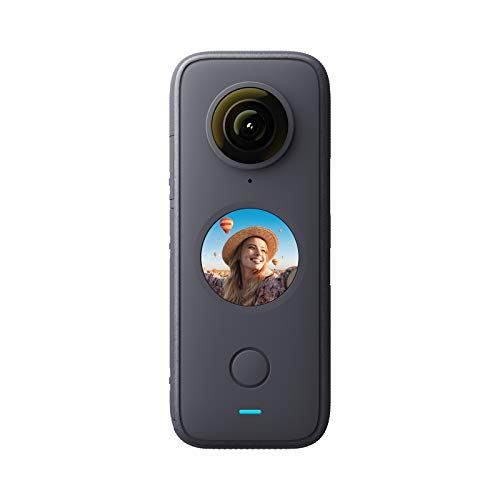 Insta360 ONE X2 (ASIN: B08M3B9754) | Check price on Amazon | |
 Owl Labs Meeting Owl 3 (ASIN: B0B193JVDJ) | Check price on Amazon |
Key takeaways
- Compare the best live stream 360 cameras for YouTube, Facebook and RTMP, from 8K action models to a 360 meeting camera, with streaming specs from each listing.
What's inside
As an Amazon Associate I earn from qualifying purchases. This post may contain affiliate links at no extra cost to you.
Disclosure: As an Amazon Associate, we may earn from qualifying purchases made through links on this page, at no additional cost to you.
Best Live Stream 360 Cameras: Broadcast Every Direction at Once
A regular camera forces a choice about what fits in the frame. A 360 camera removes that choice, and a live stream 360 camera removes it in real time: your audience can look around the scene while the event is still happening, whether that is a gig, a site walkthrough, a sports session or a hybrid meeting. The catch is that not every 360 camera can actually broadcast. Some record beautifully but have no live output at all, and others stream only through a phone app, only over USB, or only in a reframed flat view rather than a true 360 feed.
This guide covers five 360 cameras with a documented live streaming path, confirmed from each product listing or the manufacturer’s own documentation. Two are pocket action cameras from Insta360 that stream through the brand’s app to Facebook, YouTube and custom RTMP servers. One is Kandao’s 8K flagship, which stitches and streams in the camera itself. One is Ricoh’s dual 1-inch-sensor Theta Z1, built around 4K USB live streaming. The last is a different tool for a different job: the Owl Labs Meeting Owl 3, a 360 conference camera that feeds live meetings from the center of a table.
Streaming resolution is always lower than recording resolution on these cameras, so the sections below separate the two numbers carefully. Specs are taken from each product page and maker documentation.
Quick Picks
- Insta360 X3 — the most rounded app-based streamer, with 360 Live and reframed live modes
- Kandao QooCam 3 Ultra — 8K recording and in-camera live streaming with real-time stitching
- RICOH THETA Z1 51GB — dual 1-inch sensors and a dedicated 4K USB live streaming mode
- Insta360 ONE X2 — a proven, smaller 360 streamer that doubles as a webcam
- Owl Labs Meeting Owl 3 — 360 meeting camera for live hybrid sessions and streams
Insta360 X3 (ASIN: B0B9H572LC)
The X3 is the easiest recommendation for creators who want to go live from a phone. Its twin 1/2-inch 48MP sensors record 5.7K 360 video with Active HDR and stills up to 72MP, and the same camera connects to the Insta360 app for live broadcasting. Insta360’s own live stream documentation lists the X3 as a supported model for two distinct modes: 360 Live, which sends the full spherical feed so viewers can drag to look around, and Reframe Live, which sends a flat, director-controlled view. Both modes reach Facebook, YouTube and custom RTMP endpoints, so the camera covers open platforms and private servers alike.
The hardware supports that streaming role well. FlowState stabilization with horizon lock keeps a walking stream watchable, the 2.29-inch touchscreen makes settings changes quick, and the body is waterproof to 33 feet without a case. The 1,800mAh battery is replaceable, so a spare cell extends a long broadcast. Single-lens mode records 4K when you want conventional footage from the same device, and a webcam mode lets the X3 stand in on video calls.
Highlights:
– 360 Live and Reframe Live streaming to Facebook, YouTube and RTMP through the Insta360 app
– 5.7K 360 Active HDR recording, 72MP stills, 4K single-lens mode
– Waterproof to 33 feet, replaceable 1,800mAh battery, large 2.29-inch touchscreen
Considerations:
– Streaming runs through the phone app, so the phone must stay connected and in the foreground during a broadcast
– Live output resolution is lower than the 5.7K recording mode, as with every camera here
– Uses microSD cards, which are not included with the standalone camera
Kandao QooCam 3 Ultra (ASIN: B0DCP1XXTS)
See the Kandao QooCam 3 Ultra on Amazon
The QooCam 3 Ultra is the specification leader of this group. Its dual 1/1.7-inch sensors record 8K 360 video at 30fps, 5.7K at 60fps and 4K at 120fps, with 10-bit HLG color and stills up to 96MP. For live work, Kandao builds the streaming function into the camera itself: an in-camera live-streaming mode with real-time stitching, so the spherical feed is assembled on the device as you broadcast. Kandao promotes the feature for broadcasting immersive 360 content live to platforms such as Facebook and YouTube.
Supporting specs suit longer, more deliberate productions. There is 128GB of internal storage plus microSD expansion up to 1TB, a 2,280mAh battery rated by Kandao at up to 100 minutes recording at 4K and around 50 minutes at 8K, a bright F1.6 aperture for indoor and evening streams, built-in GPS, and an IP68-rated body. The 2.19-inch touchscreen gives on-device control, and four microphones capture 360-degree ambisonic audio.
Highlights:
– In-camera live streaming with real-time stitching, aimed at Facebook and YouTube broadcasts
– 8K30 360 recording, 10-bit HLG, 96MP stills, dual 1/1.7-inch sensors
– 128GB internal storage plus card expansion, F1.6 aperture, IP68 sealing
Considerations:
– Heavier and larger than the Insta360 models, so it is less of a pocket camera
– 8K recording drains the battery in roughly half the time of 4K recording
– Kandao’s app and software ecosystem is smaller than Insta360’s
RICOH THETA Z1 51GB (ASIN: B093XLLRCS)
See the RICOH THETA Z1 51GB on Amazon
The Theta Z1 takes a different route to live: it is a tethered streaming camera. Ricoh gives the Z1 a dedicated live streaming mode that outputs video continuously over USB to a computer, with streaming resolutions of 4K (3840 x 1920 at 29.97fps) and 2K (1920 x 960) in the maker’s specifications. Ricoh documents YouTube live streaming support, and because the feed arrives as a USB camera signal, it also fits software-based broadcasts where a phone app is not wanted.
Image quality is the reason to pick it. Two 1.0-inch back-illuminated CMOS sensors — far larger than the sensors in the action cameras here — deliver 23MP spherical stills, RAW+ capture and 4K recorded video with cleaner low-light performance. The 51GB internal memory holds roughly 6,350 JPEG stills or about 110 minutes of 4K video, a four-channel microphone records spatial audio, and the magnesium alloy body weighs about 182g.
Highlights:
– Dedicated USB live streaming mode at up to 4K, with documented YouTube live support
– Dual 1-inch sensors for the strongest stills and low-light quality in this roundup
– 51GB internal storage, RAW+ stills, four-channel spatial audio
Considerations:
– Streaming is wired over USB to a computer, so it suits fixed positions rather than roaming broadcasts
– Recorded 360 video tops out at 4K, below the action cameras’ headline numbers
– No built-in display for framing; you work through the small status panel and the app
Insta360 ONE X2 (ASIN: B08M3B9754)
See the Insta360 ONE X2 on Amazon
The ONE X2 is the earlier Insta360 design, and its Amazon listing leads with the feature this guide cares about: a live stream and webcam mode that goes live in 360 degrees to Facebook and YouTube, or connects to Zoom and other conferencing platforms as a webcam. Insta360’s streaming documentation confirms the ONE X2 streams through the app in both 360 Live and Reframe Live modes to Facebook, YouTube and RTMP destinations — the same platforms as the X3.
As a recorder it captures 5.7K 360 video at 30fps and 18MP 360 photos, with FlowState stabilization, a small round touchscreen and waterproofing to 33 feet. Four microphones record 360-degree audio and can focus on your voice, which helps talking-head streams. The 1,630mAh battery is removable. It lacks the X3’s bigger screen, higher-resolution stills and Active HDR video, but the streaming feature set is essentially the same, which keeps it relevant for buyers who stream more than they record.
Highlights:
– 360 live streaming to Facebook and YouTube, plus webcam mode for Zoom and similar platforms
– 5.7K 360 video, FlowState stabilization, waterproof to 33 feet
– Four-mic 360 audio and a removable 1,630mAh battery
Considerations:
– Smaller screen and older sensor than the X3; stills top out at 18MP
– No Active HDR in 360 recording
– App must remain connected and foregrounded while streaming
Owl Labs Meeting Owl 3 (ASIN: B0B193JVDJ)
See the Owl Labs Meeting Owl 3 on Amazon
The Meeting Owl 3 streams a different kind of scene: a room. This 360-degree conference camera, microphone and speaker sits in the middle of a table and captures the whole space in 1080p HD, while its Owl Intelligence System automatically focuses on whoever is speaking and shows them alongside the panoramic view. It connects to a host computer over USB with plug-and-play setup, works with Zoom, Microsoft Teams, Google Meet, Webex and other web-based platforms, and can feed live broadcasts — Owl Labs’ retail documentation confirms it works with YouTube and Facebook Live through the host computer.
Audio is half the product: an eight-microphone array picks up voices within an 18-foot radius, and the built-in speaker plays the remote side. Wi-Fi handles software updates and device management rather than the video feed itself. At just under 11 inches tall (model MTW300-1000), it is a fixed installation for a meeting room or classroom, not a camera you carry. Two units can be paired, and an expansion microphone extends coverage to larger rooms.
Highlights:
– True 360 capture of a whole room with automatic speaker focus for live meetings
– Feeds Zoom, Teams, Meet and Webex sessions and YouTube or Facebook Live broadcasts via USB
– Eight-mic array with 18-foot pickup and a built-in speaker in one device
Considerations:
– Output is 1080p, and viewers see the Owl’s framed layout rather than a freely navigable 360 sphere
– Needs a host computer and mains power; it is not a portable or battery camera
– Designed for meetings, so it has no action-camera recording modes or waterproofing
How to Choose a Live Stream 360 Camera
Start with the streaming path, because it decides everything else. App-based streamers such as the Insta360 X3 and ONE X2 send the feed through a phone, which is flexible but ties the broadcast to the phone’s connection and battery. The QooCam 3 Ultra stitches and streams in the camera, a cleaner chain for planned productions. The Theta Z1 streams over USB into a computer, suiting fixed setups with streaming software. The Meeting Owl 3 is also USB-based but purpose-built for meetings rather than spherical video platforms.
Next, match the destination. If you broadcast to YouTube or Facebook in 360, confirm the camera offers a true 360 live mode and not only a reframed flat view — both Insta360 models and the Kandao offer the spherical feed, while reframed modes are a useful extra. If you need a private server, RTMP support matters; Insta360 documents RTMP for its app streamers. For meeting platforms, a USB camera signal, as on the Theta Z1 and Meeting Owl 3, is the reliable route.
Then weigh the recording specs only after the streaming box is ticked. Resolution headroom (8K on the QooCam 3 Ultra, 5.7K on the Insta360 pair, 4K on the Theta Z1) improves the recorded archive and any reframed highlights you cut later. Sensor size matters more than megapixels for indoor and evening streams: the Theta Z1’s 1-inch sensors and the QooCam’s F1.6 aperture handle mixed light better than small-sensor action cameras. Finally, plan power and audio: long streams need mains power or spare batteries, and the built-in microphones decide whether voices stay intelligible across the room.
Key Specifications Explained
Streaming mode. Cameras here stream in one of three ways: through a phone app, in-camera, or over USB as a webcam-style signal. The mode determines which platforms you can reach and how much gear you carry.
360 Live vs reframed live. A 360 live stream sends the full sphere and lets each viewer choose where to look. A reframed stream sends a normal flat frame that you aim in the app. A flat-only output is not a true 360 broadcast.
Streaming resolution vs recording resolution. These are separate numbers. A camera may record 5.7K or 8K yet stream at a lower resolution because the feed must be stitched and uploaded in real time. Compare the streaming figure when live quality is the priority.
RTMP. Real-Time Messaging Protocol is the standard pipe for sending a feed to a server you specify. RTMP support means the camera or its app is not limited to named social platforms.
Sensor size. Larger sensors collect more light per pixel. Dual 1-inch sensors, as in the Theta Z1, are a genuine step up for indoor streams, while the smaller sensors in the action cameras trade some low-light quality for size and speed.
Stitching. Two fisheye lenses must be merged into one sphere. In-camera or in-app real-time stitching is what makes a live 360 feed possible; cameras that only stitch after recording cannot stream in 360.
Setup and Use Tips
Give the stream bandwidth headroom. A 360 feed carries far more data than a flat frame, so use the strongest connection available and keep the streaming phone close to the camera for app-based models. Run a private or unlisted test stream first to check stitching seams, audio levels and how the platform displays the feed.
Position the camera at eye level of the main subjects and away from walls; in 360, a camera shoved in a corner wastes half the sphere. Keep important subjects at least a meter away to avoid the stitch line and close-range fisheye distortion. For USB streamers such as the Theta Z1 and Meeting Owl 3, seat the camera centrally and confirm it is selected as both camera and microphone in your software.
Power is the quiet failure point of long broadcasts. Run action cameras from USB power where the model allows it, or stage spare batteries for a quick swap. Watch heat on long sessions: high-resolution modes heat small bodies, so a shaded position and airflow help. For meetings on the Meeting Owl 3, place it so no participant sits with a bright window directly behind them, since the camera exposes for the whole room.
Common Mistakes to Avoid
The most common mistake is buying a 360 camera that cannot stream at all, or one that streams only a flat reframed view, and discovering it on the day of the event. Check the streaming mode in the listing before anything else. A second mistake is judging a camera by its recording resolution when your audience will only ever see the lower-resolution live feed.
Neglecting audio is another frequent problem: 360 video invites viewers to look everywhere, but muffled voices still sink the stream. Keep talkers within the microphone’s comfortable range. Finally, avoid mounting the camera so close to a key subject that they sit on the stitch seam, and avoid handling it mid-stream — with a 360 camera, your hand walking up to adjust it is part of the show.
FAQ
Can viewers look around during a 360 live stream?
Yes, on platforms that support 360 video, such as YouTube and Facebook. In a 360 Live stream from cameras like the Insta360 X3, ONE X2 or QooCam 3 Ultra, viewers drag or move their phone to change the viewing direction while the stream runs.
Do I need a computer to stream in 360?
Not always. The Insta360 models stream through a phone app and the QooCam 3 Ultra streams in-camera. The Theta Z1 and Meeting Owl 3 work the other way: they feed a computer over USB, which then runs the broadcast through your chosen platform or software.
Why is the live picture softer than the recorded video?
Live feeds are stitched and uploaded in real time, so cameras stream at a lower resolution than they record. The Theta Z1, for example, lists 4K as its top live streaming resolution over USB, while action cameras that record 5.7K or 8K likewise stream below their recording ceiling.
Can a 360 camera work as a webcam for meetings?
Some can. The ONE X2’s listing includes a webcam mode for Zoom and similar platforms, the Theta Z1 presents itself as a USB camera in live streaming mode, and the Meeting Owl 3 is designed entirely around meeting platforms.
What internet speed does a 360 live stream need?
Requirements vary by platform and resolution, but a 360 feed needs noticeably more upload bandwidth than a flat stream of similar quality. A stable connection matters more than a fast one: test at the actual venue, at the actual time of day, before the real broadcast.
Final Verdict
For most creators, the Insta360 X3 is the safest all-round live stream 360 camera: it streams a true 360 feed or a reframed view to the major platforms from a phone, records strong 5.7K footage when the stream ends, and shrugs off water. The Kandao QooCam 3 Ultra is the pick for planned productions, pairing the group’s best recording specs with in-camera streaming and real-time stitching. Choose the RICOH THETA Z1 51GB when the stream runs from a fixed position through a computer and indoor image quality matters most. The ONE X2 remains a capable, smaller alternative with the same streaming destinations as its newer sibling. And if your “stream” is really a room full of people, the Meeting Owl 3 is the only camera here built for that job.
Related guides
More from Amazon
Programs that pair well with the guide above. Offers and eligibility are set by Amazon and may change.
Free shipping on eligible items, Prime Video and more. Eligible new members can start with a free trial.
Start a Prime free trialAudiobooks and podcasts to listen to on the go. Eligible new members can start with a free trial.
Try Audible freeAd-free music streaming. Eligible new subscribers can start with a free trial.
Try Music Unlimited freeA free business account with business pricing and bulk-buying tools for work, shop or home office.
Create a business accountAs an Amazon Associate we earn from qualifying purchases.










Write Your Review
No reviews yet. Be the first to share your experience!