
Our Short List of 3

- Specs:
- Resolution: 14MP
- Outputs: HDMI and USB
- Storage: TF card slot

- Specs:
- Resolution: 5.0 megapixel
- Mount: eyepiece mount, fits 23mm ocular and photo ports
- Connection: USB 2.0
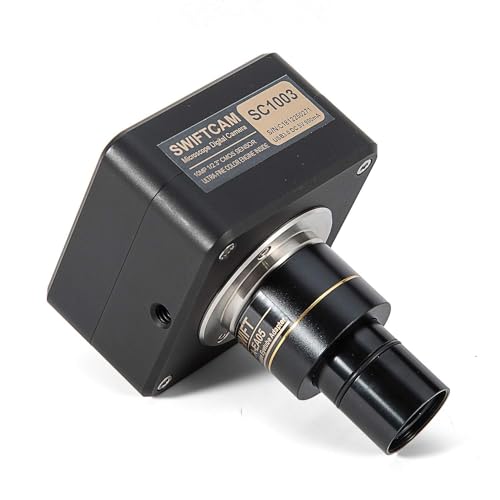
- Specs:
- Resolution: 10 megapixel
- Sensor: 1/2.3-inch CMOS
- Lens: 0.5x reduction lens, fits 23.2mm ports
All 4 Picks at a Glance
| Product | Specs | Action |
|---|---|---|
| HAYEAR 14MP HDMI/USB C-Mount Camera |
| Check price on Amazon |
| Swift 5.0 Megapixel Digital Camera for Microscopes (EC5R) |
| Check price on Amazon |
| Swiftcam SC1003-CK 10 Megapixel Camera |
| Check price on Amazon |
 HAYEAR HY-2307 14MP Industrial Microscope Camera |
| Check price on Amazon |
Key takeaways
- Four microscope camera units for eyepiece and C-mount ports, compared on megapixels, sensor size, frame rates, outputs and included adapters.
What's inside
As an Amazon Associate I earn from qualifying purchases. This post may contain affiliate links at no extra cost to you.
A microscope camera turns a view that vanishes when you lift your eye into a picture or a video you can keep, share and measure. These are camera units only, built to fit the eyepiece tube or photo port of a microscope you already own, and the real decision is fit and workflow: which port your scope offers, whether you want a live screen or a computer file, and how much motion your specimens show while you record them.
This guide suits biology students who need images for coursework, electronics hobbyists inspecting solder joints, lab technicians documenting samples for colleagues, and coin or mineral collectors who photograph small detail. The four units below were chosen from the names and specifications published on their Amazon product pages, and each one attaches to an existing microscope rather than replacing it. Check your scope’s port size before anything else, because a camera that does not fit is no use at any resolution.
Quick Picks
As an Amazon Associate we earn from qualifying purchases
| Product | Best for | Key spec from title |
|---|---|---|
| HAYEAR 14MP HDMI/USB Camera | Live screen viewing without a computer | 14MP with HDMI and USB outputs, 180x lens included |
| Swift EC5R 5MP | A simple eyepiece fit for class and lab notes | 5.0 megapixel, eyepiece mount, USB 2.0 |
| Swiftcam SC1003-CK 10MP | Smooth video and measured, calibrated images | 10 megapixel, USB 3.0, calibration kit included |
| HAYEAR HY-2307 14MP | Industrial inspection benches | 14MP, 1/2.5-inch CMOS sensor |
How to Choose
Confirm the mount your microscope actually has
Microscope cameras attach two ways. Eyepiece-mount units, like the Swift EC5R, slide into a standard 23mm ocular tube in place of an eyepiece, which suits most school and hobby scopes. C-mount units, like the HAYEAR 14MP below, thread onto a photo port, common on trinocular heads and industrial scopes. The Swiftcam splits the difference with a 0.5x reduction lens for 23.2mm ports plus adapters for 30mm and 30.5mm tubes. Measure your tube or read your scope’s manual first; the mount decides the shortlist before megapixels get a say.
Decide between a live screen and a computer workflow
An HDMI output changes how a camera feels to use. The HAYEAR 14MP sends its picture to a monitor or TV directly, so a class or a workbench can watch without a laptop in the loop, and it also offers USB for capture to a computer. USB-only cameras like the Swift pair record through software on a Windows or Mac machine, which suits measurement, annotation and filing images with notes. Think about where the image goes in the five minutes after you take it, and choose the output that matches that habit.
Match frame rate to anything that moves
Still specimens forgive a slow camera; living ones do not. The Swiftcam SC1003-CK lists 24.5 frames per second at 1792×1372 and 7.2 frames per second at its full 3584×2746, which is the classic trade: drop the resolution and the motion turns smooth. For pond water, swimming microorganisms or a soldering hand that will not stay still, the lower-resolution, higher-speed mode is the one you will actually use. For slides and circuit boards that sit patiently, full resolution wins and frame rate hardly matters.
Read sensor size alongside megapixels
Megapixels alone do not set image quality, because the same count spread over a larger sensor gathers light differently. The Swiftcam uses a 1/2.3-inch CMOS sensor for its 10MP, while the HAYEAR HY-2307 pairs its 14MP with a 1/2.5-inch CMOS sensor. A reduction lens also changes the field of view you capture compared with the eyepiece view. Treat the headline number as a filing-size figure, and weigh sensor and lens together when two cameras claim similar counts.
The 4 Best Options
HAYEAR 14MP HDMI/USB C-Mount Camera
- Specs:
- Resolution: 14MP
- Outputs: HDMI and USB
- Storage: TF card slot
This HAYEAR is the bench-friendly option, a 14MP industrial camera that sends its picture over HDMI to a screen or over USB to a computer, and records stills to a TF card in the unit itself. That mix suits teaching and inspection work where several people need to see the same field at once. Unusually for this group, the listing includes a 180x zoom C-mount lens in the box, so the package arrives with optics as well as a sensor. It mounts by C-mount, so it belongs on a scope or stand with a matching photo port.
Swift 5.0 Megapixel Digital Camera for Microscopes (EC5R)
- Specs:
- Resolution: 5.0 megapixel
- Mount: eyepiece mount, fits 23mm ocular and photo ports
- Connection: USB 2.0
The Swift EC5R is the straightforward eyepiece camera: it fits 23mm ocular and photo ports, connects over USB 2.0, and captures color photographs and video through a Windows or Mac computer. At 5.0 megapixels it files images large enough for coursework, lab notes and online sharing without overwhelming a laptop with data. There is no screen output and no lens bundle to puzzle over, which keeps both the price of entry and the learning curve low. For a school lab or a home scope that simply needs a record of what the eye saw, this is the direct route.
Swiftcam SC1003-CK 10 Megapixel Camera
- Specs:
- Resolution: 10 megapixel
- Sensor: 1/2.3-inch CMOS
- Lens: 0.5x reduction lens, fits 23.2mm ports
The Swiftcam is the measurement-minded pick. Its 10MP sensor sits behind a 0.5x reduction lens that fits 23.2mm ports, and the box adds 30mm and 30.5mm eyetube adapters, so it can move between scopes with different tubes. USB 3.0 carries the data, with frame rates listed at 24.5 per second at 1792×1372 and 7.2 per second at the full 3584×2746. A calibration slide and Swift Imaging 3.0 software come included, which turns pictures into measurements, and the camera works with Windows, Mac and Linux machines.
HAYEAR HY-2307 14MP Industrial Microscope Camera
- Specs:
- Resolution: 14MP
- Sensor: 1/2.5-inch CMOS
- Model: HY-2307
The HY-2307 is HAYEAR’s industrial camera unit built around a 14MP, 1/2.5-inch CMOS sensor, aimed at inspection work where the camera lives on a stand or a trinocular head full time. It shares its headline resolution with the other HAYEAR in this group but is a different model with its own listing, so its details should be read on their own page rather than borrowed from its sibling. The confirmed specification from the listing record is deliberately brief here: the sensor and the resolution are what the record supports, and buyers should confirm the remaining figures on the live listing.
Which One Fits Your Situation
You teach and the whole class needs to see
Choose the HAYEAR 14MP HDMI/USB camera. The HDMI output puts the specimen on a classroom screen in real time, the TF card slot saves stills without a computer, and the included 180x C-mount lens means the box arrives ready to mount. Students follow the same field you describe instead of queueing at one eyepiece.
You need images for coursework and lab reports
Take the Swift EC5R. It drops into a standard 23mm eyepiece tube, plugs into the laptop you already write your reports on, and produces tidy 5MP color images and video. The workflow is deliberately plain, which is a virtue when the deadline cares about the write-up rather than the camera settings.
You measure specimens and own more than one scope
Pick the Swiftcam SC1003-CK. The calibration slide and imaging software turn its pictures into measurements, and the reduction lens plus two eyetube adapters let one camera serve scopes with 23.2mm, 30mm and 30.5mm tubes. Its faster frame-rate mode also handles living specimens that will not sit still for the full-resolution setting.
Your bench does industrial inspection all day
Go with the HAYEAR HY-2307. It is the dedicated industrial unit of the four, with a 14MP sensor on a 1/2.5-inch CMOS, built for a fixed stand rather than a classroom tube. Because the published record for this model is brief, confirm its outputs and mount against your rig on the live listing before ordering.
Common Mistakes
- Ordering a C-mount camera for a scope that only has an eyepiece tube, or the reverse.
- Judging cameras on megapixels alone and ignoring sensor size and the reduction lens.
- Expecting smooth full-resolution video from a camera whose frame rate drops at its largest setting.
- Forgetting that a USB camera needs the computer on and the software open before anything is recorded.
- Skipping calibration, then presenting measurements that were never scaled against a known slide.
Frequently Asked Questions
Will a microscope camera fit my microscope?
It depends on the port. Eyepiece cameras such as the Swift EC5R fit standard 23mm ocular tubes, while C-mount cameras such as the HAYEAR 14MP need a photo port with that thread. The Swiftcam covers the widest ground with a 23.2mm reduction lens plus 30mm and 30.5mm adapters. Measure your tube before ordering anything.
Can I use a microscope camera without a computer?
One of these can. The HAYEAR 14MP sends a live picture over HDMI to a monitor or TV and saves stills to its TF card slot, so no computer is required for viewing or basic capture. The Swift and Swiftcam units work through a computer over USB, which suits measurement and filing but ties you to the machine.
How many megapixels do I actually need?
For coursework, lab records and sharing online, 5MP is plenty, as the Swift EC5R shows. Higher counts such as the Swiftcam’s 10MP or the HAYEAR models’ 14MP help when you crop into a frame or print large. Remember that frame rate falls as resolution rises, so moving specimens often look better at a smaller, faster setting.
What does a reduction lens do on a microscope camera?
A reduction lens, such as the Swiftcam’s 0.5x, sits between the microscope and the sensor and widens the field the camera captures, bringing it closer to what you see through the eyepieces. Without one, a small sensor can show a narrow, heavily magnified crop of the view. It also helps match the camera to standard 23.2mm photo ports.
Related guides
More from Amazon
Programs that pair well with the guide above. Offers and eligibility are set by Amazon and may change.
Free shipping on eligible items, Prime Video and more. Eligible new members can start with a free trial.
Start a Prime free trialAudiobooks and podcasts to listen to on the go. Eligible new members can start with a free trial.
Try Audible freeAd-free music streaming. Eligible new subscribers can start with a free trial.
Try Music Unlimited freeA free business account with business pricing and bulk-buying tools for work, shop or home office.
Create a business accountAs an Amazon Associate we earn from qualifying purchases.










Write Your Review
No reviews yet. Be the first to share your experience!