
Key takeaways
- Find the best touchscreen cameras for photos, vlogging and travel. Compare touch-to-focus, flip screens, touch menus and autofocus to pick the right camera.
What's inside
As an Amazon Associate I earn from qualifying purchases. This post may contain affiliate links at no extra cost to you.
The best touchscreen cameras make photography feel faster and more direct. Instead of working through dials and buttons for every small change, you tap the subject you want in focus, swipe through menus, and set the shutter with a touch. That simple change matters when a moment is moving, when you are filming yourself, or when you are learning a new camera and want the controls to feel familiar.


A good touchscreen camera is not defined by the screen alone. The screen has to respond well, stay visible in bright light, and work together with the autofocus system, the menu layout, and the way the screen moves. A vari-angle screen that flips to the front is useful for vlogging and self-portraits, while a tilting screen helps with low and high angles.
The quick answer is that the Canon EOS R50 is the strongest all-round pick for most people, because it pairs a responsive vari-angle touchscreen with fast autofocus, 4K video, and a compact APS-C body. The Sony ZV-E10 II is the better choice for creators who film themselves, while the Canon PowerShot G7 X Mark III suits travellers who want a pocketable camera with a touch screen. The Nikon Z30 is a friendly creator camera with a clear touch interface, and the Fujifilm X-S20 is the pick for photographers who want richer colour controls and a more advanced touchscreen mirrorless camera.
This guide explains what each touchscreen does, how the screens differ, and which camera fits which kind of shooting. Every camera below has a touchscreen built into the camera body, and each section describes exactly how that touchscreen is used.
Quick Picks
Our Short List of 3
All 4 Picks at a Glance
| Product | Specs | Action |
|---|---|---|
| Canon EOS R50 with RF-S 18-45mm Lens (B0BTTV6CT1) | Check price on Amazon | |
| Canon PowerShot G7 X Mark III (B07TKNCQZL) | Check price on Amazon | |
 Nikon Z30 with 16-50mm Lens (B0B527QM4X) | Check price on Amazon | |
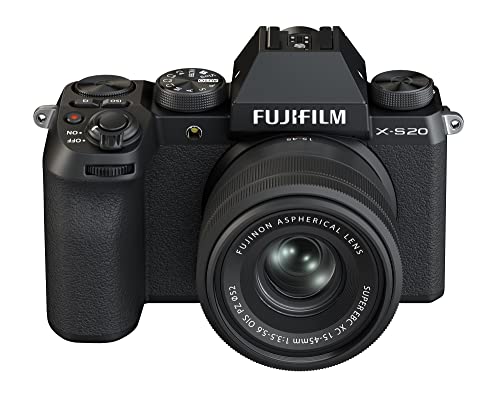 Fujifilm X-S20 with XC 15-45mm Lens (B0C5PNRYHQ) | Check price on Amazon |
How to Choose
Touch-to-Focus and Touch Shutter
Touch-to-focus is the most useful touchscreen feature on a modern camera. You tap a face, an eye, a pet, or a product on the screen, and the camera moves focus to that point. Some cameras also let you tap to take the photo, which is known as a touch shutter. This is helpful for street photography, family photos, and product shots, where the subject is not always in the centre of the frame.
Vari-Angle, Tilting, and Fixed Screens
The way the screen moves changes what you can shoot. A vari-angle screen flips out to the side and rotates, so you can face it forward for vlogging, angle it down for a low shot, or fold it inward for protection when the camera is in a bag. A tilting screen moves up and down, which helps with high and low angles but does not face fully forward. A fixed screen stays in place and is best suited to straightforward shooting at eye level.
Touch Menu Navigation
A touchscreen should make menus easier, not harder. On the best touchscreen cameras, you can tap menu items, swipe between pages, pinch to zoom into a photo during playback, and drag a finger across the screen to move through images. Some cameras also show touch icons on the shooting display, so you can change brightness, background blur, or shooting mode without opening a full menu.
Screen Size, Brightness, and Clarity
Most touchscreen cameras in this guide have a 3-inch screen, which is a good balance between visibility and camera size. A larger screen can be easier to read, but it also makes the camera bulkier. Resolution matters too: a sharper screen makes it easier to check focus and see fine detail in a photo you have just taken.
Autofocus That Works With Touch
A touchscreen is only as good as the autofocus behind it. When you tap a subject, the camera should lock on quickly and stay with it. Modern mirrorless cameras use subject detection for people, animals, and vehicles, and the touchscreen is the fastest way to tell the camera which subject you mean when several are in the frame.
Video Features for Touchscreen Creators
Many people choose a touchscreen camera for video as well as photos. A flip-out touchscreen lets you see yourself while recording, check your framing, and tap to refocus during a take. Touch controls also help when you are filming alone, because you can start and stop recording, adjust exposure, and change focus without reaching around the camera.
Size, Weight, and Lens Choice
A touchscreen camera should fit the way you shoot. A compact camera with a fixed lens is easy to carry every day and slips into a small bag or a jacket pocket. An interchangeable-lens camera is larger, but it lets you change lenses for wide landscapes, portraits, or distant subjects.
The Best Touchscreen Cameras Reviewed
Canon EOS R50 with RF-S 18-45mm Lens (B0BTTV6CT1)
The Canon EOS R50 is the best overall touchscreen camera in this guide because it brings together a responsive touch interface, fast autofocus, and a compact mirrorless body that works for photos and video. Its vari-angle touchscreen flips out to the side and rotates to face forward, so you can frame a vlog, take a self-portrait, or shoot from a low angle without guessing at the composition.
The touchscreen supports touch-to-focus and touch menus, and it works with the camera’s Dual Pixel autofocus system. Tap a face on the screen and the camera can track it, which helps with portraits, family photos, and moving subjects. The touch interface also makes it easier to change settings, review photos, and zoom into an image to check sharpness.
The camera uses a 24.2 MP APS-C sensor and the included RF-S 18-45mm lens, which covers a useful range for travel, everyday photography, and vlogging. It records 4K video and includes subject detection, so the touchscreen becomes a practical tool for both stills and video rather than a minor extra.
This camera suits beginners, travellers, and content creators who want one camera for photos and video. It is a weaker fit if you want in-body stabilisation, a larger grip for long lenses, or a camera built mainly for advanced manual control.
Sony ZV-E10 II with 16-50mm Lens (B0D92VDW76)
The Sony ZV-E10 II is built for creators, and its touchscreen is a central part of that design. The 3-inch vari-angle touchscreen flips out and rotates, and the interface changes when you turn the camera vertical, which helps when you film upright video for social platforms. Touch icons appear on the shooting display, so you can swipe in from the edge of the screen and change shooting mode or adjust settings without digging through menus.
Touch-to-focus works with the camera’s subject detection, and you can tap the screen to set focus and adjust background blur, brightness, and colour tone in supported modes. That makes the camera easy to use when you are filming yourself, because you can see the frame, tap your face, and know the camera is focused on you.
The camera uses a 26 MP APS-C sensor and comes with a 16-50mm power zoom lens, which is compact and useful for vlogging, travel, and everyday video. The touchscreen, flip-out display, and creator-focused controls work together, so the camera feels made for solo filming rather than adapted to it.
This camera suits vloggers, streamers, and creators who film themselves and want fast touch control. It is a weaker fit if you mainly shoot stills and want a viewfinder, a larger grip, or a camera with a more traditional photography-first layout.
Canon PowerShot G7 X Mark III (B07TKNCQZL)
The Canon PowerShot G7 X Mark III is the best compact touchscreen camera in this guide, and it is the easiest one to carry everywhere. It has a 3-inch tilting touchscreen that tilts up 180 degrees, so you can face the screen forward for selfies and vlogging while still holding a camera that fits in a jacket pocket. The touch panel lets you tap to focus, tap to shoot, navigate menus, and review photos with a swipe.
The touchscreen is especially useful on a compact camera because there are fewer buttons and dials than on a larger mirrorless body. Touch-to-focus lets you pick a subject quickly, and touch menus make it easier to change settings on a small body. The screen tilts rather than flipping fully to the side, which keeps the camera slim and simple, and it works well for low-angle shots, overhead shots, and self-facing video.
The camera uses a 20.1 MP 1-inch sensor and a 4.2x optical zoom lens, which gives you more reach than a phone camera while keeping the body pocketable. It records 4K video and is a popular choice for travel, everyday photography, and casual vlogging.
This camera suits travellers, casual photographers, and anyone who wants a capable touchscreen camera without carrying interchangeable lenses. It is a weaker fit if you want to change lenses, shoot fast action at long distances, or use a viewfinder for bright outdoor shooting.
Nikon Z30 with 16-50mm Lens (B0B527QM4X)
The Nikon Z30 is a friendly touchscreen camera for beginners and creators who want clear controls and a flip-out screen. Its vari-angle touchscreen flips out to the front, so you can see yourself while recording, and it supports touch-to-focus, touch settings, and touch menu navigation. You can tap the screen to position focus, adjust brightness, set the self-timer, and change settings without learning a long list of button shortcuts.
The touch interface is straightforward, the icons are clear, and the camera is designed to be easy to pick up and use. That makes it a good first mirrorless camera for someone moving from a phone, because the touch controls feel familiar while the larger sensor and interchangeable lens give you more creative control.
The camera uses a 20.9 MP DX-format sensor and comes with a 16-50mm zoom lens, which is compact and covers wide to short telephoto views. It records 4K video and is aimed at creators, vloggers, and streamers who want good video quality without a complex setup.
This camera suits beginners, vloggers, and creators who want a simple touchscreen camera with a flip-out screen. It is a weaker fit if you want a viewfinder, a higher-resolution sensor for large prints, or in-body stabilisation for handheld video without a stabilised lens.
Fujifilm X-S20 with XC 15-45mm Lens (B0C5PNRYHQ)
The Fujifilm X-S20 is the most photographer-focused touchscreen camera in this guide, and its touchscreen is part of a more advanced mirrorless system. Its 3-inch vari-angle touchscreen rotates 180 degrees, so you can face it forward for selfies and vlogging, angle it for low shots, or fold it away when you want to use the viewfinder. The touchscreen supports touch-to-focus, touch menus, and touch playback controls, and it works with the camera’s subject detection and tracking.
Fujifilm is known for colour, and the X-S20 gives you film simulation modes and colour controls that you can adjust through the touch interface and the physical dials. The touchscreen helps you tap a subject, check focus, and review images, while the dials give you direct control over exposure when you want it. That combination suits photographers who like practical control but still want the speed of touch-to-focus.
The camera uses a 26.1 MP APS-C X-Trans sensor and comes with an XC 15-45mm lens, which covers wide to standard views for travel, street, and everyday photography. It records 6.2K video and includes in-body image stabilisation, which helps with handheld stills and video.
This camera suits photographers who want strong image quality, Fujifilm colour, and a touchscreen that supports serious stills work. It is a weaker fit if you want the simplest possible camera, the smallest body in this guide, or a camera with a fully beginner-first menu system.
What to Check Before You Buy
Before you buy a touchscreen camera, check the screen type and how it moves. A vari-angle screen is best for vlogging and self-facing shots, a tilting screen is best for high and low angles in a slim body, and a fixed screen is best if you mainly use the viewfinder. Make sure the touchscreen supports touch-to-focus in both photo and video modes, and check whether it also includes a touch shutter, touch tracking, and touch menu navigation.
Finally, confirm the exact model and kit you are buying, including the lens, colour, and included accessories. Model names can be similar, and a kit with a different lens changes what you can shoot on day one. Read the listing carefully, check the sensor, screen, and lens details, and make sure the camera in the listing matches the touchscreen features described in this guide.
FAQ
Do all touchscreen cameras have touch-to-focus?
Most modern touchscreen cameras do, but not all touchscreens work the same way. Some let you tap to move the focus point, some also start tracking the subject, and some add a touch shutter that takes the photo when you tap. Check the camera’s touch features before you buy, because a touchscreen that only navigates menus is less useful for fast photography than one that also controls focus.
Is a vari-angle touchscreen better than a tilting touchscreen?
A vari-angle screen is more flexible because it flips out to the side and can face forward, which helps with vlogging, self-portraits, and low-angle shots. A tilting screen is slimmer and still helps with high and low angles, but it does not face fully forward in the same way. The better choice depends on whether you film yourself often or mainly shoot at eye level and from unusual angles.
Can I use a touchscreen camera with gloves on?
Most capacitive touchscreens respond best to bare fingers, so gloves can make touch control unreliable. Some gloves are made for touchscreens and work better, but in cold weather it is often easier to use the camera’s buttons, dials, and viewfinder. If you shoot in winter often, check how easily you can switch between touch and physical controls.
Are touchscreen cameras good for beginners?
Yes, a touchscreen camera can be easier to learn than a button-only camera, because tapping a subject to focus feels natural if you already use a phone. Touch menus, touch playback, and on-screen icons help new photographers find settings without memorising shortcuts. A beginner-friendly camera with a clear touch interface, good autofocus, and a simple menu system is a strong starting point.
Do I still need a viewfinder if the camera has a touchscreen?
A viewfinder is useful in bright sunlight, when the screen is hard to see, and when you want a stable hold for long lenses. A touchscreen is useful for framing at odd angles, tapping to focus, and changing settings quickly. Many photographers use both: the viewfinder for bright conditions and precise framing, and the touchscreen for live view, focus, and menu control.
Bottom Line
The best touchscreen cameras make focus, framing, and settings feel direct. The Canon EOS R50 is the best overall choice for most people, with a vari-angle touchscreen, fast autofocus, and a compact body for photos and video. The Sony ZV-E10 II is the best choice for creators who film themselves, the Canon PowerShot G7 X Mark III is the best compact option for travel, the Nikon Z30 is the best beginner-friendly pick, and the Fujifilm X-S20 is the best choice for photographers who want richer colour and a more advanced touchscreen system.
Choose the camera that matches how you shoot: a vari-angle screen and touch-to-focus in video for vlogging, a compact body and useful kit lens for travel, and touch eye detection for portraits.
Disclosure: As an Amazon Associate, we may earn from qualifying purchases.
Related guides
More from Amazon
Programs that pair well with the guide above. Offers and eligibility are set by Amazon and may change.
Free shipping on eligible items, Prime Video and more. Eligible new members can start with a free trial.
Start a Prime free trialAudiobooks and podcasts to listen to on the go. Eligible new members can start with a free trial.
Try Audible freeAd-free music streaming. Eligible new subscribers can start with a free trial.
Try Music Unlimited freeA free business account with business pricing and bulk-buying tools for work, shop or home office.
Create a business accountAs an Amazon Associate we earn from qualifying purchases.










Write Your Review
No reviews yet. Be the first to share your experience!