
Key takeaways
- Find the best afordable small business security cameras for shops, offices and warehouses, with clear video, night vision, local storage and simple setup.
What's inside
As an Amazon Associate I earn from qualifying purchases. This post may contain affiliate links at no extra cost to you.
A small business needs eyes on the front door, the till, the stockroom and the back entrance, even when the owner is away. That is what the best afordable small business security cameras are built to do. The keyword is spelled “afordable” in the search term, and the idea is simple: an affordable system a small business can set up without an installer or a long contract. The quick answer is to start with one or two indoor cameras for the counter and the stockroom, add an outdoor camera for the entrance, and choose cameras that record locally to a memory card so there is no monthly fee. The Wyze Cam v4 is the strongest starting point for most small businesses, because it works indoors and outdoors and records in 2.5K resolution. The Blink Outdoor 4 suits a yard or side gate with no outlet nearby, the Reolink Argus 3 Pro with a solar panel suits a sunny outdoor spot, the TP-Link Tapo C120 suits a counter or hallway, and the Ring Indoor Cam (2nd Gen) suits a reception desk or small office.


Quick Picks
Our Short List of 3
All 5 Picks at a Glance
| Product | Specs | Action |
|---|---|---|
| 1. Wyze Cam v4 (B0CJ9YX7DG) | Check price on Amazon | |
| 2. TP-Link Tapo C120 (B0CH45HPZT) | Check price on Amazon | |
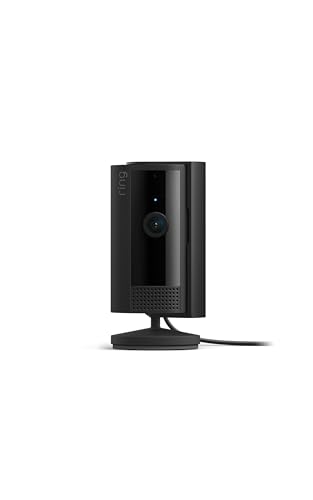 3. Ring Indoor Cam, 2nd Gen (B0B6GJBKRK) | Check price on Amazon | |
 4. Blink Outdoor 4 (B0DHLSZXQD) | Check price on Amazon | |
 5. Reolink Argus 3 Pro with Solar Panel (B0DQV4L955) | Check price on Amazon |
How to Choose
Indoor or Outdoor Placement
Walk the premises and list every spot that needs a camera. A shop usually needs the entrance, the till and the stockroom. Indoor cameras are smaller and sit on a shelf, a desk or a wall mount. Outdoor cameras need weather resistance, so look for an IP65 or IP66 rating, which means the camera is built to handle rain and dust. A camera that works in both places gives more freedom, because the same model can watch a counter and later move to a covered entrance. Before buying, check for a power outlet at each spot and check that Wi-Fi reaches the farthest camera.
Video Resolution and Night Vision
Resolution decides how much detail the footage holds. A 1080p HD camera is enough to see who entered a room and what they were carrying. A 2K or 2.5K camera records finer detail, which helps when the owner needs to read a label or a face at the till. A 5MP camera records still finer detail, which helps in a warehouse aisle or a car park. Night vision matters just as much, because many incidents happen after closing time. Color night vision keeps colors visible in low light, which can make clothing and vehicles easier to describe. Infrared night vision records in black and white and works in complete darkness, which suits a locked stockroom or a dark yard.
Wired or Wire-Free Power
Wired cameras plug into a power outlet and run without interruption, which suits a counter, a reception desk or a hallway where an outlet is close by. The cable is the only limit, so a wired camera needs a tidy route for the lead and a mount that keeps it out of reach. Wire-free cameras run on batteries and can be mounted on a fence, a wall or a post where no outlet exists, which suits a yard, a side gate or a storage area. Battery life depends on how often the camera records and how strong the Wi-Fi signal is, so the owner needs a routine for checking battery levels.
Storage Without a Monthly Fee
Local storage records to a microSD card inside the camera or to a hub in the building, so the footage stays on site and there is no monthly fee for basic recording. That suits a small business that wants to keep costs low and keep control of its own recordings. Cloud storage uploads clips to an online account, which protects the footage if a camera is stolen or damaged, and it lets the owner watch clips from anywhere. Many cameras support both, so the owner can record locally all day and keep cloud clips only for motion events. Before buying, check the largest memory card the camera supports and whether a card is included in the box.
Motion Detection and Alerts
A small business camera should tell the owner when something happens, not just record it. Motion detection sends a phone alert when movement is seen in the frame, and person detection narrows that alert to people rather than passing cars, pets or moving shadows. That distinction matters for a shop on a busy street, where a camera pointed at a window could send alerts all day. Some cameras also detect vehicles or animals, which helps at a loading bay or a yard. Look for adjustable detection zones, so the camera watches the doorway and ignores the pavement, and adjustable sensitivity, so a small movement near the lens does not trigger a constant stream of alerts.
Field of View and Coverage
Field of view is the width of the scene a camera can see, and it decides how many cameras a business needs. A wide field of view covers a whole shop floor from one corner, while a narrow field of view suits a corridor, a till or a single doorway. A camera mounted high in a corner can watch two aisles at once in a small shop, while a camera at eye level near a till captures faces clearly. Before buying, stand in each planned camera position and check what the lens would see, including shelves, signs and windows that could block the view or cause glare.
App, Access and Privacy
The camera app should let the owner watch a live view, play back clips, change settings and share access with a manager or a trusted member of staff. Shared access should be limited to the cameras that person needs, and the owner should be able to remove access when a member of staff leaves. A strong account password and two-step sign-in protect the system from strangers, and a manual privacy cover is useful for a camera in a staff room or an office where people expect privacy. Business owners should also check local rules about filming staff, customers and public areas, and they should put up a clear sign where cameras are in use.
The Best Best Afordable Small Business Security Cameras Reviewed
1. Wyze Cam v4 (B0CJ9YX7DG)
The Wyze Cam v4 is the most versatile camera in this guide and the best starting point for a small business that wants one model for several jobs. It records in 2.5K QHD resolution, which gives clear detail at a till or a doorway, and it carries an IP65 weather resistance rating, so it can watch a covered entrance as well as an indoor stockroom. Enhanced color night vision keeps the scene visible after dark, and a motion-activated spotlight and a built-in siren add a deterrent at a back door. Two-way audio lets the owner speak to a visitor or a delivery driver, and Wi-Fi 6 support helps the connection stay steady at a distance from the router. It records continuously to a microSD card of up to 512 GB, sold separately, without a subscription. It suits a shop, cafe, salon or small office, and it is a good fit for the till, the entrance and the stockroom. It is less suited to a remote fence with no outlet nearby, because this model runs on mains power through a cable.
2. TP-Link Tapo C120 (B0CH45HPZT)
The TP-Link Tapo C120 is a compact wired camera that records in 2K QHD resolution and works indoors and outdoors, which makes it a tidy fit for a counter, a hallway or a covered entrance. It carries an IP66 weather resistance rating, which means it can handle rain and dust at an outside wall. Color night vision with dual spotlights keeps the scene bright after dark, and person, pet and vehicle detection helps the owner tell a customer at the door apart from a passing car. Two-way audio lets the owner greet a visitor without walking to the door. The camera records locally to a microSD card and also supports cloud storage as an option, so the owner can keep footage on site and keep cloud clips for important events. It suits a small shop, cafe or office that needs a neat wired camera for a counter or a sheltered entrance. It is less suited to a yard with no power outlet nearby, because it needs a wired power connection.
3. Ring Indoor Cam, 2nd Gen (B0B6GJBKRK)
The Ring Indoor Cam (2nd Gen) is a compact plug-in camera for indoor use, and a natural fit for a reception desk, a small office or a treatment room. It records in 1080p HD video, which is clear enough to see who entered a room and what they did, and color night vision keeps the image usable after the lights go out. Two-way talk lets the owner speak through the camera, which is useful for greeting a visitor at reception or checking on a room from the office. A manual privacy cover slides over the lens when the camera is not needed, which is a thoughtful touch for a staff room or a meeting room. The camera is small and light, so it sits neatly on a desk or a shelf, and it can also be mounted on a wall. It suits a small office, a clinic reception, a salon or a shop counter where a discreet indoor camera is enough. It is less suited to outdoor use, because it is built for indoor spaces and has no weather resistance rating for rain.
4. Blink Outdoor 4 (B0DHLSZXQD)
The Blink Outdoor 4 is the wire-free camera in this guide, and the best choice for a small business that needs to watch an outdoor area with no power outlet nearby. It records in 1080p HD video, with infrared night vision for dark yards and car parks, and two-way audio lets the owner speak to someone in view. The camera runs on two AA lithium batteries, and Blink states a battery life of up to two years, which means the owner is not climbing a ladder every few weeks to recharge it. A Sync Module Core is included in the box, along with a mounting kit, a USB cable and a power adapter for the module. Because there is no power cable to run, this camera can be mounted on a fence, a wall or a post at a side gate, a yard or a car park. The 143-degree diagonal field of view covers a wide area from a single mounting point. It suits a shop, warehouse or workshop that needs wire-free coverage of a yard, a gate or a delivery area. It is less suited to a till, because 1080p HD video holds less detail than the 2K and 2.5K cameras in this guide.
5. Reolink Argus 3 Pro with Solar Panel (B0DQV4L955)
The Reolink Argus 3 Pro with Solar Panel is a wire-free outdoor camera for a spot where a power cable is impractical and the sun can do the charging. It records in 5MP resolution, the highest in this guide, and it captures fine detail across a yard, a car park or a loading bay. Color night vision with spotlights keeps the scene visible after dark, and smart detection for people, vehicles and animals helps the owner focus on the movement that matters. Two-way audio lets the owner speak to a visitor or warn someone away from a restricted area. The camera runs on a rechargeable battery with a capacity of 6000 mAh, and the included solar panel tops up the battery during the day, which removes the routine of taking the camera down to charge it. Local storage on a microSD card means the footage stays on site without a monthly fee. It suits a warehouse, a workshop or a garden centre with an outdoor area that gets sunlight and has no outlet nearby. It is less suited to a shaded spot, because the battery would then need manual charging.
What to Check Before You Buy
Before ordering, count the cameras the business truly needs and map each one to a spot with power and Wi-Fi. A single camera at the entrance is a start, but a till, a stockroom and a back door each deserve their own view. Check the Wi-Fi signal at the farthest mounting point, because a weak signal causes missed clips and slow live views. Check what is included in the box: some cameras include a mounting kit and a cable, while a memory card is often sold separately, so add a card of the largest supported size for each camera that will record locally. A trial run with one camera is a sensible step: mount it at the till or the entrance, watch the alerts for a week, adjust the detection zone, and then decide where the next camera should go. Check local rules about filming staff and customers, put up a clear sign where cameras are in use, and keep the account password strong and private.
FAQ
How many cameras does a small business need?
Most small businesses start with two or three cameras: one at the entrance, one at the till or counter, and one at the stockroom or back door. It is better to start with the busiest spots and add cameras one at a time than to buy a large system before knowing which views matter most.
Do small business security cameras need a monthly subscription?
No, not always. Several cameras in this guide record locally to a microSD card or to a hub, so the owner can watch live views and play back clips without a monthly fee.
Can one camera cover a whole shop?
A single wide-angle camera can cover a small shop floor or a single room, but it cannot watch the till, the entrance and the stockroom at the same time. For clear detail at the till and a clear view of the door, two cameras are usually better than one.
Are wire-free cameras reliable for a business?
Wire-free cameras are reliable when they are mounted within good Wi-Fi range and their batteries are checked on a routine. They suit yards, gates and car parks where no outlet exists.
Where should cameras be placed in a small shop?
Place one camera to face the entrance so every visitor is seen on entry, one to face the till so transactions are clearly visible, and one to watch the stockroom door and the storage shelves. A clear sign at the entrance tells customers that cameras are in use.
Bottom Line
The best afordable small business security cameras are the ones that fit the building and the daily routine of the owner. For most small businesses, the Wyze Cam v4 is the best place to start, because it works indoors and outdoors, records in 2.5K resolution and stores footage locally without a monthly fee. The TP-Link Tapo C120 is a neat wired camera for a counter or a covered entrance, the Ring Indoor Cam (2nd Gen) is a discreet camera for a reception desk or a small office, the Blink Outdoor 4 covers a yard or a gate without a cable, and the Reolink Argus 3 Pro with a solar panel watches a sunny outdoor spot without any mains power. Start with the entrance and the till, test one camera for a week, and add the next camera only when the first one has proved its view.
Disclosure: As an Amazon Associate, we may earn from qualifying purchases.
Related guides
More from Amazon
Programs that pair well with the guide above. Offers and eligibility are set by Amazon and may change.
Free shipping on eligible items, Prime Video and more. Eligible new members can start with a free trial.
Start a Prime free trialAudiobooks and podcasts to listen to on the go. Eligible new members can start with a free trial.
Try Audible freeAd-free music streaming. Eligible new subscribers can start with a free trial.
Try Music Unlimited freeA free business account with business pricing and bulk-buying tools for work, shop or home office.
Create a business accountAs an Amazon Associate we earn from qualifying purchases.










Write Your Review
No reviews yet. Be the first to share your experience!