
Our Short List of 3
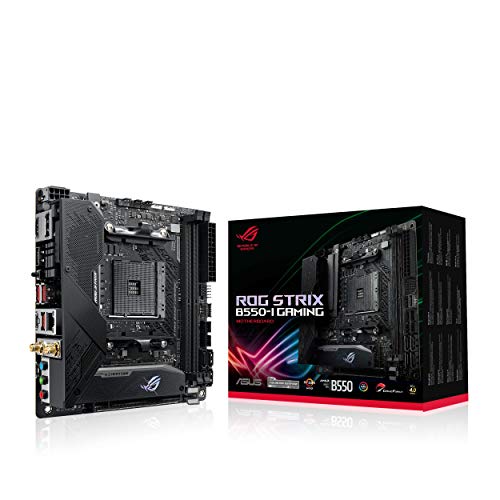
- Best for: Builders who want the most complete B550 Mini-ITX board with no meaningful feature gaps.
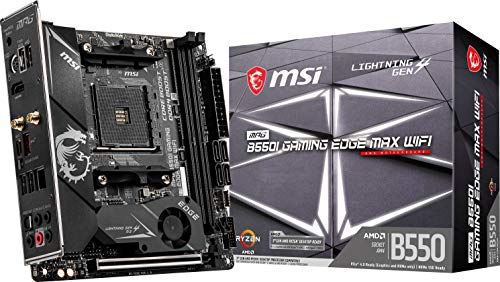
- Best for: Builders who want a no-fuss Ryzen 5000 Mini-ITX board that works out of the box.

- Best for: Builders with a specific need for X570 chipset lanes and dual Gen4 storage.
All 3 Picks at a Glance
| Product | Specs | Action |
|---|---|---|
| ASUS ROG Strix B550-I Gaming |
| Check price on Amazon |
| MSI MPG B550I Gaming Edge MAX WiFi |
| Check price on Amazon |
| ASUS ROG Strix X570-I Gaming |
| Check price on Amazon |
Key takeaways
- Compare the best Mini-ITX AM4 motherboards for compact Ryzen builds, with PCIe 4.0, dual M.2 slots, Wi-Fi 6 and strong power delivery in every pick today.
What's inside
As an Amazon Associate I earn from qualifying purchases. This post may contain affiliate links at no extra cost to you.
A Mini-ITX AM4 motherboard squeezes a full desktop Ryzen platform into a square roughly 17 by 17 centimeters, with one graphics slot, two memory slots, and tight storage and networking. Choose well and you get a compact machine that games, streams, and works without compromise; choose poorly and you face BIOS headaches or a board that cannot feed your processor under load.
The best Mini-ITX AM4 motherboards share the same strengths: a B550 or X570 chipset, PCIe 4.0 for the graphics card and at least one fast NVMe drive, two M.2 slots, built-in Wi-Fi, and power delivery strong enough for a Ryzen 7 or Ryzen 9. This guide compares four boards from ASUS, Gigabyte, and MSI that meet that bar.
Disclosure: As an Amazon Associate, we earn from qualifying purchases.
Quick Picks at a Glance
| Product | Key Spec | Best For |
|---|---|---|
| ASUS ROG Strix B550-I Gaming | B550, PCIe 4.0, DDR4 5100+ OC, Wi-Fi 6, 2.5Gb LAN | Best overall |
| Gigabyte B550I AORUS PRO AX | B550, direct 8-phase 90A VRM, dual M.2, fully passive cooling | Quiet builds |
| MSI MPG B550I Gaming Edge MAX WiFi | B550, Ryzen 5000 ready, dual M.2, Wi-Fi AX | Ryzen 5000 builds |
| ASUS ROG Strix X570-I Gaming | X570, dual PCIe 4.0 M.2, Wi-Fi 6, SupremeFX audio | Maximum connectivity |
How to Choose
Chipset: B550 or X570
B550 covers nearly every compact AM4 build, with a PCIe 4.0 graphics slot and a PCIe 4.0 M.2 slot from the processor, plus lanes for a second M.2 drive. X570 adds PCIe 4.0 lanes from the chipset, which only matters if you run several fast NVMe drives at once.
Power delivery and cooling
A Mini-ITX board has little room for heatsinks, so voltage regulation quality matters more than on a full-size board. Look for a teamed or direct phase design with solid power stages and a chunky VRM heatsink. In a case with limited airflow, fully passive cooling avoids extra noise, while a small VRM fan trades a little noise for lower temperatures.
Memory support
Every Mini-ITX AM4 board has exactly two DDR4 slots, with a maximum of 64GB. That is plenty for gaming and most productivity work, but buy the capacity you want up front, since there is no room to add sticks later. Faster memory helps Ryzen performance, so check the rated overclocking speed.
Storage layout
Dual M.2 slots are the most useful feature on a compact board, because they let you skip bulky SATA drives entirely. On B550 boards, the front M.2 slot usually runs at PCIe 4.0 speed while the rear slot runs at PCIe 3.0, which is fine for a second drive holding games or media. A front-slot heatsink stops a fast NVMe drive from throttling.
Networking
Built-in Wi-Fi is almost essential on a Mini-ITX board, because there is no spare slot for a wireless card. Wi-Fi 6 is standard across these picks, with some revisions of the Gigabyte board shipping with Wi-Fi 6E instead. A 2.5Gb Ethernet port future-proofs wired networking, while older X570 boards may still carry a 1Gb port.
BIOS and processor compatibility
AM4 is a mature platform, and that creates one real trap: older stock may ship with a BIOS that predates Ryzen 5000 processors. A board with BIOS FlashBack or Q-Flash Plus lets you update the firmware from a USB stick with no processor installed. Check the board revision and shipped BIOS version before ordering.
Rear I/O and internal headers
Count the USB ports on the rear panel and compare them with the devices you plug in every day. A front-panel USB-C header is easy to overlook and frustrating to miss, because many modern small cases put a USB-C port on the front and it will not work without the matching header. Display outputs matter if you use a Ryzen processor with integrated graphics.
Top Picks
ASUS ROG Strix B550-I Gaming
- Best for: Builders who want the most complete B550 Mini-ITX board with no meaningful feature gaps.
Builders who want the most complete B550 Mini-ITX board with no meaningful feature gaps.
The ROG Strix B550-I Gaming is the most complete B550 Mini-ITX package here. It pairs an 8+2 power stage design with a PCIe 4.0 graphics slot and a Gen4 M.2 slot up front, so a current graphics card and a fast NVMe drive both run at full speed, while a second M.2 slot on the rear runs at Gen3 speed for a games library. ASUS rates memory support up to DDR4 5100 and beyond with overclocking, for a maximum of 64GB. Networking is handled by Intel Wi-Fi 6 with Bluetooth 5.1 and a 2.5Gb Ethernet port, and SupremeFX S1220A audio rounds out the package. BIOS FlashBack lets you update firmware without a processor installed. The trade-off is a small fan inside the VRM heatsink stack.
Pros:
– PCIe 4.0 for both the graphics slot and the front M.2 slot
– Highest memory rating here at DDR4 5100 and beyond with overclocking
– Wi-Fi 6, Bluetooth 5.1, and 2.5Gb Ethernet included
– BIOS FlashBack removes BIOS version worries for Ryzen 5000
Cons:
– Second M.2 slot runs at PCIe 3.0 speed, not Gen4
– Small VRM heatsink fan adds a moving part
– Premium positioning, rarely a budget price
Gigabyte B550I AORUS PRO AX
The Gigabyte B550I AORUS PRO AX is the quiet builder’s board. Its direct 8-phase digital power design uses 90A Smart Power Stages, arranged as six phases for the processor and two for the system-on-chip, cooled by an extended heatsink, a heatpipe, and a metal backplate with no fan anywhere on the board. Storage matches the best B550 boards, with a PCIe 4.0 x4 M.2 slot at the front under a Thermal Guard and a Gen3 x4 slot at the back, plus four SATA ports. Memory support runs to DDR4 5300 with overclocking, and the board carries 2.5GbE wired networking, the Realtek ALC1220-VB audio codec, and DisplayPort plus dual HDMI outputs. Q-Flash Plus updates the BIOS with no processor, memory, or graphics card fitted. Verify the wireless module before ordering: revisions moved from Intel Wi-Fi 6 on revision 1.0 to Wi-Fi 6E on later revisions.
Pros:
– Direct 8-phase VRM with 90A power stages under fully passive cooling
– Dual M.2 slots with a Thermal Guard on the front slot
– Q-Flash Plus for processor-free BIOS updates
– Three display outputs suit integrated-graphics builds
Cons:
– Wireless module changes by revision, so check before ordering
– Only two memory slots, like every Mini-ITX board
– Rear M.2 slot is fiddly to reach
Best for: Quiet small form factor builds where a fanless board and strong power delivery matter most.
MSI MPG B550I Gaming Edge MAX WiFi
- Best for: Builders who want a no-fuss Ryzen 5000 Mini-ITX board that works out of the box.
Builders who want a no-fuss Ryzen 5000 Mini-ITX board that works out of the box.
MSI MPG B550I Gaming Edge MAX WiFi
The MSI MPG B550I Gaming Edge MAX WiFi is the straightforward pick here. It is sold as ready for AMD Ryzen 5000 Series processors, which removes the most common setup headache on the AM4 platform. It is a true Mini-ITX design on the AMD B550 chipset with an AM4 socket, DDR4 support, a PCIe 4.0 graphics slot, and dual M.2 slots. Connectivity covers the essentials: Wi-Fi AX wireless networking, 2.5Gb Ethernet, USB 3.2 Gen 2 ports, and an HDMI output for processors with integrated graphics. Its main limitation is the same one every board in this class shares: a single PCIe slot and two memory slots.
Pros:
– Sold as Ryzen 5000 ready, so no BIOS update is needed for current Ryzen chips
– PCIe 4.0 graphics slot and dual M.2 storage in a Mini-ITX footprint
– Wi-Fi AX and 2.5Gb Ethernet cover wired and wireless networking
– Sensible feature set without premium extras you may not use
Cons:
– Fewer standout extras than the ASUS and Gigabyte boards
– Only one PCIe slot and two memory slots, like all Mini-ITX boards
– Check the revision and accessories on the listing
ASUS ROG Strix X570-I Gaming
- Best for: Builders with a specific need for X570 chipset lanes and dual Gen4 storage.
Builders with a specific need for X570 chipset lanes and dual Gen4 storage.
The ASUS ROG Strix X570-I Gaming is the premium option here. Unlike the B550 boards here, it gives you PCIe 4.0 lanes from the chipset as well as from the processor, with dual M.2 slots that both support PCIe 4.0 speeds, so a two-drive NVMe setup never compromises on bandwidth. It supports AMD Ryzen 5000, 4000 G-Series, 3000, and 2000 Series desktop processors on the AM4 socket, with an 8+2 teamed power design and a maximum of 64GB of DDR4 memory across two slots. Networking includes Wi-Fi 6 and Intel Gigabit Ethernet, with SupremeFX audio and Aura Sync lighting. Wired networking tops out at 1Gb rather than 2.5Gb, and the chipset uses an active cooling fan.
Pros:
– Dual PCIe 4.0 M.2 slots with no Gen3 compromise on the second drive
– Broad processor support from Ryzen 2000 through Ryzen 5000
– Wi-Fi 6, SupremeFX audio, and polished ROG BIOS and software
– Strong 8+2 power design for higher-end Ryzen processors
Cons:
– Wired networking is limited to 1Gb Ethernet
– Active chipset fan adds noise and a moving part
– Scarce now that production has ended
Comparison Table
| Feature | ASUS ROG Strix B550-I | Gigabyte B550I AORUS PRO AX | MSI MPG B550I Edge MAX WiFi | ASUS ROG Strix X570-I |
|---|---|---|---|---|
| Chipset | AMD B550 | AMD B550 | AMD B550 | AMD X570 |
| Socket | AM4 | AM4 | AM4 | AM4 |
| Memory | DDR4 up to 5100+ OC, 64GB max | DDR4 up to 5300 OC, 64GB max | DDR4, 64GB max | DDR4 up to 5100 OC, 64GB max |
| M.2 slots | 2 (PCIe 4.0 + 3.0) | 2 (PCIe 4.0 + 3.0) | 2 (PCIe 4.0) | 2 (PCIe 4.0 + 4.0) |
| Wi-Fi | Wi-Fi 6, Bluetooth 5.1 | Wi-Fi 6 or 6E by revision | Wi-Fi AX | Wi-Fi 6 |
| Wired LAN | 2.5Gb | 2.5Gb | 2.5Gb | 1Gb |
| BIOS flash without CPU | Yes, BIOS FlashBack | Yes, Q-Flash Plus | Check listing | Check listing |
| Board cooling | Small VRM fan | Fully passive | Passive chipset | Active chipset fan |
Buying Guide
Match the board to your processor
A Ryzen 5 5600 or Ryzen 5 5600X runs happily on any board here, so choose on features instead. Step up to a Ryzen 7 5800X3D or Ryzen 9 5900X and the VRM matters more: the Gigabyte board’s direct 8-phase 90A design and the ASUS B550-I’s 8+2 stages both give comfortable headroom with enough case airflow. For a Ryzen 5 5600G, the Gigabyte board’s triple outputs are the best fit.
Match the board to your case
Mini-ITX cases vary enormously, from tiny sandwich-layout cases to larger towers. Before ordering, confirm that your processor cooler clears the VRM heatsink and the front M.2 heatsink. If your case has a front USB-C port, treat a matching header on the board as a requirement.
Storage planning for a small case
Two M.2 drives cover most compact builds entirely. Put your operating system and most-played games on the front Gen4 drive, and use the rear slot for a larger, slower drive holding the rest of your library. Only add SATA drives if you need bulk storage for media, since each one adds cables. Install the rear M.2 drive before you mount the board, since the slot sits on the back.
BIOS and the Ryzen 5000 question
Older retail stock may carry a BIOS that predates Ryzen 5000 support. The safest choices are boards with processor-free BIOS update features, such as the ASUS B550-I, the Gigabyte board, or the Ryzen 5000 ready MSI MAX. If you buy a used board, ask the seller which BIOS version is installed.
Common mistakes to avoid
The most common mistake is buying an AM5 board by accident. Check the socket on the listing: AM4 boards use DDR4 memory, while AM5 boards use DDR5, so the memory type is a quick cross-check. Also verify the front USB-C header and second M.2 slot on the specification page. Finally, confirm the condition, the revision, the warranty, and the return policy before you commit.
Frequently Asked Questions
Are Mini-ITX AM4 motherboards still worth buying?
Yes, if you already own a Ryzen processor and DDR4 memory, or you can buy them at good value. A compact B550 board gives you PCIe 4.0, dual M.2 storage, and Wi-Fi 6 without the cost of moving to a new platform.
What is the difference between B550 and X570 Mini-ITX boards?
B550 gives you PCIe 4.0 from the processor for the graphics slot and one M.2 slot, with the second M.2 slot running at PCIe 3.0. X570 adds PCIe 4.0 lanes from the chipset, so both M.2 slots can run at Gen4 speed. For most builds the difference is invisible, and B550 boards run cooler with no chipset fan.
Can a Mini-ITX AM4 board handle a Ryzen 9 processor?
Yes, provided the board has a solid power design and your case has reasonable airflow. These boards use 8-phase or 8+2 power designs that handle high-end Ryzen processors.
Do I need to update the BIOS for a Ryzen 5000 processor?
It depends on the board and when it was manufactured. Boards sold as Ryzen 5000 ready, such as the MSI MAX board here, should work out of the box. Older stock may need an update, which is easy on boards with BIOS FlashBack or Q-Flash Plus.
How much memory can a Mini-ITX AM4 board take?
All Mini-ITX AM4 boards have two DDR4 slots with a maximum of 64GB. For gaming, 32GB in a two-stick kit is the sweet spot, while 64GB suits heavy multitasking and content creation. Buy the capacity you want up front.
Conclusion
The best Mini-ITX AM4 motherboard for most compact Ryzen builds is the ASUS ROG Strix B550-I Gaming, because it combines PCIe 4.0 storage and graphics, the highest memory rating here, Wi-Fi 6, 2.5Gb Ethernet, and BIOS FlashBack. If silence is your priority, the Gigabyte B550I AORUS PRO AX matches it on storage and networking while cooling its strong 8-phase power design entirely passively. The MSI MPG B550I Gaming Edge MAX WiFi is the simplest path to a working Ryzen 5000 system, and the ASUS ROG Strix X570-I Gaming remains the right call when you need dual PCIe 4.0 M.2 slots.
Whichever board you choose, verify the socket, the BIOS version, the board revision, and the condition of the listing before ordering.
Related guides
More from Amazon
Programs that pair well with the guide above. Offers and eligibility are set by Amazon and may change.
Free shipping on eligible items, Prime Video and more. Eligible new members can start with a free trial.
Start a Prime free trialAudiobooks and podcasts to listen to on the go. Eligible new members can start with a free trial.
Try Audible freeAd-free music streaming. Eligible new subscribers can start with a free trial.
Try Music Unlimited freeA free business account with business pricing and bulk-buying tools for work, shop or home office.
Create a business accountAs an Amazon Associate we earn from qualifying purchases.









Write Your Review
No reviews yet. Be the first to share your experience!