
Key takeaways
- Find the best startup cameras for product videos, video meetings, livestreams, and social content. Compare four cameras built for small teams creating content.
What's inside
As an Amazon Associate I earn from qualifying purchases. This post may contain affiliate links at no extra cost to you.
A startup lives or dies on how clearly it can show its work. The best startup cameras in this guide are cameras for a startup team creating content: product videos, video meetings, livestreams, social clips, and recorded walkthroughs. That is the angle here. This is not a guide to cameras for a paid photography business, and it does not repeat the mirrorless cameras covered in the site’s photo-business article. The cameras below are picked for a small team that needs to look sharp on camera every day, with gear that is quick to set up and easy to hand to a teammate.


The quick answer: start with the Logitech MX Brio if most of your camera time is meetings and livestreams from a desk. Add the DJI Osmo Pocket 3 when your content leaves the office, and the Sony ZV-1 when you want polished product videos with shallow depth of field. The OBSBOT Tiny 2 suits a founder or presenter who moves around while talking. Most small teams only need one or two of these, not all four.
Quick Picks
Our Short List of 3
All 4 Picks at a Glance
| Product | Specs | Action |
|---|---|---|
| Logitech MX Brio Ultra HD 4K Webcam (B0BFJ4CRKD) | Check price on Amazon | |
| DJI Osmo Pocket 3 (B0CG19QXWD) | Check price on Amazon | |
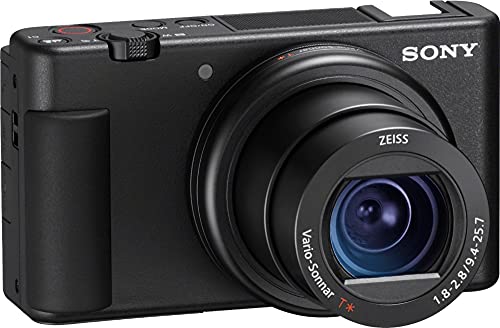 Sony ZV-1 (B08965JV8D) | Check price on Amazon | |
 OBSBOT Tiny 2 (B0C3B6ZR1V) | Check price on Amazon |
How to Choose the Best Startup Cameras
A startup camera earns its place by saving time. Your team will use it between other jobs, often with no dedicated camera operator, so ease of use matters as much as image quality. The points below map directly to the work a startup actually does with a camera.
Match the Camera to the Job
Start by listing what you will film in a typical week. A founder who spends the day on video calls needs a webcam that mounts on a monitor and connects over USB. A team filming short social clips around the office needs a camera that can be picked up, pointed, and put down in seconds. A product team recording demos needs a camera that holds focus on a small object and records clean audio. One camera rarely covers all three jobs well, so buy for the job you do most often and add a second camera only when a different job becomes regular work.
Resolution and Frame Rate
Resolution decides how much detail survives cropping and compression on video platforms. A 4K camera gives you room to crop a wide shot into a close-up without losing sharpness, which is useful when one recording has to serve as both a full-length video and a short vertical clip. Frame rate matters when anything moves: 60 frames per second keeps hand demos and walkthroughs smooth, while 120 frames per second lets you slow a moment down for a product reveal. For a static talking-head video, 30 frames per second is plenty. Do not chase the highest numbers on the box; chase the numbers that match your most common shot.
Autofocus and Stabilization
A startup camera must keep the subject sharp without constant attention. Face and object tracking keeps a presenter in focus while they move, and a gimbal or digital stabilization keeps handheld footage watchable. The DJI Osmo Pocket 3 uses a three-axis mechanical gimbal, which is the strongest form of stabilization in this guide. The webcams and the Sony ZV-1 rely on fast autofocus instead, which suits desk work and tripod shots. If your content involves walking, unboxing, or showing a workspace, stabilization should sit near the top of your list. If your camera sits on a desk or a tripod all day, autofocus and low-light handling matter more.
Audio Built Into the Camera
Viewers forgive a slightly soft image far sooner than they forgive muffled audio. Every camera in this guide includes a built-in microphone, but they are not equal. Dual noise-reducing microphones, as on the Logitech MX Brio, suit a quiet office and a video call. A directional microphone with a wind screen, as on the Sony ZV-1, suits voiceover and outdoor clips. The DJI Osmo Pocket 3 supports external microphone accessories for interviews and noisy locations. Before you buy, check whether the camera has a microphone input, because a camera with no input locks you into its built-in audio forever. Many startups pair a camera with a separate USB microphone for desk recording and keep the built-in microphone as a backup.
Lighting and Low-Light Handling
Most startups film in ordinary offices with mixed lighting: a window on one side, ceiling lights above, and a screen glowing in front. A camera with a larger sensor and automatic light correction holds up far better in that setting than a small-sensor camera. The Sony ZV-1 and the DJI Osmo Pocket 3 both use 1-inch sensors, which gather more light than a typical webcam sensor. The OBSBOT Tiny 2 uses a 1/1.5-inch sensor with HDR light correction for the same reason. The Logitech MX Brio uses AI-enhanced image processing to brighten dark rooms and correct color. Even so, a simple light placed in front of the presenter does more for image quality than any sensor upgrade, so budget for one light before you budget for a second camera.
Connection, Software, and Workflow
A camera that fights your software wastes the time it was meant to save. Webcams connect over USB and work directly with video call and streaming software, which makes them the simplest choice for a desk. The Sony ZV-1 can also work as a webcam over USB, so the same camera can film a product video in the morning and join a call in the afternoon. The DJI Osmo Pocket 3 records to a memory card and connects to a phone app for framing and transfer, which suits a social workflow. Check three things before you buy: the cable type in the box, whether the camera works with the meeting and streaming software your team already uses, and how footage gets from the camera to the computer where it will be edited. A camera with a smooth transfer path gets used; a camera with a clumsy one sits in a drawer.
Size, Weight, and Who Will Carry It
A startup camera travels: to a client office, a trade show, a supplier visit, or a team offsite. The DJI Osmo Pocket 3 weighs 179 grams and fits in a jacket pocket, so it is the easiest camera here to carry everywhere. The Sony ZV-1 is a compact camera at around 10.4 ounces, small enough for a bag but large enough to hold steady. The webcams stay on a desk and weigh almost nothing in practice, but they cannot leave the desk. Think about who will carry the camera and where it will live between shoots. A camera that lives on a desk gets used for meetings; a camera that lives in a bag gets used for everything else.
The Best Startup Cameras Reviewed
Logitech MX Brio Ultra HD 4K Webcam (B0BFJ4CRKD)
The Logitech MX Brio is the desk camera for a startup. It records 4K at 30 frames per second or 1080p at 60 frames per second, uses dual noise-reducing microphones, and connects over USB-C. A privacy shutter covers the lens when the camera is not in use, and Show Mode tilts the view down to a desk so you can show a document, a prototype, or a product sample during a call without moving the camera. It works with Microsoft Teams, Zoom, and Google Meet.
Who it suits: founders and teams who spend most of their camera time on video calls, livestreams, and recorded meetings from a fixed desk. It is the simplest camera in this guide to set up, and the one most likely to be used every day.
Who should skip it: anyone whose content happens away from a desk. A webcam cannot follow you around an office, a warehouse, or a trade show floor, and it has no battery or memory card for recording on its own.
DJI Osmo Pocket 3 (B0CG19QXWD)
The DJI Osmo Pocket 3 is a pocket vlogging camera built around a 1-inch CMOS sensor, 4K video at up to 120 frames per second, and a three-axis mechanical gimbal. A 2-inch rotatable touchscreen handles framing and settings, and face and object tracking keep a moving presenter centered in the frame. Fast focusing locks onto a product quickly, which suits unboxings and demos. The whole camera weighs 179 grams.
Who it suits: startups that publish social video, behind-the-scenes clips, and founder updates filmed on the move. It is the strongest choice here for walking shots, office tours, and event coverage, and it turns a single person into a full camera crew.
Who should skip it: teams that mainly need a desk camera for calls. The Pocket 3 is a recording camera first, so it adds steps to a meeting workflow that a webcam handles with one cable. It also records to a memory card, so footage must be transferred before editing.
Sony ZV-1 (B08965JV8D)
The Sony ZV-1 is a compact camera designed for content creators, with a 20.1 MP 1-inch sensor, a 24-70 mm ZEISS lens, 4K HDR video, and a flip screen that faces forward for self-recording. A built-in directional microphone with a wind screen captures clear voice audio, and the touchscreen handles focus and settings. It also works as a webcam for live video streaming, so one camera can cover both recorded product videos and live calls.
Who it suits: startups that want polished product videos, tutorials, and talking-head content with background blur and strong low-light handling. It is the best choice here when image quality is the priority and you are willing to learn a few camera settings.
Who should skip it: teams that want a camera with no learning curve. The ZV-1 has more settings than a webcam or a pocket camera, and it needs a memory card, a charged battery, and a tripod or grip to work at its best. If your team will only ever film from a desk, a webcam is simpler.
OBSBOT Tiny 2 (B0C3B6ZR1V)
The OBSBOT Tiny 2 is a 4K PTZ webcam with a 1/1.5-inch sensor, a two-axis gimbal, and AI tracking that follows a presenter around a room. It records at up to 60 frames per second, corrects HDR lighting automatically, and responds to voice and gesture control, so a presenter can start, stop, and reframe a shot without walking back to the computer. It connects over USB and works with meeting and streaming software.
Who it suits: founders and trainers who present while standing, whiteboard sessions, product walkthroughs, and any recording where the speaker moves. It is the only camera in this guide that can follow you, which makes it a strong fit for a small team filming demos without a camera operator.
Who should skip it: teams that film mostly from a seated position at a desk, where a fixed webcam gives the same result with fewer moving parts. It also suits a single presenter better than a group, since its tracking follows one subject at a time.
What to Check Before You Buy
Check the listing carefully before you order. Camera listings often show several versions of the same model: a standard version, a creator combo with accessories, a bundle with a memory card, and a renewed version. Confirm the exact set name and the items in the box, and make sure the listing is for a new camera rather than a renewed one. For the DJI Osmo Pocket 3, the standard set and the Creator Combo are different listings with different contents. For the Sony ZV-1, many listings are bundles that add a case, a card, and a grip, so read the included-items list rather than the headline.
Check the connection and the cable. The webcams in this guide connect over USB, while the Sony ZV-1 and the DJI Osmo Pocket 3 also need a memory card and a charged battery for recording. Confirm that your computer has the right port, and that the cable in the box is long enough to reach from the camera to the computer. A short cable is a common surprise with desk webcams.
Check the software your team already uses. A webcam should work with your meeting and streaming software without extra drivers. A camera used as a webcam may need a setting changed or an app installed before it appears as a video source. Test the full path once, from camera to software to recording, before the day you need it for a real meeting or a client call.
Check audio before you commit to a setup. Record a one-minute clip in the room where you will actually film, then listen to it on headphones. Office echo, air conditioning, and keyboard noise show up clearly in a test clip and barely register while you are filming. If the built-in microphone picks up too much room noise, a separate microphone or a quieter room will help more than a different camera.
Check storage and batteries. Video files are large, and a 4K camera fills a memory card faster than most people expect. Keep a spare memory card and, for the battery cameras, a spare battery or a USB power source nearby. A camera that runs out of storage halfway through a product demo wastes the whole shoot.
Frequently Asked Questions
What is the best startup camera for video meetings?
The Logitech MX Brio is the strongest pick for video meetings in this guide. It mounts on a monitor, connects over USB-C, records 4K at 30 frames per second or 1080p at 60 frames per second, and includes dual noise-reducing microphones and a privacy shutter. It works directly with Microsoft Teams, Zoom, and Google Meet, so there is no extra setup between the camera and the call.
Can one camera handle both meetings and social video?
Yes, with a trade-off. The Sony ZV-1 works as a webcam for calls and records polished 4K video for social content, but it needs a memory card, a charged battery, and a few minutes of setup each time you switch jobs. Many small teams pair a webcam for daily meetings with a pocket camera or a compact camera for social video, because each camera stays ready for its own job.
Do startups need a 4K camera?
Not always. A 4K camera helps when you crop footage, publish on large screens, or reuse one recording across several formats. For a standard video call or a talking-head clip viewed on a phone, 1080p at 60 frames per second looks smooth and clean. Buy 4K when you plan to crop or reframe footage; otherwise, spend the difference on lighting or a microphone.
Is a webcam enough for product videos?
A webcam can record a simple product demo at a desk, especially with good lighting and a separate microphone. It cannot match a compact camera for background blur, low-light handling, or close-up detail, and it cannot leave the desk. If product videos are a regular part of your content, a camera like the Sony ZV-1 or the DJI Osmo Pocket 3 will show the product more clearly.
What accessories should a startup buy with its first camera?
Start with a tripod or a small grip, a memory card with enough capacity for a full shoot, and one light placed in front of the presenter. Add a separate microphone when audio matters, which is most of the time for product videos and interviews. Buy accessories after you have filmed with the camera for a week, so you buy for the problems you actually hit rather than the ones you guessed at.
Bottom Line
The best startup cameras are the ones your team will actually use every week. For most small teams, that means a webcam on the desk and a portable camera in a bag. The Logitech MX Brio covers meetings and livestreams, the DJI Osmo Pocket 3 covers social video on the move, the Sony ZV-1 covers polished product videos, and the OBSBOT Tiny 2 covers hands-free presenting. Pick the camera for the job you do most often, check the listing and the connection before you order, and add lighting and a microphone before you add a second camera.
Disclosure: As an Amazon Associate, we may earn from qualifying purchases.
Related guides
More from Amazon
Programs that pair well with the guide above. Offers and eligibility are set by Amazon and may change.
Free shipping on eligible items, Prime Video and more. Eligible new members can start with a free trial.
Start a Prime free trialAudiobooks and podcasts to listen to on the go. Eligible new members can start with a free trial.
Try Audible freeAd-free music streaming. Eligible new subscribers can start with a free trial.
Try Music Unlimited freeA free business account with business pricing and bulk-buying tools for work, shop or home office.
Create a business accountAs an Amazon Associate we earn from qualifying purchases.










Write Your Review
No reviews yet. Be the first to share your experience!