
Key takeaways
- Find the best chap vlogging cameras for YouTube and TikTok, with flip screens, fast autofocus, mic inputs, and 4K video for creators on a tight budget.
What's inside
As an Amazon Associate I earn from qualifying purchases. This post may contain affiliate links at no extra cost to you.
Introduction
The best chap vlogging cameras are the cheap vlogging cameras that help a new creator start filming without a large outlay. The word “chap” in this keyword is a misspelling of “cheap,” so this guide covers budget-friendly cameras built for vlogging: cameras with a screen that flips toward the person filming, autofocus that holds on a face, a microphone that captures clear speech, and video quality that looks good on YouTube and TikTok.

A vlogging camera is judged differently from a general stills camera. It must handle talking to the lens, walking while filming, and recording in rooms with ordinary light. The screen, autofocus, and audio decide whether a take is usable: a face that drifts soft or speech that sounds muffled ruins a clip.
The quick answer is to start with the Sony ZV-1 if the goal is a compact camera that is ready to vlog straight out of the box, with a side flip-out screen, fast eye autofocus, and a microphone jack. Creators who want to change lenses as their channel grows should look at the Sony ZV-E10 kit or the Canon EOS M50 Mark II instead. Creators who want the smallest camera that still records 4K video should look at the Canon PowerShot G7 X Mark III, and creators with the tightest budget should look at the ORDRO M3.
This guide covers five cameras. Every one is a vlogging camera with a screen that faces the creator, and every one records 4K video. None is an action camera, a webcam, or a security camera, and none is listed here as an accessory. A desk setup needs good autofocus and clean audio, while a travel vlog needs a light body and steady footage.
Quick Picks
Our Short List of 3
All 5 Picks at a Glance
| Product | Specs | Action |
|---|---|---|
| Sony ZV-1 (B08965JV8D) | Check price on Amazon | |
| Canon EOS M50 Mark II (B08KSKV35C) | Check price on Amazon | |
 Sony ZV-E10 Kit (B09BBLH4SG) | Check price on Amazon | |
 Canon PowerShot G7 X Mark III (B07TKNCQZL) | Check price on Amazon | |
 ORDRO M3 (B0CPHRKN9Z) | Check price on Amazon |
How to Choose
A Screen That Faces You
A flip screen is the single most useful vlogging feature. A side flip-out screen turns fully toward the person in front of the lens, so framing, focus, and recording status can be checked at a glance. A tilt screen flips up for low-angle selfies and down for high shots, which works well for travel and desk filming but can be hidden behind a microphone or a tripod plate. A vari-angle screen flips out to the side and rotates, which suits both self-filming and filming other people.
Autofocus That Stays on Your Face
Vlogging autofocus has one job: keep the creator’s face sharp while the camera moves and the background changes. Eye autofocus locks onto an eye and follows it, which helps when the creator turns, walks, or leans toward the camera. Product showcase modes shift focus from a face to an object held up to the lens. Contrast-detection autofocus can hunt in low light, while phase-detection and hybrid systems tend to hold focus more smoothly.
Audio: Built-In Microphone and Microphone Input
Clear audio is what separates a watchable vlog from a frustrating one. A forward-facing built-in microphone picks up the voice of the person in front of the camera and reduces sound from behind it. A wind screen over the microphone cuts wind noise outdoors. A 3.5mm microphone input is the upgrade path that matters most: it allows a shotgun microphone for interviews or a lavalier microphone for a speaker to be added later.
Sensor Size and Low Light
Sensor size shapes how a camera handles dim rooms, evening streets, and indoor lighting. A 1-inch sensor gathers more light than the small sensor in a phone or a budget camcorder, which gives cleaner footage indoors and a softer background behind the subject. An APS-C sensor gathers more light still, and it gives a stronger background blur and better low-light footage, which suits creators who film indoors or in the evening.
Stabilization and Handling
A vlogging camera is often held at arm’s length or carried while walking, so stabilization matters. Optical stabilization steadies the lens, digital stabilization steadies the footage in the camera, and a combination of the two works best for walking shots. A light camera with a comfortable grip gets carried more often, and a pocketable camera is more likely to be there when something worth filming happens.
Battery, Storage, and Livestreaming
Vlogging drains batteries faster than stills photography, because the screen, autofocus, and microphone run continuously. A camera that charges over USB can be topped up from a power bank between takes, and a spare battery is a practical addition for a full day of filming. Most vlogging cameras record to a memory card, so check the card type and the largest card size the camera accepts, and format the card in the camera before first use. Livestreaming and webcam modes suit creators who stream as well as record.
The Best Best Chap Vlogging Cameras Reviewed
Sony ZV-1 (B08965JV8D)
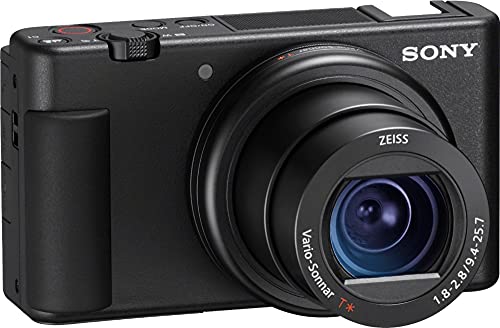
The Sony ZV-1 is the best overall compact vlogging camera in this guide, because it was designed for creators from the start. It has a 20.1MP stacked 1-inch sensor, a 24-70mm f/1.8-2.8 ZEISS lens, and a side flip-out 3.0-inch touchscreen that turns fully toward the person filming. Fast hybrid autofocus with Real-time Eye Autofocus holds on a face while the creator moves, and the Product Showcase setting shifts focus from a face to an object held up to the lens. The forward-directional onboard microphone comes with a detachable wind screen, and a standard 3.5mm microphone jack allows an external microphone to be added later. The camera records 4K HDR video, and image stabilization suppresses shake while walking.
The main trade-off is battery life, which is short by the standards of larger cameras, so a spare battery or a power bank is a sensible companion. The lens is fixed, so creators who later want a wide-angle lens or a long zoom will need a different camera. This camera suits a beginner who wants a compact camera ready to film straight out of the box, and a desk creator who wants reliable eye autofocus. It should be skipped by anyone who needs interchangeable lenses, anyone who films long continuous takes, and anyone who wants a large sensor for evening filming.
Canon EOS M50 Mark II (B08KSKV35C)
The Canon EOS M50 Mark II is the best mirrorless vlogging kit on a budget in this guide. It has a 24.1MP APS-C sensor, Dual Pixel CMOS autofocus, and a vari-angle touchscreen that flips out to the side for self-filming. The kit includes the EF-M 15-45mm lens, so the camera is ready to film as soon as a memory card is fitted. A microphone input allows an external microphone to be added, and Wi-Fi and Bluetooth allow files to be moved to a phone for quick editing and sharing. The camera records 4K video and Full HD video,
The larger APS-C sensor gives cleaner footage in dim rooms and a softer background than the 1-inch sensors in the compact cameras in this guide, which suits creators who film indoors or in the evening. The main trade-off is that 4K video is cropped, which narrows the field of view, so creators who film 4K at arm’s length should check the framing first. This camera suits a creator who wants a larger sensor and interchangeable lenses without leaving the budget range, and a desk creator who films in a dim room. It should be skipped by anyone who films mostly in 4K at arm’s length, anyone who wants a pocketable camera, and anyone who plans to build a large lens collection.
Sony ZV-E10 Kit (B09BBLH4SG)
The Sony ZV-E10 kit is the best interchangeable-lens vlogging camera for growing channels in this guide. It has a 24.2MP APS-C sensor, fast hybrid autofocus, and a vari-angle flip-out LCD, with vlog-specific features built into the camera. The kit includes the 16-50mm power zoom lens, so the camera is ready to film as soon as a memory card is fitted. The camera records 4K video, and its autofocus holds on a face while the creator walks, turns, or holds up an object. A microphone input and a headphone jack allow audio to be upgraded and monitored, and the microphone wind screen in the box cuts wind noise outdoors.
The interchangeable lens mount is the reason to choose this camera over a fixed-lens compact. The main trade-offs are the lack of in-body stabilization, which means steady footage depends on the lens or a gimbal, and the slow kit lens, which gathers less light than a fast prime. This camera suits a creator who plans to grow a channel and add lenses over time, and a creator who wants microphone monitoring while filming. It should be skipped by anyone who wants a pocketable camera, anyone who films handheld while walking without a gimbal, and anyone who wants a camera that is ready with no extra lenses to buy.
Canon PowerShot G7 X Mark III (B07TKNCQZL)
The Canon PowerShot G7 X Mark III is the best pocket vlogging camera for travel in this guide. It has a 20.1MP 1-inch stacked CMOS sensor, a DIGIC 8 processor, and a 4.2x optical zoom lens covering 24-100mm at f/1.8-2.8. It records 4K 30p video and Full HD video at 120p for slow motion, and its 3-inch tilt touchscreen flips up for selfies and angled shots. A microphone input allows an external microphone to be added, and the camera supports livestreaming to YouTube and vertical video for mobile viewing.
The G7 X Mark III suits a travel creator who wants a small camera with a zoom lens, a creator who films vertical video for social platforms, and a creator who wants livestreaming built into the camera. The main trade-offs are the tilt screen, which does not flip out to the side like the screens on the Sony cameras in this guide, and contrast-detection autofocus, which can hunt in low light where the Sony models hold focus more smoothly. Listings for this camera can also be hard to find in stock, so buyers should confirm the exact listing, the included accessories, and the seller before ordering. It should be skipped by anyone who needs a side flip-out screen, anyone who films fast-moving subjects in dim light, and anyone who wants interchangeable lenses.
ORDRO M3 (B0CPHRKN9Z)
The ORDRO M3 is the lowest-cost starter in this guide, and it is the pick for a first-time vlogger who wants to learn framing, talking to the camera, and editing before committing to a larger purchase. It records 4K video and stills, and its 3.5-inch flippable touchscreen turns toward the person filming. Face tracking follows the subject, and Wi-Fi allows files to be moved to a phone. A 64GB card is included in the box, and the large-capacity battery supports long recording sessions.
This camera is a camcorder-style handheld rather than a compact stills camera, which is a partial fit for this guide: it is marketed for YouTube vlogging and it has the flippable screen and face tracking that vlogging needs, but its small sensor trails the 1-inch and APS-C sensors in this guide for low-light footage, and no microphone input is stated on the listing, so there is no wired path to add an external microphone later. This camera suits a student and a first-time creator who wants the lowest-cost way to start a channel. It should be skipped by anyone who needs a microphone input, anyone who films in dim rooms, and anyone who wants the image quality of a larger sensor.
What to Check Before You Buy
Check the screen first. Confirm whether it flips out to the side, tilts up, or rotates fully, and check whether it is a touchscreen. Check the microphone input and the headphone jack next, because those two sockets decide whether audio can be upgraded and monitored later. Check the memory card, the battery, and the cables in the box: a card is usually needed, and a second battery is useful for a long day of filming.
Check the listing itself before ordering. Confirm the exact model number, the included lens or accessories, and the seller. Some cameras in this guide are sold as a body alone, some as a kit with a lens, and some as a bundle with a card and a case, and those versions are not the same purchase. A renewed listing should be read as a renewed listing, not as a new camera. Finally, record a short practice clip indoors and outdoors, and play it back with sound before the first real vlog.
Frequently Asked Questions
What does “chap” mean in this guide?
“Chap” is a misspelling of “cheap.” This guide covers budget-friendly vlogging cameras: cameras with a flip screen, good autofocus, and a microphone input, chosen for creators who want to start a channel without a large outlay.
Can I start vlogging with a phone instead of a camera?
Yes, a modern phone records good video and is always at hand. A dedicated vlogging camera adds a flip screen for framing, a larger sensor for dim rooms, a microphone input for better audio, and a grip shaped for filming. A phone suits a creator who is testing whether vlogging is enjoyable. A dedicated camera suits a creator who films often and wants better audio, better low-light footage
Do I need 4K video for YouTube vlogging?
For most beginner channels, Full HD video is enough, and it keeps file sizes manageable and editing simple. 4K video gives sharper footage and room to crop in editing, which helps when a take needs reframing. Every camera in this guide records 4K video, so the choice is about autofocus, audio, and handling rather than resolution alone.
Do I need an external microphone?
Not at first. The built-in microphones on the Sony and Canon cameras in this guide record clear speech for desk filming and quiet rooms, and the Sony ZV-1 includes a wind screen for outdoor use. An external microphone becomes worth adding when filming outdoors, in noisy rooms, or at a distance from the camera. Choose a camera with a microphone input if an external microphone is a likely future purchase.
What else do I need besides the camera?
A memory card, a spare battery, and a small tripod or grip cover most first vlogs. A memory card should be fast enough for 4K video and formatted in the camera before first use. A spare battery covers a long day of filming, and a small tripod or grip steadies desk shots and walking shots. Start with the card, the battery, and the grip, and add the rest as the channel grows.
Bottom Line
The best chap vlogging cameras in this guide all share the same idea: a screen that faces the creator, autofocus that holds on a face, clear audio, and 4K video, at a cost that suits a new channel. The Sony ZV-1 is the best overall compact choice. The Canon EOS M50 Mark II and the Sony ZV-E10 kit add larger sensors and interchangeable lenses. The Canon PowerShot G7 X Mark III adds a pocketable body and livestreaming for travel. The ORDRO M3 is the lowest-cost way to start.
Choose by screen and audio first, then by sensor size. If filming will happen mostly at a desk or in a dim room, the larger sensors in the Canon M50 Mark II and the Sony ZV-E10 deserve a close look. If filming will happen while walking or travelling, the compact Sony ZV-1 and the pocketable Canon G7 X Mark III are easier to carry. If the budget is the main limit and the goal is to learn the basics, the ORDRO M3 is a fair starting point.
Disclosure: As an Amazon Associate, we may earn from qualifying purchases.
Related guides
More from Amazon
Programs that pair well with the guide above. Offers and eligibility are set by Amazon and may change.
Free shipping on eligible items, Prime Video and more. Eligible new members can start with a free trial.
Start a Prime free trialAudiobooks and podcasts to listen to on the go. Eligible new members can start with a free trial.
Try Audible freeAd-free music streaming. Eligible new subscribers can start with a free trial.
Try Music Unlimited freeA free business account with business pricing and bulk-buying tools for work, shop or home office.
Create a business accountAs an Amazon Associate we earn from qualifying purchases.










Write Your Review
No reviews yet. Be the first to share your experience!