
Our Short List of 3
All 3 Picks at a Glance
| Product | Specs | Action |
|---|---|---|
 Wyze Bulb Cam (ASIN: B0DPKWGZ1D) | Check price on Amazon | |
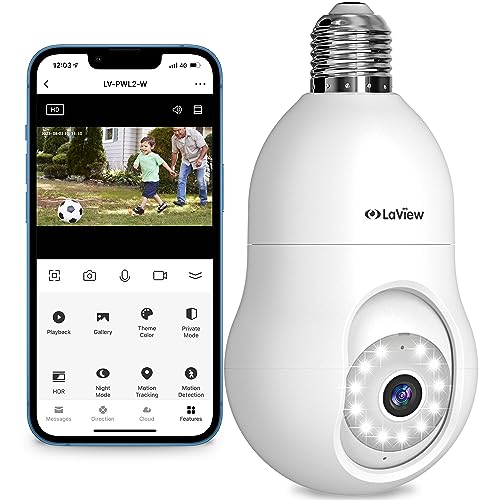 LaView 4MP Bulb Security Camera (ASIN: B0BDFRNZY6) | Check price on Amazon | |
 EDSACE Light Bulb Camera 2-Pack (ASIN: B0CJXT6CD8) | Check price on Amazon |
Key takeaways
- Compare the best light bulb cameras that screw into a standard socket — 2K and 4MP video, color night vision, pan coverage and app viewing, explained.
What's inside
As an Amazon Associate I earn from qualifying purchases. This post may contain affiliate links at no extra cost to you.
Disclosure: As an Amazon Associate, we may earn from qualifying purchases made through links on this page, at no additional cost to you.
Best Light Bulb Cameras
A light bulb camera is a security camera built into a bulb-shaped body that screws into an ordinary light socket. The socket gives it power around the clock, so there are no batteries to recharge and no new wiring to run, and the camera connects to your home WiFi so you can watch a live feed, review recordings and get motion alerts from a phone app. For a porch, garage, hallway or rental where drilling and cabling are awkward, it is one of the simplest camera installs there is.
The trade-offs are just as clear. The camera only works while the socket has power, so a wall switch left off or a dimmer in the circuit can take it offline. Most models are fixed-view or motorized pan cameras rather than true wide-angle systems, and almost all of them work on 2.4GHz WiFi only. The four cameras below cover the main approaches: a name-brand bulb that doubles as a real porch light, a 4MP pan-and-tilt model with strong night vision, and two dual-band two-packs for covering more than one socket.
Quick Picks
- Wyze Bulb Cam (ASIN: B0DPKWGZ1D) — View on Amazon — 2K video plus a genuinely usable 800-lumen dimmable light, from an established smart-home brand.
- LaView 4MP Bulb Security Camera (ASIN: B0BDFRNZY6) — View on Amazon — the sharpest sensor here at 4MP, with a 360° pan, Starlight color night vision and an IP67 rating.
- EDSACE Light Bulb Camera 2-Pack (ASIN: B0CJXT6CD8) — View on Amazon — a dual-band WiFi 6 two-pack with 360° panoramic view and auto tracking via the EseeCloud app.
- AONUOWE Light Bulb Security Camera 2-Pack (ASIN: B09YTG56Y6) — View on Amazon — a dual-band 1080p two-pack with motorized pan and tilt and an IP67 housing.
The Cameras in Detail
Wyze Bulb Cam (ASIN: B0DPKWGZ1D)
The Wyze Bulb Cam (model WYZEC-BC) is the pick that behaves most like an actual light bulb. It screws into a standard E26 socket and combines a 2K camera with an 800-lumen dimmable LED at a warm 3000K color temperature, so the porch or entryway it watches is also properly lit. The camera records 2K video with a wide 160° field of view and color night vision rated to 35 feet, and the lens position is fixed — you aim it by hand when you install it rather than panning from the app. It connects over 2.4GHz WiFi only and is controlled through the Wyze app, with support for Amazon Alexa, Google Assistant and IFTTT.
For recording, the Bulb Cam supports continuous local recording to a microSD card of up to 256GB, with Wyze’s optional cloud service available if you want event clips stored off the device. Motion detection can trigger the built-in siren and the light itself, which makes it a reasonable deterrent package for a front porch. The unit draws 15 watts, measures about 8.8 inches long, and is designed for outdoor fixtures such as porch downlights and wall lights. One firm limit from the listing: it must not be used on a dimmer switch, and like every socket camera it needs the fixture’s switch left on.
Highlights:
– Real, dimmable 800-lumen warm light alongside the camera — most rivals barely glow
– 2K resolution with a wide 160° view and color night vision
– Local microSD recording up to 256GB without needing a subscription
– Works with Alexa, Google Assistant and IFTTT
Considerations:
– Fixed camera angle, adjusted by hand only — no app-controlled pan
– 2.4GHz WiFi only, and it cannot be used with a dimmer switch
– Advanced detection features sit behind Wyze’s optional paid cloud tier
LaView 4MP Bulb Security Camera (ASIN: B0BDFRNZY6)
The LaView 4MP Bulb Security Camera (model LV-PWL2-W) is a camera first and a light second. Its 4MP sensor records at 2560 × 1440, the highest resolution in this roundup, and the motorized body pans a full 360° with motion tracking that follows movement across roughly a 355° arc. Night performance is the headline: a Starlight sensor delivers full-color video in low light out to about 33 feet, backed by a 110dB audible alarm siren, two-way audio and motion alerts through the LaView app. It is rated IP67 for indoor and outdoor use and is compatible with Amazon Alexa and Google Assistant.
The LaView screws into a standard E27 socket (110V–240V) and connects on 2.4GHz WiFi only. Recordings can go to a microSD card (up to 128GB) or to LaView’s cloud. Two honest caveats from the listing and its documentation: the built-in light is modest — treat this as a camera that happens to emit some light, not as a replacement for a porch bulb — and motion tracking outdoors can be triggered by leaves or animals, so plan to tune the sensitivity and detection zones. The camera draws just 4 watts and weighs about 12.6 ounces.
Highlights:
– 4MP (2560 × 1440) video — the most detail of any pick here
– 360° pan with motion tracking and Starlight color night vision
– IP67 rating suits exposed outdoor sockets
– Loud 110dB siren plus two-way audio
Considerations:
– 2.4GHz WiFi only
– Built-in light is weak; it will not light a room or porch by itself
– Motion tracking can false-trigger on foliage and animals outdoors
EDSACE Light Bulb Camera 2-Pack (ASIN: B0CJXT6CD8)
The EDSACE two-pack is built for covering two sockets at once — a front porch and a garage, for example. Each unit records 1080p video with a 360° panoramic view, color night vision rated to 33 feet, auto tracking and motion detection with phone alerts, plus two-way audio through the EseeCloud app. The standout specification is the radio: these cameras support both 2.4GHz and 5GHz WiFi and are listed as WiFi 6 devices, which gives them more flexibility in homes where the 2.4GHz band is crowded or the router sits far from the socket.
Each camera draws power from the socket like the others here, uses LED lighting, and weighs in as part of a 1.15-pound two-pack. The EseeCloud app is a generic platform app rather than a brand ecosystem, so expect a more utilitarian experience than the Wyze app, and check the listing for the current storage options (SD card and cloud) before ordering. Resolution is the compromise: at 1080p these cameras capture noticeably less fine detail than the 2K Wyze or the 4MP LaView, which matters if you need to identify faces at a distance.
Highlights:
– Two cameras in the box for multi-socket coverage
– Dual-band 2.4GHz/5GHz WiFi 6 — rare in this category
– 360° panoramic view with auto tracking and two-way audio
– Color night vision to about 33 feet
Considerations:
– 1080p resolution is a step down from the 2K and 4MP picks
– EseeCloud is a generic app with a plainer interface
– Confirm the variant and pack count on the listing before ordering
AONUOWE Light Bulb Security Camera 2-Pack (ASIN: B09YTG56Y6)
This two-pack (branded Cemueo on the listing, manufactured by AONUOWE) pairs 1080p video with a motorized pan-and-tilt head: roughly 355° of horizontal pan and 60° of tilt, driven from the app, so a single socket can sweep most of a room or yard. Like the EDSACE set, it supports dual-band 2.4GHz and 5GHz WiFi, which helps in homes with congested 2.4GHz networks. The housing carries an IP67 rating, and the cameras offer full-color night vision alongside infrared, two-way audio and motion-only alerts.
The cameras screw into a standard E27 base (110V–240V) and are controlled entirely through the companion app on iOS or Android. Video is stored as MPEG-4, and the listing positions the pair for outdoor use while noting suitability for living rooms, kitchens and offices as well. As with most budget two-packs, the app experience and long-term software support are less certain than with a major brand, and 1080p detail is adequate for awareness — who is there and what they are doing — rather than for reading small details at range.
Highlights:
– Motorized pan and tilt you can drive from the app
– Dual-band 2.4GHz/5GHz WiFi
– IP67 housing for outdoor sockets
– Two cameras in the box
Considerations:
– 1080p resolution limits fine detail
– Generic-brand app; long-term support is less predictable
– Motion-only alerts — no person-specific detection on the listing
A Quick Note on Legal and Responsible Use
Only install a bulb camera in spaces you own or are authorized to monitor, such as your own porch, garage or living areas. Never point one at a place where people have a reasonable expectation of privacy — bathrooms, bedrooms of guests, a neighbor’s windows or yard — and be aware that many jurisdictions restrict recording audio even more strictly than video: several US states require the consent of all parties to record a conversation, and two-way audio features fall under those rules. If you rent, employ household help or host guests, check your local and state laws and tell people the camera is there. Rules vary, and this guide is not legal advice.
How to Choose
Start with the socket, not the camera. A bulb camera needs a fixture that stays powered, so rule out sockets controlled by a dimmer and think about whether the wall switch will realistically stay on. Downward-facing porch fixtures and open garage sockets are the natural homes for these cameras; enclosed globes can trap heat and block the lens, so check the fixture style against the camera’s length — some models are nearly nine inches long.
Next, decide between a fixed wide view and a motorized pan. A fixed camera like the Wyze watches one scene with no moving parts and nothing to re-aim, which suits a single doorway. A pan-and-tilt model like the LaView or AONUOWE covers a wider area from one socket but only looks one way at a time, and tracking can be fooled by pets and foliage. Then check your WiFi: most bulb cameras are 2.4GHz only, so if your router is far from the socket or your 2.4GHz band is saturated, a dual-band model such as the EDSACE or AONUOWE removes one common failure point. Finally, decide how you will record — a microSD card keeps footage local with no ongoing cost, while cloud plans add off-site backup and smarter alerts for a fee.
Key Specifications Explained
Resolution. 1080p is enough to see that someone is at the door; 2K and 4MP (2560 × 1440) preserve the detail that identifies a face or a package label across a driveway. If the camera covers a long approach, resolution is the spec that matters most.
Field of view and pan range. A fixed 160° lens sees a whole porch at once. A 360° pan figure means the motorized head can rotate to face any direction — the live view at any moment is still the lens’s own field of view, not a full circle.
Night vision. Infrared night vision is black-and-white. Color night vision uses a sensitive sensor (LaView’s Starlight, for example) plus whatever ambient light or built-in LED is available, and it preserves clothing and car colors that often matter more than raw brightness.
WiFi band. 2.4GHz reaches farther through walls; 5GHz is faster and less crowded but shorter-ranged. Dual-band cameras give you the choice per socket.
Storage. A microSD card records locally and keeps working if the internet drops, but the card leaves with the camera if it is stolen. Cloud storage protects the footage off-site and usually unlocks person or package detection, at the cost of a subscription.
Weather rating. An IP67 rating means the camera is dust-tight and can withstand temporary immersion, which is more than enough for rain on an exposed socket. Unrated cameras belong under a covered fixture.
Setup and Use Tips
Screw the camera in with the power off, then restore power and pair it with the app while standing near the router; you can move through the house afterward to confirm the signal holds at the socket. Name each camera by its location in the app right away — “Porch” and “Garage” age better than “Camera 1.” Set motion detection zones to exclude streets, sidewalks and swaying trees, and start with medium sensitivity: bulb cameras sit high and see a lot of incidental movement.
Put a label or a piece of tape over the wall switch that feeds the socket, or fit a switch guard, so nobody kills the camera by habit. If the fixture is on a timer, remove the timer or set it to always-on. Format the microSD card in the camera before relying on it, and check the live view after dark at least once — that is when you will find out whether a nearby light source is blowing out the image or the night vision range is honestly matched to your space. Finally, update the camera’s firmware and change any default passwords during setup, and keep the app account behind a strong, unique password with two-factor authentication where offered.
Common Mistakes to Avoid
The most common failure is installing the camera in a socket controlled by a dimmer or a motion-sensor fixture, which starves or cycles its power. A second is buying a 2.4GHz-only camera for a socket at the edge of the home’s WiFi coverage and blaming the camera for dropouts that are really a network problem — check signal at the socket with your phone first. Third, do not expect the camera half of a bulb camera to replace real lighting unless the listing states a serious lumen output; most emit a token glow. Fourth, remember the camera sees only where it points: a fixed bulb camera aimed at the door does not watch the driveway, no matter how wide the marketing makes the angle sound. And avoid mounting a non-weather-rated camera in an open outdoor socket where rain can reach it.
FAQ
Do light bulb cameras work with the light switch off?
No. The socket is the camera’s only power source, so the switch feeding it must stay on. The light itself can usually be turned on and off from the app without cutting power to the camera.
Will a light bulb camera fit any socket?
They fit standard E26/E27 screw bases, but check the fixture: the camera is longer and wider than a normal bulb, so small enclosed fixtures, globes and some recessed cans will not close over it or may block its view.
Do I need a subscription for a light bulb camera?
Not for live viewing or microSD recording on the models listed here. Subscriptions typically add cloud storage and advanced alerts such as person or package detection. Check the listing for what is included before you buy.
Can a light bulb camera work outdoors?
Yes, if it carries a weather rating such as IP67, as the LaView and AONUOWE picks do, or if the socket is under a covered fixture. Keep unrated models indoors or under cover.
Is 1080p enough, or should I choose 2K or 4MP?
For a hallway or a small room, 1080p is generally sufficient. For a porch covering a driveway or street, 2K or 4MP preserves the extra detail that makes footage useful, and it is worth prioritizing.
Final Verdict
For most people, the Wyze Bulb Cam is the most complete package: it is the only pick here that genuinely replaces a porch light, its 2K video and 160° view cover an entryway without moving parts, and local recording avoids a subscription. If image detail is the priority — a long driveway, a wide yard — the LaView 4MP earns its place with the sharpest sensor, a full pan and strong color night vision, as long as you supply your own lighting. When you need two sockets covered or your network favors 5GHz, the EDSACE and AONUOWE two-packs trade resolution for coverage and dual-band flexibility. Whichever you choose, confirm the socket stays powered, check your WiFi signal at the fixture, and plan your recording method before the camera goes in.
Related guides
More from Amazon
Programs that pair well with the guide above. Offers and eligibility are set by Amazon and may change.
Free shipping on eligible items, Prime Video and more. Eligible new members can start with a free trial.
Start a Prime free trialAudiobooks and podcasts to listen to on the go. Eligible new members can start with a free trial.
Try Audible freeAd-free music streaming. Eligible new subscribers can start with a free trial.
Try Music Unlimited freeA free business account with business pricing and bulk-buying tools for work, shop or home office.
Create a business accountAs an Amazon Associate we earn from qualifying purchases.










Write Your Review
No reviews yet. Be the first to share your experience!