
Our Short List of 3

- Best for: Blink owners who need a reliable mid-range signal boost.
- AC1200 dual band, up to 1.2Gbps
- Covers up to 1500 sq. ft
- Supports up to 30 devices
- OneMesh compatible
- Best for: Small homes with one or two Blink cameras at the edge of Wi-Fi range.
- AC750 dual band, up to 750Mbps
- Covers up to 1200 sq. ft
- Dual band 5GHz and 2.4GHz
- Ethernet port included

- Best for: A single Blink camera in one weak spot near the house.
- AC750 dual band, up to 750Mbps
- Covers up to 600 sq. ft
- Supports up to 15 devices
- FastLane technology
All 5 Picks at a Glance
| Product | Specs | Action |
|---|---|---|
| TP-Link RE315 |
| Check price on Amazon |
| TP-Link RE220 |
| Check price on Amazon |
| NETGEAR EX2800 |
| Check price on Amazon |
 TP-Link RE600X |
| Check price on Amazon |
 Blink Add-On Sync Module 2 |
| Check price on Amazon |
Key takeaways
- Compare the 5 best WiFi extenders for Blink cameras, with coverage, dual-band speed, and Blink hub options to fix weak signals.
What's inside
As an Amazon Associate I earn from qualifying purchases. This post may contain affiliate links at no extra cost to you.
A Blink camera that keeps dropping offline is usually a Wi-Fi problem, not a camera problem: the camera sits at the edge of the router’s range, the signal weakens through exterior walls, and motion clips fail to upload. The buyer is really choosing between extending the network toward the camera and strengthening the Blink system itself with its own hub. Coverage area, band choice, and placement decide whether the fix works or just moves the dead zone a few feet further out.
This guide is for Blink owners whose outdoor or far-room cameras lose connection, buffer, or miss motion events. The products below were chosen from the names and specifications shown on each product page on Amazon, with attention to coverage, dual-band support, Ethernet ports, and Blink compatibility.
Quick Picks
As an Amazon Associate we earn from qualifying purchases
| Product | Best for | Key spec from title |
|---|---|---|
| TP-Link RE315 | Everyday Blink signal boost | AC1200 dual band, up to 1500 sq. ft |
| TP-Link RE220 | Small homes with a few Blink cameras | AC750 dual band, up to 1200 sq. ft |
| NETGEAR EX2800 | Compact plug-in fix for one dead zone | AC750 dual band, up to 600 sq. ft |
| TP-Link RE600X | Wi-Fi 6 coverage for many devices | AX1800 Wi-Fi 6, up to 1500 sq. ft |
| Blink Add-On Sync Module 2 | Strengthening the Blink system itself | Local USB storage, up to 10 devices |
How to Choose
Place the extender halfway, not beside the camera
An extender only helps when it sits where the router signal is still strong enough to repeat, which is roughly halfway between the router and the Blink camera. Placing it beside the camera repeats a weak signal and changes nothing, while placing it too close to the router wastes its range. Walk the path between router and camera with a phone, watch the signal bars, and choose an outlet where the signal is still solid. A smart signal indicator on the extender helps confirm the spot during setup.
Use the 2.4GHz band for Blink cameras
Blink cameras connect on the 2.4GHz band, which travels much further through walls than 5GHz but carries less speed overall. An extender that broadcasts both bands lets the camera use 2.4GHz for range while phones and laptops use 5GHz for faster speed. Dual-band extenders also support FastLane-style modes that dedicate one band to the router link and the other to devices. Before buying, confirm the extender supports 2.4GHz well, because a 5GHz-only device cannot help a Blink camera at all.
Check coverage against the real distance
Manufacturers state coverage in open space, but walls, floors, and appliances cut that figure sharply in a real home. A camera mounted outside a brick wall or at the far end of a garden needs more stated coverage than the straight-line distance suggests. Measure the distance from router to camera, add a margin for walls, and choose an extender rated well above that figure. An extender rated for 1,500 square feet suits a detached garage camera better than one rated for 600 square feet.
Consider the Sync Module for local storage
The Blink Sync Module 2 is not a Wi-Fi extender, but it strengthens a Blink system by adding local USB storage and managing up to ten cameras from one central hub. It reduces dependence on cloud clips and keeps recordings at home, which matters when the internet connection is unreliable. Owners who already have decent Wi-Fi but want local storage and a single hub should consider it alongside an extender, since the two solve different problems and work well together.
The 5 Best Options
TP-Link RE315
- Best for: Blink owners who need a reliable mid-range signal boost.
- AC1200 dual band, up to 1.2Gbps
- Covers up to 1500 sq. ft
- Supports up to 30 devices
- OneMesh compatible
Blink owners who need a reliable mid-range signal boost.
OneMesh only works with a compatible TP-Link router, so check the router model first.
The TP-Link RE315 is the everyday fix for a Blink camera that drops offline, with AC1200 dual-band speed, coverage up to 1,500 square feet, and support for up to 30 devices. Its OneMesh support joins the extender to a compatible TP-Link router under one network name, so the camera roams without reconnecting. One Ethernet port lets the owner wire a nearby device or use the extender as an access point, and the wall-plug design fits a hallway outlet halfway to the camera.
Watch out for: OneMesh only works with a compatible TP-Link router, so check the router model first.
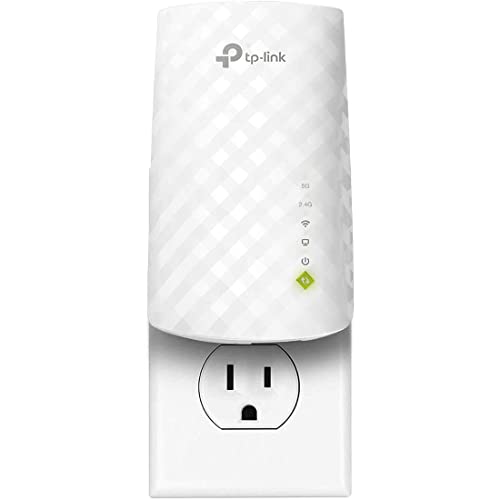
TP-Link RE220
- Best for: Small homes with one or two Blink cameras at the edge of Wi-Fi range.
- AC750 dual band, up to 750Mbps
- Covers up to 1200 sq. ft
- Dual band 5GHz and 2.4GHz
- Ethernet port included
Small homes with one or two Blink cameras at the edge of Wi-Fi range.
AC750 speed is enough for cameras but tight for several 4K streams at once, so keep heavy streaming on the main router.
The TP-Link RE220 suits smaller homes with a few Blink cameras, with AC750 dual-band speed, coverage up to 1,200 square feet, and an Ethernet port for a wired device. Its compact wall-plug body fits a hallway or spare-room outlet, and OneMesh support keeps one network name when paired with a compatible TP-Link router. The 2.4GHz band reaches through interior walls to an outdoor Blink camera, while the 5GHz band serves phones and laptops indoors.
Watch out for: AC750 speed is enough for cameras but tight for several 4K streams at once, so keep heavy streaming on the main router.
NETGEAR EX2800
- Best for: A single Blink camera in one weak spot near the house.
- AC750 dual band, up to 750Mbps
- Covers up to 600 sq. ft
- Supports up to 15 devices
- FastLane technology
A single Blink camera in one weak spot near the house.
The 600 square foot coverage suits one room or a near-outdoor camera, not a distant garage or garden.
The NETGEAR EX2800 is the compact plug-in fix for a single dead zone, with AC750 dual-band speed and a wall-plug design that disappears into an outlet. Its FastLane technology dedicates one band to the router link and the other to devices, which helps keep camera clips uploading smoothly. The extender works with any router, so Blink owners do not need to replace their existing network gear to fix one weak spot.
Watch out for: The 600 square foot coverage suits one room or a near-outdoor camera, not a distant garage or garden.
TP-Link RE600X
- Best for: Homes with many Blink cameras and smart devices sharing one network.
- AX1800 Wi-Fi 6, up to 1.8Gbps
- Covers up to 1500 sq. ft
- Supports up to 30 devices
- Gigabit Ethernet port
Homes with many Blink cameras and smart devices sharing one network.
Wi-Fi 6 benefits appear only when the router also supports Wi-Fi 6, so check the router first.
The TP-Link RE600X is the Wi-Fi 6 option for homes with many devices, with AX1800 dual-band speed, coverage up to 1,500 square feet, and support for up to 30 devices. Its gigabit Ethernet port connects a wired device at full speed, AP mode turns a wired connection into a wireless signal, and OneMesh support keeps one network name with a compatible router. Wi-Fi 6 handles many connected cameras and smart devices more efficiently than older standards, which helps when several Blink cameras share the network.
Watch out for: Wi-Fi 6 benefits appear only when the router also supports Wi-Fi 6, so check the router first.
Blink Add-On Sync Module 2
- Best for: Blink owners who want local storage and a single hub for all their cameras.
- Local USB storage for video clips
- Supports up to 10 Blink devices
- No additional fee for local clip viewing
- Works with the Blink Home Monitor app
Blink owners who want local storage and a single hub for all their cameras.
This is a hub, not a Wi-Fi extender, so it cannot fix a weak router signal on its own.
The Blink Add-On Sync Module 2 is Blink’s own hub, and it belongs in this guide because it strengthens the Blink system at its centre rather than extending Wi-Fi. It stores video clips locally on a USB drive, supports up to ten Blink devices, and lets the owner view clips in the Blink app or on a computer with no additional fee. Placing the module closer to the cameras can improve their connection, and local storage keeps recordings available even when the internet drops.
Watch out for: This is a hub, not a Wi-Fi extender, so it cannot fix a weak router signal on its own.
Which One Fits Your Situation
One Blink camera keeps going offline outside
The TP-Link RE315 fits a single outdoor camera best, because its 1,500 square foot coverage and dual-band signal reach through an exterior wall to a porch or garden camera. Place it in a hallway outlet halfway between router and camera. The NETGEAR EX2800 is the cheaper alternative when the camera sits just outside one room, since its 600 square foot coverage covers that shorter distance.
Several Blink cameras around a larger home
The TP-Link RE600X leads for larger homes, because its Wi-Fi 6 capacity and 1,500 square foot coverage handle several cameras plus phones, laptops, and smart devices without choking. The TP-Link RE315 is the fallback when the router does not support Wi-Fi 6, since it offers the same coverage with the older AC1200 standard at a lower cost.
A small flat with one weak corner
The TP-Link RE220 suits a small flat, because its 1,200 square foot coverage and compact plug-in body fix one weak corner without taking up space. The NETGEAR EX2800 is the alternative when the weak spot is a single room, since its smaller coverage matches that shorter distance and its FastLane mode keeps camera clips uploading steadily.
Wanting local storage as well as a stronger signal
The Blink Add-On Sync Module 2 is the pick for local storage, because it keeps clips on a USB drive at home and manages up to ten cameras from one hub. Pair it with the TP-Link RE315 when the Wi-Fi signal also needs help, since the extender fixes the connection while the module handles storage, and the two solve different problems together.
Common Mistakes
- Placing the extender beside the camera instead of halfway between router and camera.
- Buying a 5GHz-only extender, which cannot help Blink cameras that use the 2.4GHz band.
- Trusting the stated coverage figure without allowing for walls, floors, and appliances.
- Expecting the Sync Module 2 to fix a weak Wi-Fi signal, when it is a hub and storage device.
- Forgetting to check whether OneMesh needs a compatible TP-Link router to work.
Frequently Asked Questions
Do Blink cameras work with any WiFi extender?
Yes, Blink cameras connect to standard 2.4GHz Wi-Fi, so any extender that broadcasts a 2.4GHz network works with them. Dual-band extenders are the best choice, because they give the camera the long-range 2.4GHz band while faster devices use 5GHz. Set the extender up with the same network name and password, or give it a distinct name and reconnect the camera to it.
Where should I place a WiFi extender for a Blink camera?
Place it roughly halfway between the router and the camera, at an outlet where the router signal is still strong. An extender placed beside the camera repeats a weak signal and helps little, while one placed too close to the router wastes its range. Use the extender’s signal indicator during setup, and test the camera’s live view after moving it.
Will an extender fix a Blink camera that misses motion events?
Often, yes, when missed events come from a weak connection that fails to upload clips. A stronger signal lets the camera stay connected and send motion clips reliably. If the camera still misses events after the signal improves, check motion sensitivity, detection zones, and battery level in the Blink app, since those cause missed events too.
Does the Blink Sync Module 2 replace a WiFi extender?
No, the Sync Module 2 is a hub that adds local USB storage and manages up to ten Blink devices, but it does not extend Wi-Fi range. It helps when the goal is local recording and a single hub, while an extender helps when the camera sits too far from the router. Many owners use both together, with the extender fixing the signal and the module handling storage.
Related guides
More from Amazon
Programs that pair well with the guide above. Offers and eligibility are set by Amazon and may change.
Free shipping on eligible items, Prime Video and more. Eligible new members can start with a free trial.
Start a Prime free trialAudiobooks and podcasts to listen to on the go. Eligible new members can start with a free trial.
Try Audible freeAd-free music streaming. Eligible new subscribers can start with a free trial.
Try Music Unlimited freeA free business account with business pricing and bulk-buying tools for work, shop or home office.
Create a business accountAs an Amazon Associate we earn from qualifying purchases.










Write Your Review
No reviews yet. Be the first to share your experience!