
Key takeaways
- Find the best and cheapest video cameras with microphones for family, school, and YouTube filming, with built-in mics, long zoom, and simple controls.
What's inside
As an Amazon Associate I earn from qualifying purchases. This post may contain affiliate links at no extra cost to you.
Introduction
The best and cheapest video cameras with microphones are simple camcorders that record clear speech without an extra microphone, a separate recorder, or a complicated setup. A family camcorder should be ready the moment an event starts, and its built-in microphone should capture voices, school performances, and everyday conversation well enough that the footage is worth keeping.

Many buyers start with a phone, then find that a phone is easy to interrupt and hard to hold steady for a long event. A dedicated video camera has a grip shaped for recording, a flip-out screen for framing, optical zoom for reaching across a room or a field, and a microphone placed to pick up sound from the direction the lens is pointing. When the microphone is built in, there is no cable to forget and no second device to charge.
The quick answer is to start with the type of built-in microphone, not with the longest zoom. A stereo microphone suits most family and classroom use because it gives voices a natural sense of space. A zoom microphone suits school plays and sports because it narrows its focus as the lens moves closer. A microphone with wind-noise reduction suits outdoor filming because wind can overwhelm speech in seconds. After the microphone, look at optical zoom, stabilization, screen size, battery life, and storage.
This guide covers five camcorders that fit the brief: every one is a video camera with a built-in microphone, every one records Full HD video, and every one is aimed at buyers who want good value and simple operation. None is an action camera, a DSLR, or a mirrorless camera, and none is listed here as an external microphone. Think about where the camera will be used most. A living room needs a wide lens and a microphone for voices at close range. A sports field needs long zoom and a microphone that stays focused on the action.
Quick Picks
Our Short List of 3
All 5 Picks at a Glance
| Product | Specs | Action |
|---|---|---|
| kimire Video Camera Camcorder (B08K7HFMX4) | Check price on Amazon | |
| Panasonic HC-V180K (B01A60SXSO) | Check price on Amazon | |
 Sony HDRCX405 Handycam (B00RK7ODDG) | Check price on Amazon | |
 Sony HDRCX440 Handycam (B00R5LHB0Y) | Check price on Amazon | |
 Canon VIXIA HF R800 (B01N7OAH3I) | Check price on Amazon |
How to Choose
Built-In Microphone Type First
The microphone decides whether a clip is pleasant to watch again. A built-in stereo microphone records left and right sound and suits voices, music, and room ambience. A zoom microphone changes its pickup pattern as the lens zooms in, which helps when the subject is far away. A microphone with wind-noise reduction helps outdoors. If a model has no microphone input, the built-in microphone is the only audio path, so its quality matters even more.
Zoom That Matches the Distance
Optical zoom uses the lens to bring a subject closer without losing detail in the same way that digital zoom does. A 30x optical zoom is ample for a classroom and a family gathering. A 50x optical zoom reaches across a sports field and a large hall. A 57x advanced zoom goes further still, although a tripod becomes more important at the far end of the range. Look for the optical zoom figure first, and check the widest angle as well, because a wide lens makes a small room easy to film.
Video Resolution and Frame Rate
All five picks record Full HD 1080p video, which remains a sensible choice for family archives, school projects, and beginner channels. Frame rate matters for movement. A camcorder that records 1080p at 60 frames per second gives smoother motion for sports and children running across a garden. A camcorder that records 1080p at 15 frames per second, like the kimire starter model below, is best for slow, steady scenes and for learning the basics.
Screen and Stabilization
A flip-out screen makes self-filming and low-angle shots far easier. A screen that rotates 270 degrees lets the person in front of the lens see the framing. A touch screen speeds up menu changes, although buttons can be easier to use in cold weather. Optical stabilization steadies the image while walking or zooming, and it is especially helpful at long zoom settings where small hand movements become large shakes on screen.
Storage, Battery, and File Transfer
Most camcorders in this guide record to a memory card, so check the card type and the largest card size the camera accepts. A card is usually bought separately, and it should be formatted in the camera before first use. The Sony HDRCX440 also has 8GB of internal memory, which is useful as a backup when a card is full or left at home. A second battery is a practical addition for weddings, school days, and holidays.
Microphone Input and Future Upgrades
A microphone input is not essential for a first camcorder, but it changes what the camera can grow into. The Canon VIXIA HF R800 has a microphone input, so a shotgun microphone or a lavalier microphone can be added later. The other models in this guide rely on their built-in microphones, which keeps them simple, but leaves no wired upgrade path. Buyers who are certain they will want an external microphone later should weigh that input more heavily than a small difference in zoom.
Size, Weight, and Simple Controls
A camcorder that is light and easy to hold gets used more often. Look at weight, grip shape, and the position of the zoom lever and record button. A beginner benefits from an automatic mode that handles exposure and focus, a pause function that stops and resumes recording without creating a new file, and a menu that can be learned in one sitting. For a value purchase, simple controls and a comfortable grip usually matter more than a long list of effects.
The Best Best and Cheapest Video Cameras With Microphones Reviewed
kimire Video Camera Camcorder (B08K7HFMX4)
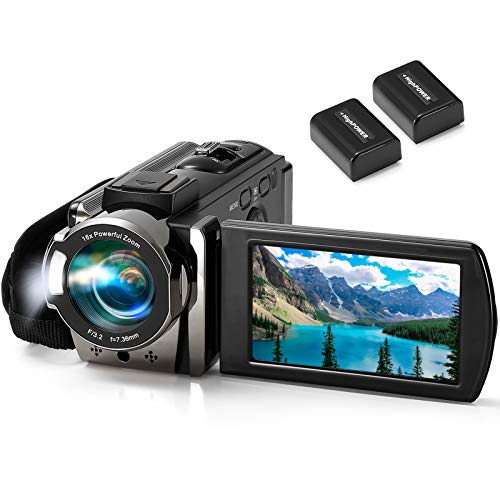
The kimire Video Camera Camcorder is the lowest-cost starter in this guide. It records Full HD 1080p video and 24MP still photos, and its 3.0-inch LCD rotates 270 degrees for self-filming. The listing states that it has a built-in microphone, and it lists video sound as supported, so speech is recorded with the video and no extra audio device is needed. Two rechargeable batteries are included, and the camera can record while charging.
The key trade-off is frame rate. Full HD video is recorded at 15 frames per second, while 720p video is available at 30 frames per second. That makes this model best for slow, steady subjects: a child reading, a birthday speech, a garden tour, or a first vlog at a desk. The zoom is 16x digital zoom, not optical zoom, and the camera does not support an external microphone. This camcorder suits a first-time buyer, a student, and a parent buying a first camera for a teenager. It should be skipped by anyone who films fast action, anyone who needs long optical zoom, and anyone who plans to add an external microphone later.
Panasonic HC-V180K (B01A60SXSO)
The Panasonic HC-V180K is the long-zoom family pick. It records Full HD 1080p video with a 50x optical zoom and up to 90x intelligent zoom, a 1/5.8-inch back-side illuminated sensor, and a 2.7-inch touch-enabled LCD. Its built-in microphone is a 2-channel zoom microphone that works with the zoom lens, so audio stays focused on the subject as the lens moves closer. That is useful for school plays, sports days, and wildlife. Five-axis image stabilization helps keep the picture steady while walking or zooming.
The camera is compact and light for its zoom range. It records to SD, SDHC, and SDXC cards, and it has HDMI and USB connections. There is no microphone input, so the built-in 2-channel zoom microphone is the only audio path. There is also no Wi-Fi, so files move by cable or by card reader. This camcorder suits parents filming school events and grandparents recording grandchildren at a distance. It should be skipped by anyone who needs a microphone input or wireless transfer to a phone.
Sony HDRCX405 Handycam (B00RK7ODDG)
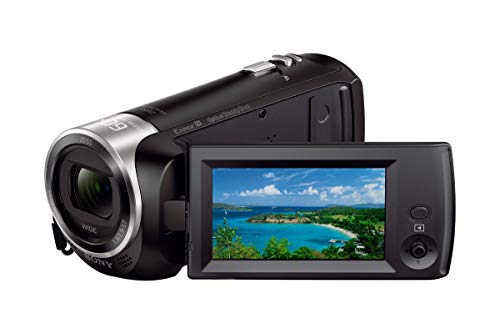
The Sony HDRCX405 Handycam is the simple everyday pick. It records Full HD 1080p video at 60 frames per second, which gives smooth motion for children, pets, and sports, and it uses a 30x optical zoom ZEISS lens with a 26.8mm wide angle. The built-in microphone is listed as a built-in microphone, with B and H Photo listing it as a mono microphone and other listings describing stereo operation, so buyers should expect a basic built-in microphone rather than a wide stereo soundstage. Face detection with voice enhancement and noise reduction helps keep speech clear.
The camera is light and easy to hold, and its built-in USB cable stows in the hand strap for charging and file transfer. Optical SteadyShot stabilization helps with handheld filming, and Intelligent Auto adjusts settings across many scene combinations. There is no external microphone input and no Wi-Fi. This camcorder suits a family that wants smooth Full HD video, a wide lens for small rooms, and a camera that is ready without extra gear. It should be skipped by anyone who needs a microphone input or Wi-Fi transfer.
Sony HDRCX440 Handycam (B00R5LHB0Y)
The Sony HDRCX440 Handycam is the step-up Sony pick for buyers who want better audio and wireless transfer. It records Full HD 1080p video at 60 frames per second with a 30x optical zoom ZEISS lens, a 26.8mm wide angle, and Optical SteadyShot stabilization. Its built-in microphone is a stereo zoom microphone: the pickup narrows as the zoom lever moves in, which helps voices stay clear when filming a stage or a distant subject. The microphone level can be set to low or normal.
The camera also has 8GB of internal memory in addition to a card slot, so filming can continue if a card is full or forgotten. Built-in Wi-Fi and NFC allow wireless transfer and remote control from a phone. As with the HDRCX405, there is no external microphone input, so the built-in stereo zoom microphone remains the audio path. The camera is a discontinued model at some retailers, so buyers should confirm the exact listing and the seller before ordering. This camcorder suits a buyer who films school performances and sports and wants the microphone to follow the zoom. It should be skipped by anyone who needs a wired microphone input or a touch screen.
Canon VIXIA HF R800 (B01N7OAH3I)
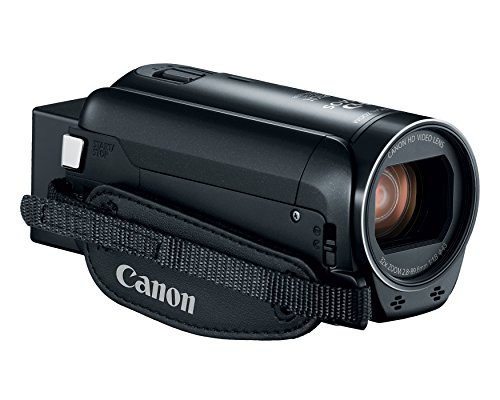
The Canon VIXIA HF R800 is the longest-zoom pick, with a 57x advanced zoom and a 32x optical zoom from a 3.28MP Full HD CMOS sensor and a DIGIC DV 4 image processor. It records Full HD 1080p video at 60 frames per second and has a 3.0-inch touch panel LCD. Its built-in microphone is a stereo microphone mounted at the front of the camera, and the camera also has a microphone input and a headphone jack, so an external microphone can be added later and audio can be monitored while filming. Audio scene settings include a standard mode, a clear voice mode, and a noise suppression mode for wind and traffic.
That combination makes the R800 the most flexible audio choice in this guide. The built-in stereo microphone handles everyday filming, while the microphone input allows a shotgun microphone for interviews or a lavalier microphone for a speaker. The long zoom reaches subjects that other camcorders in this guide cannot, although a tripod helps at the far end of the range. It is a 2017 model, so buyers should confirm the exact listing and should not expect Wi-Fi or 4K video. This camcorder suits a buyer who wants the longest reach, a built-in stereo microphone, and a microphone input for later upgrades. It should be skipped by anyone who wants Wi-Fi transfer or 4K video.
What to Check Before You Buy
Check the microphone description first. A listing that says built-in microphone is a good start, but a listing that names the type, such as stereo, zoom, or wind-noise reduction, gives a clearer picture. Check whether there is a microphone input, a headphone jack, and a wind-noise setting. Check the memory card, the battery, and the cables in the box. A card is usually needed, and a second battery is useful for a long event. Check the zoom, the screen, and the weight together. A long optical zoom is useful only if the camera can be held steady, so stabilization and a comfortable grip matter.
Check the listing itself before ordering. Confirm the exact model number, the included accessories, and the seller. Some models in this guide are older, and listings can vary between a camera alone, a camera with a card and case, and a renewed camera. A renewed listing should be read as a renewed listing, not as a new camera. Finally, plan a short practice session before an important event. Charge the battery, format the card, record a short clip indoors and outdoors, and play it back with sound.
Frequently Asked Questions
Do all video cameras have a built-in microphone?
Most camcorders do, but the type and quality vary widely. Some have a basic mono microphone, some have a stereo microphone, and some have a zoom microphone that narrows as the lens zooms in. A few older or specialist cameras have no microphone at all, so the listing should be checked for the words built-in microphone and for the microphone type. Every camcorder in this guide has a built-in microphone.
Can I add an external microphone later?
It depends on the model. The Canon VIXIA HF R800 in this guide has a microphone input, so an external microphone can be added later. The Panasonic HC-V180K, the Sony HDRCX405, the Sony HDRCX440, and the kimire model rely on their built-in microphones and have no wired microphone input. If an external microphone is a firm future need, choose a model with an input from the start.
Is Full HD 1080p enough for family video?
For most family, school, and beginner channel use, Full HD 1080p is enough, and it keeps file sizes manageable and editing simple. The frame rate matters as much as the resolution: 60 frames per second gives smoother motion for sports and active children, while a lower frame rate suits slow, steady scenes. A buyer who wants 4K video should look at a different class of camera.
What memory card should I buy?
Buy a card in a size the camera accepts, from the card type named in the listing, and format it in the camera before first use. A larger card holds more video, but it is also wise to carry a second card for a long event. Copy files to a computer or a hard drive after each event rather than leaving them on the card alone.
Why does my video sound hollow or windy?
Hollow sound often comes from filming in a large, empty room, where the microphone picks up echoes as well as voices. Moving closer to the speaker usually helps more than changing a setting. Windy sound comes from air moving across the microphone, and a wind-noise setting or a sheltered position can reduce it. If the microphone is covered by a finger or a strap, the sound will be muffled.
Bottom Line
The best and cheapest video cameras with microphones in this guide all share the same idea: a real camcorder, a built-in microphone, Full HD video, and simple controls. The kimire model is the lowest-cost way to start, although its 15 frames per second Full HD video suits slow scenes best. The Panasonic HC-V180K adds a 50x optical zoom and a 2-channel zoom microphone. The Sony HDRCX405 adds smooth 60 frames per second video and a built-in USB cable. The Sony HDRCX440 adds a stereo zoom microphone, 8GB of internal memory, and Wi-Fi. The Canon VIXIA HF R800 adds the longest zoom in the guide and the only microphone input.
Choose by microphone first, then by zoom and frame rate. If the camera will be used for voices at a distance, the zoom microphones on the Panasonic and Sony HDRCX440 models deserve a close look. If the budget is the main limit and the subjects are slow and close, the kimire model is a fair starting point. Whichever model is chosen, confirm the exact listing, buy a memory card, charge a spare battery, and record a short practice clip before the event that matters.
Disclosure: As an Amazon Associate, we may earn from qualifying purchases.
Related guides
More from Amazon
Programs that pair well with the guide above. Offers and eligibility are set by Amazon and may change.
Free shipping on eligible items, Prime Video and more. Eligible new members can start with a free trial.
Start a Prime free trialAudiobooks and podcasts to listen to on the go. Eligible new members can start with a free trial.
Try Audible freeAd-free music streaming. Eligible new subscribers can start with a free trial.
Try Music Unlimited freeA free business account with business pricing and bulk-buying tools for work, shop or home office.
Create a business accountAs an Amazon Associate we earn from qualifying purchases.










Write Your Review
No reviews yet. Be the first to share your experience!