
Our Short List of 3

- Best for: Renters in open-plan studios who want one moving camera to cover the whole space.
- 1080p HD video with color night vision
- 360° pan and 180° tilt with automatic motion tracking
- IP65 weather resistance for indoor or covered outdoor use
- Two-way audio with built-in speaker and microphone

- Best for: Renters who want sharp 2K footage stored locally with no ongoing plan.
- 2K video (listed as 1296p) with 3MP sensor
- 110° field of view
- Night vision up to 30 ft
- Person and motion detection, plus baby crying detection

- Best for: Shared apartments and nurseries where a visible, physical privacy off-switch matters.
- 2K video with 1440p effective resolution
- 130° field of view
- Automated privacy shield that covers the lens
- Two-way audio with noise and echo cancellation
All 4 Picks at a Glance
| Product | Specs | Action |
|---|---|---|
| Wyze Cam Pan v3 |
| Check price on Amazon |
| TP-Link Tapo C110 |
| Check price on Amazon |
| Arlo Essential Indoor Camera 2K |
| Check price on Amazon |
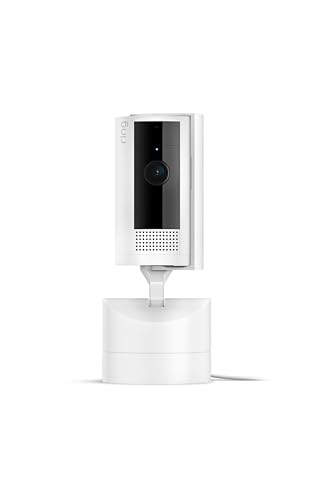 Ring Pan-Tilt Indoor Cam |
| Check price on Amazon |
Key takeaways
- Renting? Compare four apartment security cameras that need no drilling: plug-in pan-and-tilt and fixed models with local storage and real privacy controls.
What's inside
As an Amazon Associate I earn from qualifying purchases. This post may contain affiliate links at no extra cost to you.
The real decision when you rent is not which camera has the longest feature list. It is whether you can install the thing at all. Most leases ban drilling, hardwiring and anything that marks the walls, and your deposit rides on leaving the place exactly as you found it. So an apartment camera has to sit on a shelf or stick to a lease-friendly mount, run from an ordinary outlet, cover a small space well, and come down cleanly the day you move out.
This guide is for renters in studios, one-bedrooms and shared flats who want to watch the front door, a living room or a pet while they are out. The four picks below were chosen from their Amazon US product pages: the Wyze Cam Pan v3, TP-Link Tapo C110, Arlo Essential Indoor Camera 2K and Ring Pan-Tilt Indoor Cam, picked for shelf-friendly designs, plug-in power, storage options and privacy controls stated on their listings.
Quick Picks
As an Amazon Associate we earn from qualifying purchases.
| Product | Best for | Key spec from title |
|---|---|---|
| Wyze Cam Pan v3 | One camera that follows movement around a studio or living room | 1080p pan/tilt/zoom with color night vision |
| TP-Link Tapo C110 | Renters who want recordings kept on a memory card, not a cloud plan | 2K security camera with SD card storage |
| Arlo Essential Indoor Camera 2K | Privacy-first bedrooms, nurseries and shared rooms | 2K wired camera with automated privacy shield |
| Ring Pan-Tilt Indoor Cam | Watching the entry door and living area from one shelf spot | 360° pan coverage with HD video |
How to Choose
Mounting That Leaves No Trace Behind
Start with how the camera attaches, because that is where renters get into trouble. A shelf-sitting camera needs nothing from your landlord at all, and all four picks here can stand on furniture. Wall plates and brackets are included in several of these boxes, but screws are exactly what most leases restrict, so treat the included mount as optional rather than required. Check the listing’s box contents before ordering: a camera that ships with a stand or base gives you a no-damage install on day one, while one that only ships with a screw mount limits where it can go in a rental.
Coverage From a Single Outlet
Apartments rarely offer spare outlets in the right places, so one camera usually has to do the work of two. A pan-and-tilt model like the Wyze or Ring here can sweep a whole open-plan room from one corner, turning to follow movement instead of staring at one wall. A fixed camera with a wide lens, like the Tapo or Arlo, covers less area but has no moving parts and never points the wrong way. Match the choice to your layout: open-plan spaces reward pan and tilt, while a hallway-facing door is fine with a fixed wide view.
Storage That Suits a Temporary Home
Decide where recordings live before you buy, because the two approaches behave very differently when you move. The Wyze and Tapo record to a microSD card inside the camera, so your footage is yours, carries no monthly fee, and simply moves with you to the next flat. The Arlo and Ring keep recordings in their cloud services, which means an ongoing subscription to review clips after the trial ends. Neither approach is wrong, but a renter on a short lease should know whether the camera stops saving video the moment a plan lapses.
Privacy Controls for Shared Living
A camera in a rented home often films people who never bought it: roommates, partners, guests and the occasional landlord visit for repairs. Physical privacy controls matter here. The Arlo closes an automated shield over its lens, the Ring has a manual cover you swivel shut, and the Wyze has a privacy mode that turns the lens away. These are stronger guarantees than a software toggle buried in an app menu, and they make it far easier to keep housemates comfortable with a camera in a shared living room.
The 4 Best Options
Wyze Cam Pan v3
- Best for: Renters in open-plan studios who want one moving camera to cover the whole space.
- 1080p HD video with color night vision
- 360° pan and 180° tilt with automatic motion tracking
- IP65 weather resistance for indoor or covered outdoor use
- Two-way audio with built-in speaker and microphone
Renters in open-plan studios who want one moving camera to cover the whole space.
Outdoor use needs Wyze’s separate outdoor power adapter, and the camera only connects to 2.4GHz Wi-Fi.
If one camera has to watch an entire studio, this is the natural pick. Its motorised head pans a full circle and tilts to follow a person or pet across the room, and the Pan Scan feature can patrol between waypoints you set in the app. Unusually for an indoor camera, the listing rates it IP65, so it can also sit on a covered balcony or by a draughty entry. Local recording to a microSD card keeps clips in the camera with no plan required, which suits renters who do not want another subscription following them between addresses.
TP-Link Tapo C110
- Best for: Renters who want sharp 2K footage stored locally with no ongoing plan.
- 2K video (listed as 1296p) with 3MP sensor
- 110° field of view
- Night vision up to 30 ft
- Person and motion detection, plus baby crying detection
Renters who want sharp 2K footage stored locally with no ongoing plan.
The lens is fixed, so shelf placement and aim matter; the microSD card is not included.
The Tapo C110 is the straightforward fixed camera of the group, and that simplicity is its appeal. It records in 2K, detects people separately from general motion, and saves continuously to a microSD card, so a renter can review a full day without paying for cloud history. It stands on its included base on a shelf or bookcase, which keeps the install completely damage-free, and the built-in siren can be triggered from the app if you spot something wrong while you are out. Baby crying detection also makes it a sensible double-duty nursery camera for young families in small flats.
Arlo Essential Indoor Camera 2K
- Best for: Shared apartments and nurseries where a visible, physical privacy off-switch matters.
- 2K video with 1440p effective resolution
- 130° field of view
- Automated privacy shield that covers the lens
- Two-way audio with noise and echo cancellation
Shared apartments and nurseries where a visible, physical privacy off-switch matters.
Recorded video and smart alerts need an Arlo Secure subscription after the trial, and there is no memory card slot.
Arlo’s indoor camera is built around one idea renters in shared homes will appreciate: a physical privacy shield that closes over the lens automatically when the camera is disarmed. The 2K picture and wide 130-degree view cover a living room from a shelf, and the camera can stand freely or use its wall mount if your lease allows it. Two-way audio has noise cancellation for clearer calls to pets or family. The trade-off is storage: Arlo keeps recordings in its cloud service, so reviewing clips depends on keeping an Arlo Secure plan active after the trial.
Ring Pan-Tilt Indoor Cam
- Best for: Ring or Alexa households that want to look around the room remotely, not just at one wall.
- 1080p HD video with color night vision and Live View
- 360° pan coverage and 169° tilt coverage, controlled in the Ring app
- 143° diagonal static field of view
- Two-way talk with noise cancellation
Ring or Alexa households that want to look around the room remotely, not just at one wall.
Watching and saving recordings requires a Ring subscription, and the camera needs an outlet within reach of its cable.
Ring’s pan-tilt model lets you steer the view from your phone, panning a full 360 degrees and tilting through 169 degrees, which makes it easy to check the front door, then swing round to the sofa where the dog is sleeping. It records 1080p HD with color night vision, and a manual privacy cover physically blocks the lens and microphone when you are home. The ten-foot power cable gives more placement freedom than most plug-in cameras, helping it reach a hallway shelf from the nearest outlet. It fits best in homes already using Ring or Alexa.
Which One Fits Your Situation
You Live in a Studio or One-Bedroom
Choose between the two pan-and-tilt models. The Wyze Cam Pan v3 follows movement automatically and records to a memory card, which suits a single open space you want covered all day. The Ring Pan-Tilt Indoor Cam gives you manual control of the view from the app instead, which is better for deliberate check-ins on the door or a pet’s favourite spot.
Your Lease Bans Screws and Wall Damage
All four cameras can sit on a shelf, bookcase or windowsill, so none of them needs a drill. The Arlo stands freely out of the box, the Tapo includes a base for tabletop use, and both pan-and-tilt models are designed to be placed and plugged in. Keep the included wall hardware in a drawer for a future home where mounting is allowed.
You Share the Flat With Roommates
Pick a camera with a physical privacy control so housemates can see at a glance that it is off. The Arlo’s automated shield and the Ring’s manual cover both block the lens in hardware rather than software. The Wyze privacy mode, which turns its lens away, is the next best thing. Agree together where the camera points before you plug it in.
You Want the Entry Door Covered From Inside
Place a pan-and-tilt camera in the hallway or on a shelf facing the door. The Ring’s wide tilt range handles doors at odd angles, while the Wyze can also sit just inside a covered porch thanks to its IP65 rating. Keep the camera inside your own unit and aimed at your door only, not into a shared corridor.
Common Mistakes
- Screwing a mount into the wall before checking what the lease actually allows, and losing deposit money over four small holes.
- Ordering a camera that needs a memory card, then forgetting the card is sold separately and ending up with live view only.
- Assuming recordings are free forever, when Arlo and Ring cameras need an active plan to save and review clips.
- Aiming a camera through a window at a shared hallway or a neighbour’s door, which creates privacy problems a renter does not need.
- Placing the camera far from an outlet, then running an ugly extension lead across the room because the cable length was never checked.
Frequently Asked Questions
Can I install these cameras without drilling any holes?
Yes. Every camera in this guide can stand on a shelf, table or bookcase and runs from a standard outlet, so no drilling is required. Wall mounts are included in some boxes for owners who are allowed to use them, but they are optional. For a rental, tabletop placement plus a cable run along a skirting board is the safest install.
Do apartment cameras need a subscription to record video?
It depends on the brand. The Wyze Cam Pan v3 and Tapo C110 record to a microSD card inside the camera with no monthly fee, although both offer optional cloud plans. The Arlo and Ring cameras store recordings in their cloud services, so you need an active plan to save and review clips once the included trial ends.
Can I point a camera at my apartment door from inside?
Generally yes, and it is the most useful angle for a renter: the camera stays inside your own home and watches your own entry. Avoid aiming through a peephole or window into shared hallways where neighbours are filmed, and check your lease and local rules if you are unsure. A camera covering your door, hallway and living area from inside is the safer setup.
Will these cameras work on the Wi-Fi in my building?
All four connect to 2.4GHz Wi-Fi, which nearly every home router provides. Problems arise with shared building networks that use a captive login page, since cameras cannot complete that sign-in step. If your flat has its own router, setup is straightforward. If the whole building shares one network, ask the provider about a private network or use your own router.
Related guides
More from Amazon
Programs that pair well with the guide above. Offers and eligibility are set by Amazon and may change.
Free shipping on eligible items, Prime Video and more. Eligible new members can start with a free trial.
Start a Prime free trialAudiobooks and podcasts to listen to on the go. Eligible new members can start with a free trial.
Try Audible freeAd-free music streaming. Eligible new subscribers can start with a free trial.
Try Music Unlimited freeA free business account with business pricing and bulk-buying tools for work, shop or home office.
Create a business accountAs an Amazon Associate we earn from qualifying purchases.










Write Your Review
No reviews yet. Be the first to share your experience!